AWS SAA-C03 Complete Study Material
All 84 topics across 11 domains — free printable PDF with exam tips, comparison tables and practice questions.
Download Complete PDF — Free1. Access Management
IAM
AWS IAM - Certified Solutions Architect Exam Guide
Key IAM Concepts for the Exam
IAM Users and Groups
- Users: Individual identities with specific permissions to access AWS resources.
- Groups: Collections of IAM users that share the same permissions. Users inherit the permissions assigned to the group.
IAM Roles
Roles are used to delegate permissions to trusted entities, such as AWS services, users, or applications. Roles do not have long-term credentials; instead, they are used to assume temporary credentials.
IAM Policies
- Managed Policies: AWS provides pre-built policies that can be attached to users, groups, or roles.
- Inline Policies: Policies that are directly embedded into a user, group, or role.
- Custom Policies: JSON-based policies that define granular permissions based on actions, resources, and conditions.
Security Best Practices
- Least Privilege Principle: Assign the minimum permissions necessary for users or services to perform their tasks.
- Multi-Factor Authentication (MFA): Enforce MFA for root accounts and sensitive operations.
- Password Policies: Set password complexity requirements, expiration periods, and enforce the use of strong passwords.
Cross-Account Access
Use IAM roles to allow users from one AWS account to access resources in another account securely.
Federation and Identity Providers
- Federation: Integrate with external identity providers (like SAML or OIDC) to grant users from those providers access to AWS resources.
- Web Identity Federation: Used for applications like mobile or web apps to authenticate users via social identity providers (e.g., Google, Facebook).
Service-Linked Roles
Roles that are predefined by AWS services to allow them to perform actions on your behalf. These roles are managed entirely by the service, reducing the complexity of managing permissions.
Resource-Based Policies
Unlike user-based policies, resource-based policies are attached directly to AWS resources like S3 buckets, SNS topics, or SQS queues, defining who can access those resources and what actions they can perform.
Exam Tips
- Understand the JSON structure of IAM policies, including elements like Effect , Action , Resource , and Condition .
- Be familiar with common use cases for IAM, such as setting up cross-account roles, creating least-privilege policies, and implementing MFA.
- Know how to configure federated access and how IAM integrates with other AWS services for authentication and authorization.
- Scenarios on the exam may require you to identify the correct IAM setup for a given use case, so practice interpreting and creating policies.
AWS AD
Overview
AWS Access Management involves controlling and managing who has access to your AWS resources and what actions they can perform.
Key Components
- IAM (Identity and Access Management)
- Resource Access Manager (RAM)
- AWS Organizations
Points to Remember
- Use IAM roles and policies to grant permissions securely.
- Implement the principle of least privilege.
AWS Organizations
AWS Organizations
AWS Organizations is a powerful service designed to help you centrally manage and govern your AWS accounts. It simplifies the management of multiple accounts by providing a unified environment where you can organize, secure, and monitor your resources.
Key Features of AWS Organizations
- Centralized Account Management: Consolidated Billing: Group multiple AWS accounts under a single organization to receive a consolidated bill for all member accounts. Account Creation and Management: Easily create new AWS accounts and manage existing ones within your organization.
- Service Control Policies (SCPs): Policy-Based Governance: Implement and enforce policies across your organization to control which AWS services and resources can be accessed by member accounts. Granular Permissions: Apply fine-grained permissions to individual accounts or entire organizational units (OUs) to ensure compliance and security.
- Cost Management: Cost Allocation: Assign costs to specific projects, teams, or business units by tagging resources and using cost allocation reports. Savings Plans: Take advantage of savings plans and reserved instances across multiple accounts to optimize costs.
- Resource Sharing: Share Resources: Use AWS Resource Access Manager (RAM) to share AWS resources like VPCs and transit gateways across accounts within your organization.
- Security and Compliance: Centralized Security Management: Use AWS Organizations to centralize security controls and ensure compliance across all accounts. Automated Policy Enforcement: Automatically apply security baselines and governance policies to new accounts as they are created.
- Monitoring and Reporting: AWS CloudTrail Integration: Enable organization-wide logging with AWS CloudTrail to monitor activity across all accounts. AWS Config: Use AWS Config to enforce compliance rules and track resource configurations across your organization.
Why AWS Organizations is Important for Exam Preparation
Understanding AWS Organizations is critical for managing complex environments with multiple AWS accounts. For the AWS SAA-C03 certification, focus on how AWS Organizations can be used to streamline account management, enforce security policies, and optimize costs. Remember key concepts like SCPs, consolidated billing, and resource sharing, as they are likely to appear in exam scenarios related to multi-account management and governance.
Cognito
AWS Cognito - Certified Solutions Architect Exam Guide
Key AWS Cognito Concepts for the Exam
User Pools
A user pool is a user directory that allows you to store user profiles and provide sign-up, sign-in, and access control features. AWS Cognito User Pools are used to manage user authentication and authorization.
- Sign-Up and Sign-In: Offers customizable sign-up and sign-in workflows, including support for MFA and passwordless sign-in.
- User Management: Automatically handles user registration, password recovery, and account verification.
- Security Features: Supports MFA, account recovery, and password policies to ensure secure access to your applications.
Identity Pools (Federated Identities)
Identity pools enable you to create unique identities for your users and authenticate them with federated identity providers, such as Facebook, Google, or your own SAML-based provider. Once authenticated, users are granted temporary AWS credentials to access your AWS resources.
- Federated Authentication: Allows users to sign in using external identity providers or enterprise directories.
- Guest Access: Supports unauthenticated guest access, allowing users to interact with your application without requiring a login.
- Temporary AWS Credentials: Provides secure, temporary credentials for users to access AWS services like S3, DynamoDB, etc.
Integration with Other AWS Services
AWS Cognito seamlessly integrates with other AWS services, making it easy to add user management, authentication, and authorization to your applications.
- API Gateway: Securely authenticate and authorize API requests using AWS Cognito User Pools.
- Lambda: Use Lambda triggers to customize authentication flows, such as implementing custom challenges during sign-in.
- AppSync: Manage user access and permissions in your GraphQL API with AWS Cognito.
Security Features
AWS Cognito offers several security features to protect user data and ensure secure authentication.
- Multi-Factor Authentication (MFA): Supports SMS-based and TOTP-based MFA for added security.
- Encryption: Encrypts user data at rest and in transit using AWS KMS.
- Compliance: AWS Cognito complies with various security standards, including HIPAA, GDPR, and SOC 2.
Common Exam Scenarios
- Implementing user authentication and authorization for a web or mobile application using AWS Cognito User Pools.
- Using Identity Pools to manage access to AWS resources based on federated user identities from external identity providers.
- Integrating AWS Cognito with API Gateway to secure API endpoints with user authentication.
- Customizing the authentication flow using AWS Lambda triggers to meet specific application requirements.
Exam Tips
- Understand the difference between User Pools and Identity Pools, and when to use each.
- Be familiar with the security features provided by AWS Cognito, such as MFA, encryption, and compliance with industry standards.
- Know how to integrate AWS Cognito with other AWS services, such as API Gateway, Lambda, and AppSync.
- Practice setting up and configuring AWS Cognito User Pools and Identity Pools for different authentication and authorization scenarios.
Connect
AWS Connect - Certified Solutions Architect Exam Guide
Overview of AWS Connect
AWS Connect is a cloud-based contact center service that enables businesses to provide superior customer service at a lower cost. It offers a comprehensive suite of features, including voice, chat, and task management, with seamless integration with other AWS services.
Key Concepts for the Exam
Scalability and Flexibility
AWS Connect is highly scalable and can easily adapt to the changing needs of businesses. Whether you need to handle a few calls or millions of customer interactions, AWS Connect scales to meet demand without requiring upfront investments in hardware or infrastructure.
- Pay-as-you-go: Only pay for the time you use AWS Connect, making it cost-effective for businesses of all sizes.
- Automatic scaling: Adjusts resources automatically to handle fluctuations in call volume.
Integration with Other AWS Services
AWS Connect integrates seamlessly with other AWS services, providing enhanced functionality and streamlined operations.
- AWS Lambda: Automate tasks such as data retrieval and updating databases based on customer interactions.
- Amazon S3: Store and analyze call recordings securely.
- AWS CloudWatch: Monitor and track contact center performance in real time.
- Amazon Lex: Build intelligent conversational interfaces (IVR systems) that can process natural language.
Customer Experience
AWS Connect focuses on delivering a superior customer experience by providing features that help businesses understand and meet their customers' needs effectively.
- Omnichannel support: Handle voice, chat, and tasks all in one platform, ensuring a consistent customer experience across channels.
- AI-Powered Insights: Leverage AWS AI services like Amazon Comprehend to gain insights from customer interactions.
- Personalization: Use data from CRM systems to tailor customer interactions and provide personalized service.
Security and Compliance
AWS Connect ensures that customer data is protected and meets various regulatory requirements.
- Data Encryption: Data is encrypted both in transit and at rest using AWS KMS.
- Compliance: AWS Connect is compliant with several industry standards, including PCI-DSS, HIPAA, and SOC.
- Access Controls: Integrate with AWS IAM to manage user access and permissions within the contact center.
Common Exam Scenarios
- Designing a scalable contact center solution using AWS Connect for a global customer base.
- Integrating AWS Connect with other AWS services like Lambda and Lex to enhance customer interactions.
- Implementing security best practices for storing call recordings in Amazon S3 with encryption and compliance considerations.
- Optimizing customer experience by utilizing AWS Connect's omnichannel capabilities and AI-powered insights.
Exam Tips
- Understand the key features and benefits of AWS Connect, including scalability, flexibility, and integration with other AWS services.
- Be familiar with the security and compliance aspects of AWS Connect, including data encryption and access controls.
- Know how to implement AWS Connect in various scenarios, such as integrating with Lambda and Lex for enhanced functionality.
- Practice designing contact center solutions that meet the specific needs of businesses, focusing on customer experience and cost-effectiveness.
Control Tower
AWS Control Tower - Certified Solutions Architect Exam Guide
Overview of AWS Control Tower
AWS Control Tower is a service that simplifies the setup and governance of a secure, multi-account AWS environment. It provides a pre-configured environment with best-practice blueprints, automated guardrails, and centralized management, enabling organizations to efficiently manage their AWS environment.
Key Concepts for the Exam
Multi-Account Management
AWS Control Tower helps organizations set up and manage multiple AWS accounts in a structured manner, ensuring governance and compliance across the organization.
- Landing Zone: A pre-configured, secure environment that includes accounts, organizational units (OUs), and guardrails to enforce governance.
- Account Factory: A feature that automates the provisioning of new accounts using predefined account configurations and ensures compliance with organizational policies.
Automated Governance
AWS Control Tower automates the implementation of governance policies and compliance requirements across all accounts in an organization.
- Guardrails: Pre-configured policies that enforce rules such as security baselines, logging, and monitoring across all accounts.
- Compliance Dashboard: A centralized dashboard that provides visibility into the compliance status of all accounts and guardrails.
- Service Control Policies (SCPs): Enforce permissions at the organizational level to ensure that all accounts adhere to governance standards.
Security and Compliance
AWS Control Tower enables organizations to enforce security and compliance best practices consistently across their AWS environment.
- Security Baselines: Pre-configured security settings that ensure all accounts adhere to industry best practices.
- Logging and Monitoring: Automated logging and monitoring of activities across accounts using services like AWS CloudTrail and AWS Config.
- Data Protection: Encryption of data at rest and in transit, along with access controls to secure sensitive information.
Integration with Other AWS Services
AWS Control Tower integrates with various AWS services to provide a comprehensive governance solution.
- AWS Organizations: Used to structure and manage multiple AWS accounts and enforce policies across the organization.
- AWS SSO (Single Sign-On): Simplifies user access management by allowing centralized control over login credentials and permissions.
- AWS CloudFormation: Automates the provisioning of resources and infrastructure in the landing zone environment.
- AWS Config: Continuously monitors and records AWS resource configurations to ensure compliance with governance policies.
Common Exam Scenarios
- Designing a multi-account environment using AWS Control Tower that ensures governance and compliance across an organization.
- Implementing automated guardrails to enforce security and compliance policies in a multi-account environment.
- Integrating AWS Control Tower with AWS Organizations and AWS SSO for centralized management and access control.
- Using AWS Control Tower to monitor and ensure compliance with security baselines and logging requirements.
Exam Tips
- Understand the key components of AWS Control Tower, including landing zones, guardrails, and account factories.
- Be familiar with how AWS Control Tower integrates with other AWS services to provide governance and security.
- Know how to implement AWS Control Tower in various scenarios, such as setting up a multi-account environment and enforcing compliance.
- Practice designing solutions that leverage AWS Control Tower to automate governance and ensure compliance across an organization.
Identity Center
AWS Identity Center - Certified Solutions Architect Exam Guide
Overview of AWS Identity Center
AWS Identity Center (formerly known as AWS Single Sign-On) is a service that allows you to centrally manage access to multiple AWS accounts and business applications using a single sign-on (SSO) experience. It simplifies the process of managing identities, permissions, and access control across an organization.
Key Concepts for the Exam
Centralized Access Management
AWS Identity Center provides centralized management of access to AWS accounts and applications by integrating with identity sources like AWS IAM Identity Center, Active Directory, or external identity providers.
- SSO Experience: Users can log in once and gain access to all assigned AWS accounts and applications without needing to sign in multiple times.
- Identity Providers: AWS Identity Center supports integration with external identity providers (IdPs) using SAML 2.0, allowing organizations to use existing credentials.
Permission Management
AWS Identity Center simplifies permission management by allowing administrators to create and assign permission sets that define the AWS service-level permissions users have.
- Permission Sets: Reusable configurations that define a set of permissions users can inherit when accessing AWS accounts.
- Role-Based Access: Assign roles to users or groups to manage permissions effectively across the organization.
Integration with AWS Organizations
AWS Identity Center integrates with AWS Organizations, allowing you to manage user access across all AWS accounts in the organization.
- Account Grouping: Group accounts within AWS Organizations and assign access based on organizational structure.
- Cross-Account Access: Use permission sets to grant users cross-account access within the organization, reducing the complexity of managing individual account access.
Security and Compliance
AWS Identity Center helps ensure that access to AWS resources is secure and compliant with organizational policies.
- Multi-Factor Authentication (MFA): Enforce MFA for additional security when users sign in to AWS resources.
- Audit and Monitoring: Monitor user activity and generate audit logs to ensure compliance with security policies.
Common Exam Scenarios
- Designing a centralized access management solution using AWS Identity Center for multiple AWS accounts.
- Implementing SSO for AWS accounts and third-party applications using AWS Identity Center.
- Creating and managing permission sets to enforce role-based access control across AWS accounts.
- Integrating AWS Identity Center with AWS Organizations to manage access across multiple accounts.
Exam Tips
- Understand how AWS Identity Center integrates with identity providers and AWS Organizations.
- Be familiar with creating and managing permission sets to enforce access control.
- Know how to implement SSO for AWS accounts and external applications using AWS Identity Center.
- Practice designing access management solutions that leverage AWS Identity Center for centralized control.
Systems Manager
AWS Systems Manager - Certified Solutions Architect Exam Guide
Overview of AWS Systems Manager
AWS Systems Manager is a management service that enables you to gain operational insights and automate operational tasks across your AWS infrastructure. It helps you maintain security, improve visibility into resource groups, and streamline operations through automation.
Key Concepts for the Exam
Operational Management
AWS Systems Manager provides a unified user interface that allows you to view operational data from multiple AWS services and automate tasks across your AWS resources.
- Resource Groups: Group your AWS resources by application, environment, or other criteria to manage and automate tasks more efficiently.
- Operations Dashboard: Monitor operational data from AWS resources across your environment, helping you maintain control over your AWS infrastructure.
Automation
AWS Systems Manager offers automation capabilities to simplify common operational tasks, reducing human error and improving efficiency.
- Run Command: Execute commands on your AWS resources securely and at scale, without needing to log in to individual instances.
- Automation Documents: Create reusable automation workflows to manage AWS resources and applications.
Patch Management
AWS Systems Manager simplifies the process of patching your managed instances, ensuring they are up to date with the latest security and software updates.
- Patch Manager: Automate the process of patching managed instances with security and critical updates.
- Compliance Reports: Generate reports to ensure that all instances comply with your organization's patching policies.
Parameter Store
AWS Systems Manager Parameter Store provides a centralized store to manage configuration data, secrets, and other parameters across your AWS infrastructure.
- Parameter Management: Store and manage parameters, such as database connection strings, passwords, and other configuration data securely.
- Versioning: Keep track of parameter versions and use the appropriate version in your applications.
Session Manager
Session Manager allows you to securely manage your EC2 instances using a browser-based shell or the AWS CLI, without needing to open inbound ports or manage SSH keys.
- Secure Access: Access EC2 instances securely without opening inbound ports or managing SSH keys.
- Audit and Logging: Track all session activity for compliance and troubleshooting purposes.
Common Exam Scenarios
- Implementing automated patch management across multiple EC2 instances using AWS Systems Manager.
- Configuring and managing parameter values for your applications using Parameter Store.
- Executing operational tasks at scale using AWS Systems Manager's Run Command.
- Securing access to EC2 instances using Session Manager without the need for SSH.
Exam Tips
- Understand how AWS Systems Manager can be used to automate operational tasks and improve management efficiency.
- Be familiar with using AWS Systems Manager for patch management and ensuring compliance across your infrastructure.
- Know how to securely manage and store configuration data using Parameter Store.
- Practice scenarios that involve managing EC2 instances and automating common tasks with AWS Systems Manager.
2. Command Line Interfaces
CLI
AWS CLI - Certified Solutions Architect Exam Guide
Overview of AWS CLI
The AWS Command Line Interface (CLI) is a unified tool that provides a consistent interface for interacting with AWS services from the command line. It allows developers and system administrators to manage their AWS resources and automate workflows using simple commands.
Key Concepts for the Exam
Installation and Configuration
Before using AWS CLI, you need to install and configure it on your local machine or within an AWS environment.
- Installation: AWS CLI can be installed on various operating systems, including Windows, macOS, and Linux.
- Configuration: Use the `aws configure` command to set up your credentials, region, and output format. These settings are stored in the `~/.aws` directory.
Basic Commands
AWS CLI allows you to perform a wide range of operations across different AWS services.
- Listing Resources: Use commands like `aws ec2 describe-instances` or `aws s3 ls` to list your resources.
- Creating Resources: Create resources using commands like `aws ec2 run-instances` or `aws s3 mb s3://your-bucket-name`.
- Managing Resources: Start, stop, or terminate instances using commands like `aws ec2 start-instances`, `aws ec2 stop-instances`, or `aws ec2 terminate-instances`.
Scripting and Automation
AWS CLI is a powerful tool for scripting and automating AWS tasks.
- Bash Scripts: Incorporate AWS CLI commands into shell scripts to automate common tasks, such as backups, deployments, or resource management.
- JSON Output: Use JSON output to parse command responses and integrate them with other scripts or tools.
Advanced Features
For advanced use cases, AWS CLI provides features like profiles, pagination, and parameter files.
- Profiles: Use named profiles to manage multiple sets of credentials and settings. Switch between profiles using the `--profile` flag.
- Pagination: Handle large data sets with the built-in pagination, ensuring that all results are retrieved even if they span multiple pages.
- Parameter Files: Pass large or complex parameters using JSON or YAML parameter files to streamline CLI commands.
Common Exam Scenarios
- Setting up and configuring AWS CLI on a new environment.
- Automating infrastructure deployments using AWS CLI scripts.
- Managing and querying AWS resources using CLI commands.
- Switching between different AWS accounts using named profiles in AWS CLI.
Exam Tips
- Ensure you are familiar with the basic and advanced features of AWS CLI.
- Practice using AWS CLI to manage and automate AWS resources.
- Understand how to configure AWS CLI for different environments and use cases.
- Know how to handle large data sets with pagination and use parameter files for complex configurations.
CloudShell
AWS CloudShell - Certified Solutions Architect Exam Guide
Overview of AWS CloudShell
AWS CloudShell is a browser-based shell that provides a pre-configured environment for managing AWS resources. It offers a command-line interface (CLI) for interacting with AWS services and is integrated with AWS Management Console. CloudShell simplifies tasks by providing an easy-to-use interface directly within the browser, without requiring any additional setup or configuration.
Key Concepts for the Exam
Getting Started with AWS CloudShell
AWS CloudShell can be accessed directly from the AWS Management Console. It provides an environment with the AWS CLI pre-installed, along with other essential tools and libraries.
- Accessing CloudShell: Open the AWS Management Console, and click on the CloudShell icon in the top-right corner of the console.
- Environment: Each CloudShell environment comes with a pre-configured Amazon Linux instance that includes AWS CLI, AWS SDKs, and other useful utilities.
Features and Capabilities
AWS CloudShell offers several features that make it a powerful tool for managing AWS resources:
- Pre-configured Environment: Includes AWS CLI, Python, Node.js, and other tools for quick and easy access to AWS services.
- Persistent Storage: CloudShell provides persistent storage for your scripts and files, which is retained across sessions.
- Direct AWS Service Interaction: Run CLI commands and scripts to manage AWS resources without the need for local setup.
- Integrated with AWS Management Console: Seamlessly switch between the CloudShell environment and the AWS Management Console for a smooth workflow.
Common Use Cases
AWS CloudShell can be used for various tasks including:
- Resource Management: Use CloudShell to manage and interact with AWS resources using the AWS CLI.
- Scripting and Automation: Develop and test scripts to automate AWS tasks and deployments.
- Learning and Development: Quickly test AWS CLI commands and scripts without local setup.
Access Control and Permissions
Permissions for AWS CloudShell are managed through AWS Identity and Access Management (IAM). Ensure that your IAM role or user has the necessary permissions to access CloudShell and perform the required actions.
- IAM Policies: Attach IAM policies to your user or role to grant permissions for CloudShell and the AWS services you intend to manage.
- Security Best Practices: Follow best practices for securing access to AWS CloudShell and the resources it manages.
Exam Tips
- Familiarize yourself with accessing and using AWS CloudShell from the AWS Management Console.
- Understand the key features and capabilities of AWS CloudShell, including its pre-configured environment and persistent storage.
- Practice managing AWS resources and automating tasks using AWS CloudShell and the AWS CLI.
- Be aware of IAM permissions related to AWS CloudShell and ensure your user or role has appropriate access.
3. Compute Services
EC2
AWS EC2 - Certified Solutions Architect Exam Guide
Overview of AWS EC2
Amazon Elastic Compute Cloud (EC2) is a core AWS service that provides scalable computing capacity in the cloud. It allows users to launch and manage virtual servers, known as instances, in the AWS cloud. EC2 offers flexibility in choosing the right instance type for your workload, including the ability to scale up or down based on demand.
Key Concepts for the Exam
EC2 Instance Types
EC2 instances come in various types and families designed for different use cases:
- General Purpose: Balanced compute, memory, and networking resources. Examples: t3 , m5 .
- Compute Optimized: Ideal for compute-intensive applications. Examples: c5 , c6g .
- Memory Optimized: For applications requiring large amounts of memory. Examples: r5 , x1e .
- Storage Optimized: Optimized for high, sequential read and write access to very large data sets. Examples: i3 , d2 .
- Accelerated Computing: Provides hardware accelerators for specific workloads. Examples: p3 , g4ad .
Key Features
AWS EC2 offers several key features that are essential for managing cloud computing resources:
- Scalability: Easily scale your EC2 instances up or down based on demand using features like Auto Scaling.
- Elastic Load Balancing: Distribute incoming traffic across multiple EC2 instances to ensure high availability.
- Instance Store and EBS: Choose between instance store (temporary storage) or Amazon Elastic Block Store (persistent storage) for your data.
- Amazon Machine Images (AMIs): Use AMIs to create instances with predefined configurations, including OS, applications, and settings.
- Security: Use security groups and network ACLs to control inbound and outbound traffic to your EC2 instances. Integrate with AWS Identity and Access Management (IAM) for fine-grained access control.
Instance Lifecycle
The lifecycle of an EC2 instance includes several stages:
EC2 Instance Lifecycle Diagram
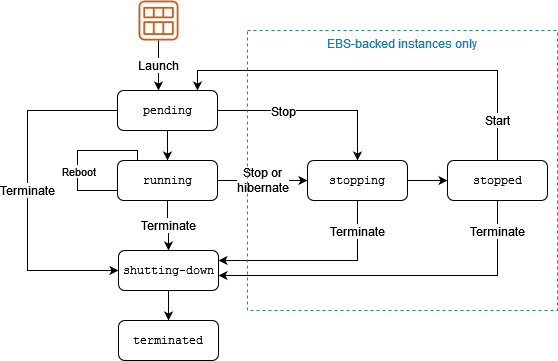
EC2 Instance Lifecycle Diagram
Diagram showing the lifecycle stages of an EC2 instance.
- Launch: Start an instance using an AMI and select the appropriate instance type and configuration.
- Running: The instance is active and can be accessed and managed.
- Stopped: The instance is stopped but can be restarted at any time. Billing is stopped when an instance is stopped, but data on EBS volumes persists.
- Terminated: The instance is permanently deleted. All data on instance store volumes is lost. EBS volumes can be retained if specified.
Pricing
AWS EC2 pricing is based on several factors:
- Instance Type: Different instance types have different pricing.
- On-Demand Instances: Pay for compute capacity by the hour or second with no long-term commitments.
- Reserved Instances: Purchase instances for a one- or three-year term at a significant discount compared to on-demand pricing.
- Spot Instances: Bid for unused capacity at reduced rates, with the possibility of interruption.
- Savings Plans: Flexible pricing model offering lower rates on EC2 usage in exchange for a commitment to a consistent amount of usage over a 1- or 3-year term.
Security and Networking
Security and networking configurations are crucial for managing EC2 instances:
- Security Groups: Act as virtual firewalls to control inbound and outbound traffic to your instances.
- Network ACLs: Provide an additional layer of security at the subnet level.
- Key Pairs: Used for securely connecting to your instances via SSH (for Linux) or RDP (for Windows).
- Elastic IPs: Static IP addresses that can be associated with EC2 instances for maintaining a consistent IP address.
Exam Tips
- Understand the various instance types and their use cases.
- Be familiar with the EC2 instance lifecycle and pricing models.
- Know how to configure security groups and network settings for your instances.
- Practice using AWS EC2 for different scenarios, including launching, managing, and terminating instances.
AMI
AWS AMI Information - Certified Solutions Architect Exam Guide
Overview of Amazon Machine Images (AMIs)
Amazon Machine Images (AMIs) are pre-configured templates used to create and launch Amazon EC2 instances. An AMI includes the operating system, application server, applications, and other configurations required to launch an instance. AMIs can be created from existing EC2 instances or can be obtained from the AWS Marketplace.
Key Components of AMIs
- Image: The base template for the instance.
- Instance Type: Determines the resources allocated to the instance (e.g., CPU, memory).
- Launch Configuration: Defines how the instance is configured upon launch (e.g., network settings, storage).
- Snapshot: The underlying storage that is used by the instance's root volume and additional volumes.
AMI Lifecycle
AMIs have a lifecycle that involves creation, usage, and deregistration. Below is a diagram illustrating the lifecycle of an AMI:
AMI Lifecycle Diagram

AMI Lifecycle Diagram
Creating and Using AMIs
To create an AMI, you can start from an existing EC2 instance, configure it as needed, and then create an image of that instance. Once created, the AMI can be used to launch new EC2 instances with the same configuration.
Steps to Create an AMI
- Launch an EC2 instance and configure it as required.
- Connect to the instance and install any necessary software or updates.
- Create an image of the instance from the EC2 Management Console or using the AWS CLI.
- The AMI can now be used to launch new instances with the same configuration.
Using AMIs
When launching a new EC2 instance, you can select an AMI from your account or from the AWS Marketplace. You can also use custom AMIs that you have created for specific configurations or software stacks.
App Runner
AWS App Runner Information - Certified Solutions Architect Exam Guide
Overview of AWS App Runner
AWS App Runner is a fully managed service that makes it easy for developers to quickly deploy containerized applications from source code or container images. It abstracts away the infrastructure management tasks, such as scaling, load balancing, and monitoring, allowing developers to focus on building their applications.
Key Features
- Simplified Deployment: Deploy applications from source code or container images without managing servers or infrastructure.
- Automatic Scaling: Automatically scales the application up or down based on traffic.
- Integrated Monitoring: Provides built-in monitoring and logging with AWS CloudWatch.
- Managed Load Balancing: Automatically balances the load between instances to ensure high availability.
Architecture and Workflow
Below is a diagram illustrating the architecture and workflow of AWS App Runner:

AWS App Runner Architecture Diagram
How AWS App Runner Works
1. **Source Code or Container Image**: You provide your application source code or a container image.
2. **Build and Deployment**: App Runner handles the build and deployment of the application. If you use source code, App Runner builds the container image automatically. If you use a container image, App Runner deploys it directly.
3. **Automatic Scaling**: App Runner automatically scales the application based on incoming traffic.
4. **Monitoring and Logging**: App Runner integrates with AWS CloudWatch for monitoring and logging.
Getting Started with AWS App Runner
To get started with AWS App Runner:
- Sign in to the AWS Management Console.
- Navigate to the App Runner service.
- Choose to create a new service, and specify the source (source code repository or container image).
- Configure the service settings, such as environment variables and scaling options.
- Deploy the application and monitor its performance using the built-in tools.
Batch
AWS Batch Information
Overview
AWS Batch is a fully managed service that enables developers, scientists, and engineers to easily and efficiently run hundreds of thousands of batch computing jobs. AWS Batch dynamically provisions the optimal quantity and type of compute resources (e.g., CPU or memory-optimized instances) based on the volume and specific resource requirements of the batch jobs submitted.

AWS Batch Architecture Diagram
Key Features
- Job Scheduling: AWS Batch manages the execution of your jobs and allows you to define dependencies between jobs, such as "this job can only run after this one finishes."
- Resource Management: AWS Batch automatically provisions the compute resources required, based on the needs of the job, without requiring manual intervention.
- Scalability: It automatically scales up compute resources when demand increases and scales down when jobs complete.
- Custom Compute Environments: You can configure environments with different instance types, custom AMIs, and VPC settings.
Use Cases
- Data Processing: Batch processing of large volumes of data, like extracting, transforming, and loading (ETL) tasks.
- Rendering: Parallel processing for rendering high-resolution images and videos.
- Machine Learning: Running multiple training jobs on a large dataset using different parameters.
ECS (Elastic Container Service)
AWS Elastic Container Service (ECS) Information
Overview
AWS Elastic Container Service (ECS) is a fully managed container orchestration service that makes it easy to deploy, manage, and scale containerized applications using Docker containers. ECS is highly scalable, high-performance, and supports Docker containers to run and manage containers on a cluster of Amazon EC2 instances.

AWS ECS Architecture Diagram

AWS ECS Architecture Diagram
Key Features
- Cluster Management: ECS manages clusters of EC2 instances, providing the infrastructure for running containerized applications.
- Task Definition: Define your containers, resources, networking, and IAM roles in a task definition, which is a blueprint for running containers.
- Service Auto Scaling: Automatically scale your containerized applications based on demand, maintaining the desired number of tasks.
- Integration with AWS Services: ECS integrates with other AWS services such as IAM, CloudWatch, ALB (Application Load Balancer), and ECR (Elastic Container Registry).
- Fargate Launch Type: Run containers without managing the underlying EC2 instances, allowing you to focus on application development.
Use Cases
- Microservices: Deploy and manage microservices architectures, allowing independent scaling and deployment of different services.
- Batch Processing: Run parallel tasks such as image processing, ETL jobs, and data processing using containers.
- Hybrid Deployment: Deploy ECS on-premises using ECS Anywhere, allowing you to run containerized applications in a hybrid environment.
Exam Tips for AWS Certified Solutions Architect
- Understand the differences between ECS and other container services like EKS (Elastic Kubernetes Service).
- Know the use cases for EC2 launch type vs. Fargate launch type.
- Be familiar with the integration of ECS with other AWS services like IAM, CloudWatch, and Application Load Balancer.
- Understand how ECS handles service auto-scaling and load balancing for containerized applications.
EKS (Elastic Kubernetes Service)
AWS Elastic Kubernetes Service (EKS) Information
Overview
AWS Elastic Kubernetes Service (EKS) is a managed service that simplifies running Kubernetes on AWS without needing to install and operate your own Kubernetes control plane or nodes. EKS is highly available, scalable, and secure, and it runs the open-source Kubernetes software, so you can use all the existing features and plugins from the Kubernetes community.
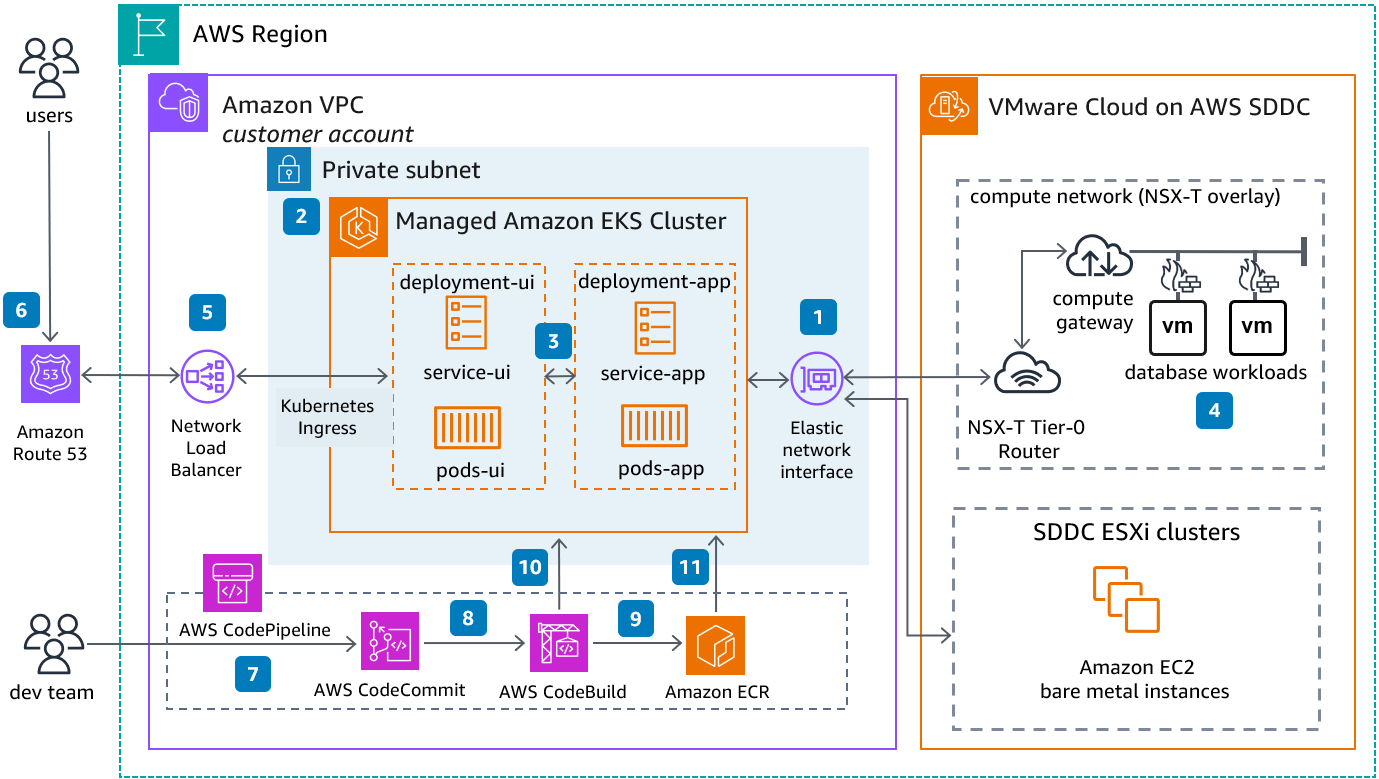
AWS EKS Architecture Diagram

AWS EKS Architecture Diagram
Key Features
- Fully Managed Kubernetes: EKS automatically manages the availability and scalability of the Kubernetes control plane.
- Integration with AWS Services: EKS integrates seamlessly with AWS services like IAM, CloudWatch, and ALB, providing a secure and scalable environment for running Kubernetes workloads.
- High Availability: The EKS control plane runs across multiple Availability Zones to ensure high availability and automatically replaces unhealthy instances.
- Support for EKS Anywhere: Run Kubernetes on-premises with EKS Anywhere, providing a consistent Kubernetes experience on your infrastructure.
- Fargate for EKS: Run Kubernetes pods without managing servers, using AWS Fargate, which provides serverless compute for Kubernetes applications.
- Amazon EKS Add-ons: Easily install and manage common operational software for EKS clusters, such as networking, storage, and observability components.
Use Cases
- Microservices Architecture: Deploy and manage microservices-based applications with Kubernetes, allowing each service to scale independently.
- Hybrid and Multi-Cloud Deployments: Use EKS to run Kubernetes workloads across on-premises environments and multiple cloud providers.
- Data Processing and Machine Learning: Run distributed data processing or machine learning workloads that benefit from Kubernetes' scheduling and scaling capabilities.
Exam Tips for AWS Certified Solutions Architect
- Understand the differences between EKS, ECS, and other container services on AWS.
- Know how to set up and configure an EKS cluster, including networking, IAM roles, and security groups.
- Be familiar with how EKS integrates with other AWS services, such as IAM, CloudWatch, and Application Load Balancer.
- Understand the use cases for Fargate in EKS, and when to use Fargate vs. self-managed nodes.
- Understand the concepts of Kubernetes, including pods, services, namespaces, and deployments, as they apply to EKS.
- Know how to secure your EKS clusters using IAM roles, security groups, and Kubernetes RBAC (Role-Based Access Control).
Elastic Beanstalk
AWS Elastic Beanstalk Information
Overview
AWS Elastic Beanstalk is a Platform as a Service (PaaS) offering from Amazon Web Services that simplifies the process of deploying, managing, and scaling web applications and services. Elastic Beanstalk allows you to quickly deploy applications written in various programming languages, including Java, .NET, PHP, Node.js, Python, Ruby, Go, and Docker, without needing to manage the underlying infrastructure.
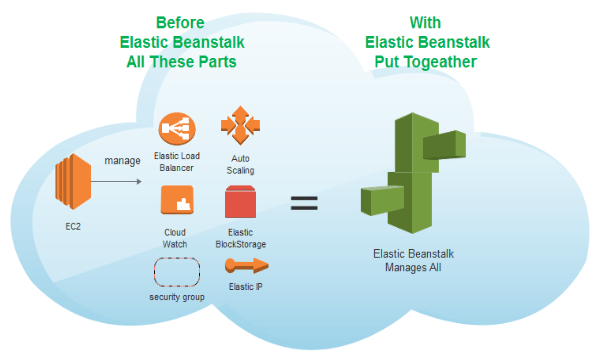
AWS Elastic Beanstalk Architecture Diagram
Key Features
- Automatic Scaling: Elastic Beanstalk automatically scales your application based on the demands of your application. It adjusts the number of Amazon EC2 instances running your application depending on traffic and load.
- Managed Environment: Elastic Beanstalk manages the infrastructure and resources that run your applications, including load balancing, scaling, monitoring, and health management.
- Customization: You can choose from several environments, such as single-instance, load-balanced, and auto-scaling environments, depending on your application's needs.
- Built-In Monitoring: Elastic Beanstalk integrates with Amazon CloudWatch to provide detailed monitoring and alerts for your applications.
- Application Updates: Elastic Beanstalk allows you to perform rolling updates and application versioning to update your applications without downtime.
- Support for Multiple Languages and Platforms: Elastic Beanstalk supports a wide variety of programming languages and platforms, including Docker, allowing you to deploy containerized applications easily.
How It Works
When you deploy your application to Elastic Beanstalk, it automatically handles the deployment process, including provisioning the necessary resources like EC2 instances, configuring load balancers, and setting up auto-scaling. You can upload your application code directly to the Elastic Beanstalk console, use Git to deploy, or integrate with your CI/CD pipeline.
Elastic Beanstalk provides a simple web interface, command-line tools, and APIs that allow you to manage your applications. It also supports environment cloning, which allows you to replicate an existing environment for testing or staging.
Use Cases
- Web Applications: Deploy and scale web applications quickly without managing the underlying infrastructure.
- Microservices: Deploy microservices architectures using Docker or other supported platforms with Elastic Beanstalk.
- API Backends: Build and deploy API backends with automatic scaling and monitoring.
- Development and Testing: Quickly spin up environments for development, testing, or staging purposes.
Exam Tips for AWS Certified Solutions Architect
- Understand the core components of Elastic Beanstalk, including environments, applications, and deployments.
- Know how Elastic Beanstalk integrates with other AWS services, such as RDS, S3, and IAM.
- Be familiar with the different deployment strategies supported by Elastic Beanstalk, including rolling updates and blue/green deployments.
- Understand the pricing model for Elastic Beanstalk, which is based on the resources (like EC2 instances) that your application consumes.
- Know how to customize and extend Elastic Beanstalk environments using configuration files and environment variables.
- Be aware of the limitations and best practices for using Elastic Beanstalk in production environments.
Lambda
AWS Lambda
AWS Lambda is a serverless compute service that lets you run code without provisioning or managing servers. Lambda automatically scales your application by running code in response to each trigger. You can use AWS Lambda to extend other AWS services with custom logic, or create your own backend services that operate at AWS scale, performance, and security.
Key Features
- Automatic Scaling: AWS Lambda scales automatically by running code in response to each trigger, scaling with the size of the workload.
- Cost-effective: With AWS Lambda, you only pay for what you use. You are charged based on the number of requests for your functions and the time your code executes.
- Event-driven: AWS Lambda functions can be triggered by various AWS services or HTTP endpoints via Amazon API Gateway, or using AWS SDKs.
- Supported Languages: AWS Lambda natively supports Node.js, Python, Ruby, Java, Go, .NET Core, and custom runtimes.
Architecture Overview
AWS Lambda allows you to execute your code based on events, without having to manage servers. Here's a basic architecture of how AWS Lambda works:
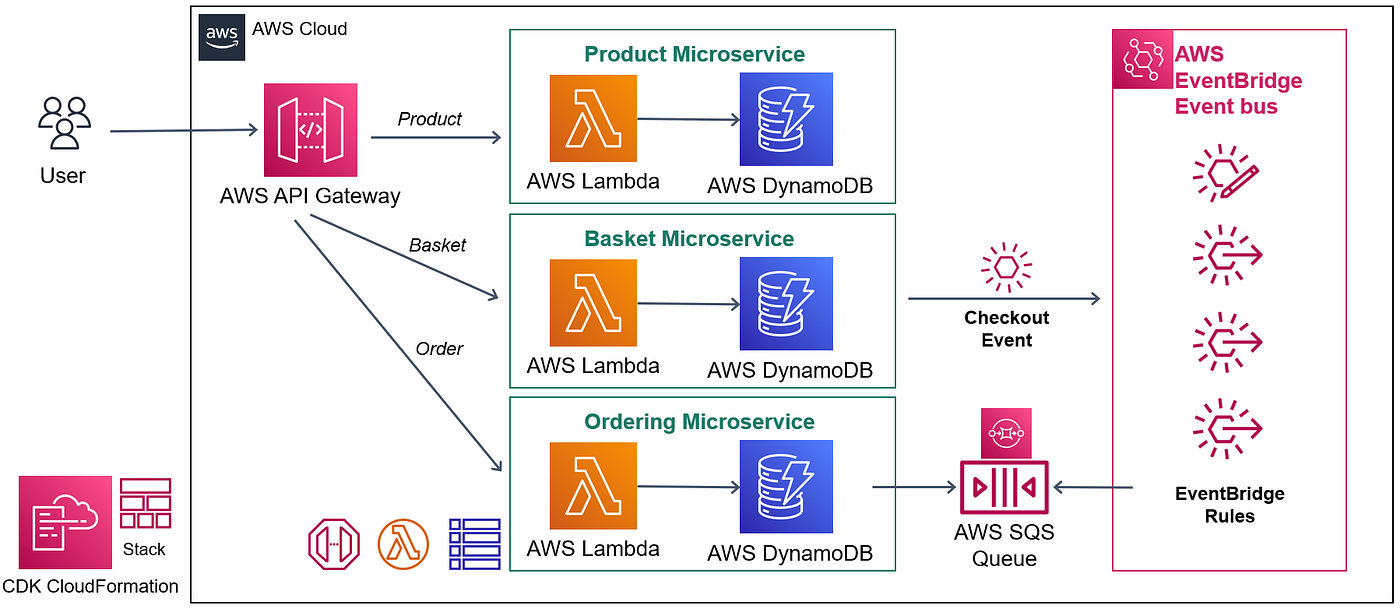
AWS Lambda Architecture Diagram
- Event Source: The event source could be an S3 bucket, a DynamoDB table, or an HTTP request via API Gateway.
- Lambda Function: The AWS Lambda function processes the event data. You write the code to handle the event.
- Execution Environment: AWS Lambda manages the compute fleet, automatically scaling your application by running code in response to each event.
- Logging and Monitoring: AWS Lambda integrates with AWS CloudWatch for logging and monitoring, so you can track your function's execution.
Use Cases
- Real-time file processing: Use AWS Lambda to automatically process files uploaded to S3.
- Data transformation: Use Lambda functions to transform data in DynamoDB streams or Kinesis data streams.
- Automated backups: Schedule AWS Lambda to create backups of your resources at regular intervals.
Integration with Other AWS Services
AWS Lambda integrates seamlessly with other AWS services, including:
- Amazon S3: Trigger AWS Lambda to process files uploaded to an S3 bucket.
- Amazon DynamoDB: Process data modifications in DynamoDB tables using DynamoDB Streams.
- Amazon API Gateway: Build scalable, serverless APIs with Lambda as the backend.
- AWS Step Functions: Orchestrate multiple AWS Lambda functions for complex workflows.
Proton
AWS Proton
AWS Proton is a fully managed application delivery service that allows platform teams to provide consistent standards and best practices for infrastructure and code deployment, enabling developers to focus on writing application code. AWS Proton is designed to automate and manage the provisioning and deployment of serverless and container-based applications.
Key Features
- Template Management: AWS Proton allows platform teams to create, manage, and update standardized templates for application infrastructure and code deployment.
- Self-Service Interface: Developers can deploy their code using pre-approved templates, ensuring that best practices are followed without needing to manage infrastructure.
- Automated Deployments: AWS Proton automates the provisioning of infrastructure, continuous integration, continuous deployment (CI/CD) pipelines, and monitoring tools.
- Integration with AWS Services: AWS Proton integrates seamlessly with other AWS services, such as AWS CloudFormation, AWS CodePipeline, and AWS CodeBuild.
Architecture Overview
AWS Proton provides a structured environment for deploying and managing modern applications. The following diagram illustrates the basic architecture of AWS Proton:

AWS Proton Architecture Diagram
- Templates: Platform teams create infrastructure as code (IaC) templates that define the resources required for different application components.
- Service: Developers choose a template and create a service, which AWS Proton uses to deploy and manage the infrastructure for the application.
- Environment: The infrastructure is provisioned within an environment that defines the context, such as development, staging, or production.
- Automated Pipeline: AWS Proton sets up an automated CI/CD pipeline to handle code deployment, testing, and monitoring.
Use Cases
- Standardized Environments: Use AWS Proton to create and manage consistent environments across multiple teams, ensuring adherence to organizational best practices.
- Application Modernization: Leverage AWS Proton to migrate legacy applications to modern, serverless, or containerized architectures.
- Rapid Development: Enable developers to focus on writing code by providing them with pre-configured, ready-to-use infrastructure and deployment pipelines.
Integration with Other AWS Services
AWS Proton integrates with several other AWS services to provide a comprehensive application delivery solution:
- AWS CloudFormation: AWS Proton uses CloudFormation to define and provision infrastructure resources.
- AWS CodePipeline: AWS Proton automates the CI/CD process using AWS CodePipeline.
- AWS CodeBuild: CodeBuild is used within the CI/CD pipeline to compile code, run tests, and create deployable artifacts.
- Amazon CloudWatch: AWS Proton integrates with CloudWatch for monitoring and logging, providing insights into application performance.
4. Cost Management
AWS Billing
AWS Billing
AWS Billing is a critical component for managing and understanding your AWS costs. AWS provides various tools to help you monitor, allocate, and optimize your cloud spending, ensuring efficient use of resources and budget control.
Key Features
- Cost Explorer: View and analyze your AWS costs and usage, create custom reports, and visualize data to identify trends and anomalies.
- Budgets: Set custom cost and usage budgets, and receive alerts when your spending approaches or exceeds your budgeted thresholds.
- Detailed Billing Reports: Get detailed reports on your AWS usage and costs for in-depth analysis and reconciliation.
- Reserved Instances Reporting: Track utilization and savings from Reserved Instances (RIs) to assess the effectiveness of your investments.
- Cost Allocation Tags: Tags applied to resources to categorize and track costs, useful for cost allocation and departmental budgeting.
- Cost and Usage Report (CUR): Detailed CSV report providing information about AWS usage and costs for integration with billing tools.
Architecture Overview
The following diagram illustrates the structure of AWS Billing services and how they interact with other AWS components:

AWS Billing Architecture Diagram
- Cost Explorer: Tool for visualizing and analyzing costs.
- Budgets: Feature for setting and tracking cost and usage budgets.
- Billing Reports: Detailed reports for usage and cost analysis.
- Cost Allocation Tags: Tags for categorizing and tracking costs.
Use Cases
- Cost Management: Efficiently manage and monitor cloud spending to avoid unexpected costs.
- Budgeting: Set and track budgets to maintain financial control over your AWS resources.
- Cost Optimization: Utilize detailed reports and analysis to optimize cloud spending and resource utilization.
Integration with Other AWS Services
AWS Billing integrates with several AWS services to provide a comprehensive cost management solution:
- AWS CloudFormation: Use CloudFormation for defining and provisioning infrastructure resources in your billing reports.
- AWS Cost Management: Suite of services including Cost Explorer, Budgets, and Cost and Usage Reports for managing AWS spending.
- AWS Marketplace: Offers third-party solutions for cost management and optimization available for purchase.
- AWS Trusted Advisor: Provides recommendations to reduce costs and improve resource utilization.
Compute Optimizer
AWS Compute Optimizer
AWS Compute Optimizer is a service that helps you optimize your AWS compute resources by providing recommendations based on your usage patterns. It analyzes your historical usage data and provides recommendations to help you right-size your compute resources, improving performance and reducing costs.
Key Features
- Resource Recommendations: AWS Compute Optimizer provides recommendations for instance types and sizes based on your workload's historical usage data.
- Detailed Reports: Access detailed reports on your current resource usage and performance, helping you understand how to improve efficiency.
- Cost Savings: Optimize your AWS resources to reduce costs by choosing the most appropriate instance types and sizes.
- Integration with AWS Cost Explorer: View cost savings recommendations alongside your AWS Cost Explorer data for better budget management.
- Support for Various Resource Types: Recommendations are available for EC2 instances, Auto Scaling groups, and Amazon ECS tasks.
Architecture Overview
The following diagram illustrates how AWS Compute Optimizer analyzes and provides recommendations for your compute resources:

AWS Compute Optimizer Architecture Diagram
- Data Collection: AWS Compute Optimizer collects and analyzes your historical resource usage data.
- Recommendations Engine: Based on usage patterns, the engine generates recommendations for optimal resource types and sizes.
- Reports and Dashboards: Provides detailed reports and visualizations to help you understand and act on the recommendations.
Use Cases
- Cost Optimization: Reduce your AWS spending by identifying underutilized or over-provisioned resources and switching to more appropriate instance types.
- Performance Improvement: Enhance the performance of your applications by choosing instances that better match your workload's needs.
- Resource Planning: Use recommendations to plan for future resource needs and make informed decisions about scaling your infrastructure.
Integration with Other AWS Services
AWS Compute Optimizer integrates with several AWS services to provide a comprehensive resource optimization solution:
- AWS Cost Explorer: View cost-saving recommendations alongside your cost and usage data to better manage your budget.
- AWS Auto Scaling: Implement Compute Optimizer's recommendations to adjust your Auto Scaling groups and optimize resource allocation.
- Amazon CloudWatch: Use CloudWatch metrics to monitor your resource usage and performance, which are analyzed by Compute Optimizer.
- AWS Lambda: Leverage recommendations for Lambda functions to optimize the performance and cost of serverless workloads.
Cost Allocation Tags
AWS Cost Allocation Tags
AWS Cost Allocation Tags help you track and manage costs in AWS by assigning custom labels to AWS resources. These tags are used to categorize and allocate AWS costs to specific projects, departments, or cost centers.
Key Concepts
- Cost Allocation Tags: Key-value pairs assigned to AWS resources for tracking costs.
- Types of Tags: User-Defined Tags (created by you) and AWS-Generated Tags (automatically created by AWS).
- Cost Allocation Reports: Reports that use these tags to show how costs are distributed across different tags.
Usage Examples
- Tracking Costs by Project: Assign tags like "Project: Website" to track costs for specific projects.
- Departmental Cost Tracking: Use tags like "Department: Marketing" to allocate costs to departments.
- Resource Management: Manage costs for specific AWS resources by applying relevant tags.
Diagrams
The diagram below illustrates how AWS Cost Allocation Tags work:
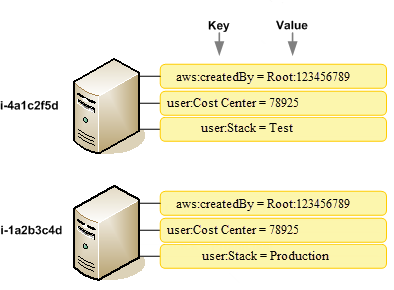
AWS Cost Allocation Tags Diagram
Diagram showing the relationship between resources and cost allocation tags.
Integration with Other AWS Services
- AWS Cost Explorer: View cost allocation alongside your cost and usage data.
- AWS Budgets: Set budgets and track costs using tags for more effective financial management.
- AWS Organizations: Use tags to manage costs across multiple AWS accounts.
Cost Explorer
AWS Cost Explorer
AWS Cost Explorer is a tool that enables you to visualize and analyze your AWS spending. It helps you understand where your money is going, discover spending patterns, and find opportunities to optimize your costs.
Key Features
- Cost and Usage Reports: View detailed reports on your AWS usage and costs, broken down by service, region, and other dimensions.
- Customizable Filters: Apply filters to narrow down your analysis by time period, account, service, and more.
- Forecasting: Generate cost forecasts to predict future spending based on historical data.
- Cost Allocation Tags: Use tags to organize and track costs across different projects, departments, or cost centers.
- RI and Savings Plans Recommendations: Get recommendations on Reserved Instances (RI) and Savings Plans to optimize your spending.
Visualization and Reporting
The following diagram illustrates how AWS Cost Explorer visualizes and reports your cost and usage data:
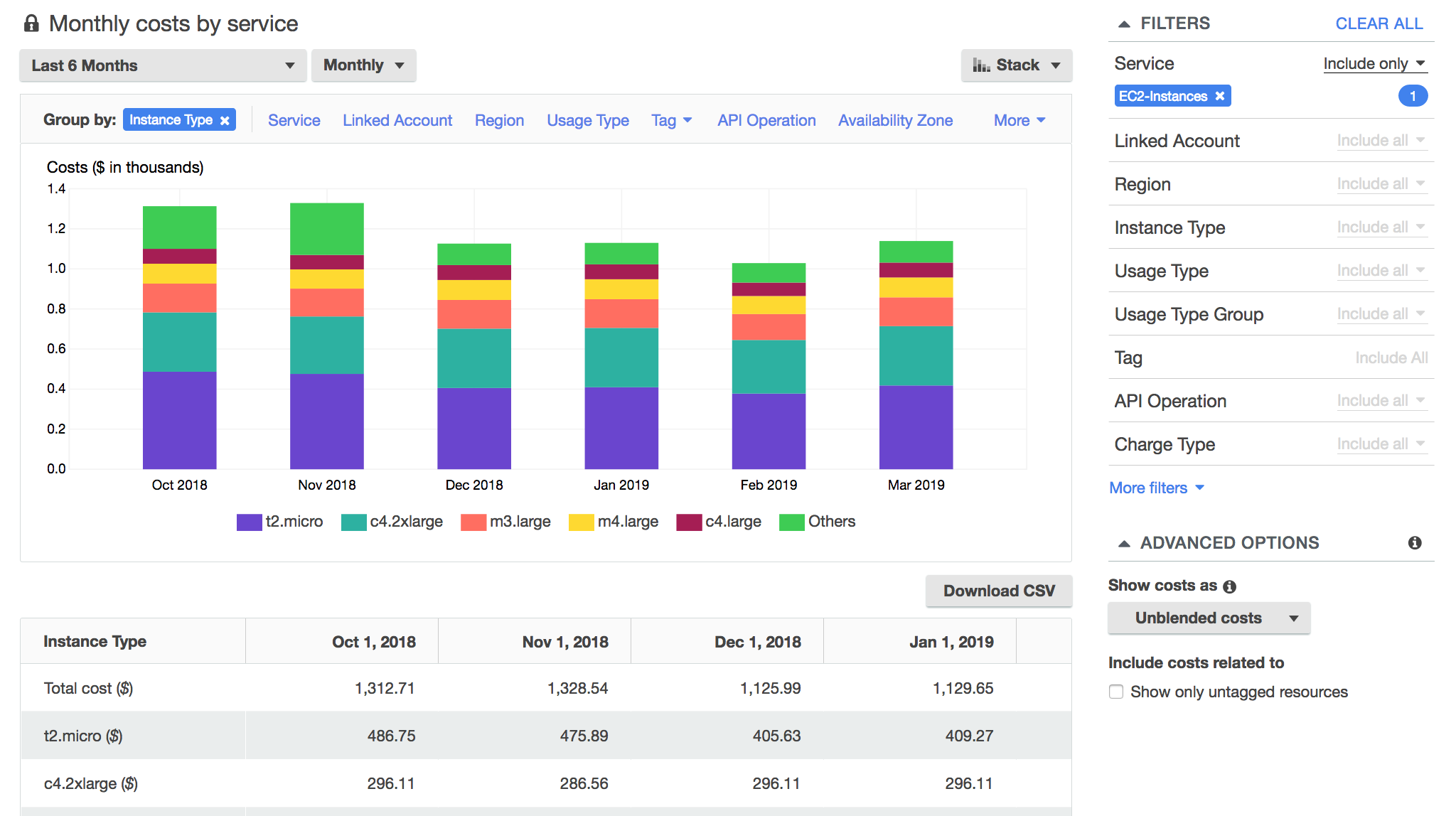
AWS Cost Explorer Visualization Diagram
- Cost Breakdown: View your costs broken down by various dimensions like service, region, and linked account.
- Time-Series Analysis: Analyze how your costs have changed over time with customizable time periods.
- Monthly and Daily Views: Switch between monthly and daily cost views for more granular analysis.
Use Cases
- Budget Tracking: Monitor your spending against budgets to ensure you're on track with financial goals.
- Cost Optimization: Identify areas where you can save money by optimizing resource usage or purchasing Reserved Instances.
- Business Planning: Use cost forecasts to plan future budgets and anticipate upcoming costs.
Integration with Other AWS Services
AWS Cost Explorer integrates with several AWS services to provide comprehensive cost management capabilities:
- AWS Budgets: Set and track budgets for your AWS spending directly from Cost Explorer.
- AWS Cost and Usage Report: Dive deeper into your cost data with the detailed reports available in Cost Explorer.
- AWS Trusted Advisor: Get cost optimization recommendations alongside security and performance best practices.
Savings Plans
AWS Savings Plans
AWS Savings Plans is a flexible pricing model that offers significant savings on your AWS usage. By committing to a consistent amount of usage (measured in USD per hour) for a one- or three-year term, you can save up to 72% on AWS services compared to On-Demand prices.
Key Features
- Flexible Usage: Savings Plans automatically apply to any eligible usage, regardless of region, instance family, operating system, or tenancy.
- Two Plan Types: Choose between Compute Savings Plans and EC2 Instance Savings Plans, depending on your usage patterns.
- Significant Discounts: Enjoy up to 72% savings compared to On-Demand pricing, with no upfront payment options available.
- Comprehensive Coverage: Savings Plans cover usage for EC2, AWS Lambda, and AWS Fargate, providing broad coverage for your workloads.
- Easy Management: Track your Savings Plans' utilization and performance through the AWS Cost Explorer and other AWS management tools.
Types of Savings Plans
The following diagram illustrates the different types of AWS Savings Plans and their applicable services:
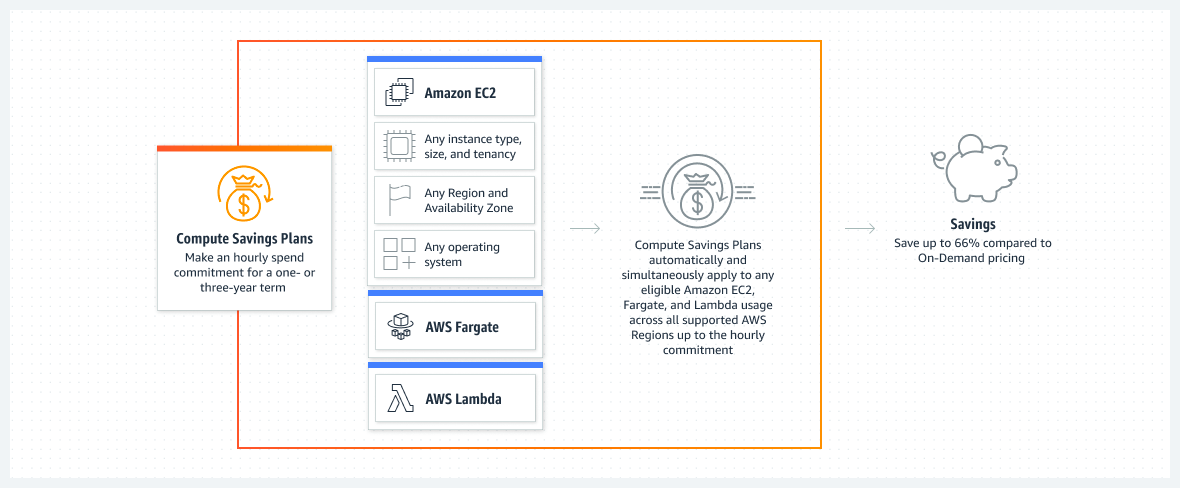
AWS Savings Plans Diagram
- Compute Savings Plans: Offer the most flexibility, automatically applying to any compute usage, regardless of instance type, region, or service.
- EC2 Instance Savings Plans: Provide savings on specific instance families in a chosen region, ideal for customers with predictable workloads.
Use Cases
- Cost Savings: Reduce your AWS bill by committing to consistent usage and receiving significant discounts on your compute costs.
- Flexible Commitment: Benefit from savings without being locked into specific instance types or regions, allowing for flexible usage.
- Workload Optimization: Optimize your spending by selecting the right type of Savings Plan based on your workload's characteristics.
Integration with Other AWS Services
AWS Savings Plans integrates with various AWS services to maximize your savings across your compute resources:
- AWS Cost Explorer: Track your Savings Plans utilization and identify additional opportunities for savings.
- AWS Budgets: Set and monitor budgets for your Savings Plans to ensure you're maximizing your savings potential.
- AWS Organizations: Share Savings Plans across multiple accounts within your AWS organization for centralized management and savings.
Trusted Advisor
AWS Trusted Advisor
AWS Trusted Advisor is an online resource that helps you reduce cost, increase performance, and improve security by following AWS best practices. It offers insights and recommendations across various AWS services to help you optimize your infrastructure.
Key Features
- Cost Optimization: Identify opportunities to reduce your overall AWS spending by highlighting unused resources and recommending cost-saving measures.
- Performance Improvement: Receive recommendations to improve the performance of your AWS infrastructure by addressing potential bottlenecks and optimizing resource utilization.
- Security Enhancements: Trusted Advisor checks your AWS environment against best practices to improve security, including identifying potential vulnerabilities and misconfigurations.
- Fault Tolerance: Improve the reliability of your AWS applications by following recommendations to increase fault tolerance and availability.
- Service Limits: Monitor your usage against service limits and receive alerts when you approach or exceed those limits.
Architecture Overview
The following diagram illustrates how AWS Trusted Advisor evaluates and provides recommendations for your AWS environment:

AWS Trusted Advisor Architecture Diagram
- Data Collection: Trusted Advisor continuously monitors your AWS resources and usage patterns.
- Best Practice Checks: The service evaluates your environment against AWS best practices and generates recommendations for cost, performance, security, and fault tolerance.
- Reports and Dashboards: Provides detailed reports and visualizations to help you act on the recommendations.
Use Cases
- Cost Management: Optimize your AWS spending by identifying idle resources and choosing more cost-effective options.
- Security Posture Improvement: Enhance your security by following Trusted Advisor’s recommendations for identity and access management, encryption, and network configuration.
- Infrastructure Reliability: Increase the fault tolerance of your applications by adhering to best practices for high availability and disaster recovery.
Integration with Other AWS Services
AWS Trusted Advisor integrates with several other AWS services to offer a comprehensive set of recommendations:
- AWS Organizations: Use Trusted Advisor across multiple AWS accounts within an organization to manage costs and improve security at scale.
- Amazon CloudWatch: Monitor performance and receive alerts based on Trusted Advisor recommendations to take immediate action.
- AWS Config: Ensure compliance by continuously monitoring configuration changes and their impact on best practices.
- AWS Identity and Access Management (IAM): Improve security by following recommendations for IAM roles, policies, and multi-factor authentication (MFA).
5. Data Transfer
App Flow
AWS AppFlow
AWS AppFlow is a fully managed integration service that allows you to securely transfer data between AWS services and SaaS (Software-as-a-Service) applications without writing custom code. It simplifies data transfer and enables you to easily create and manage data flows across various applications.
Key Features
- Secure Data Transfer: AppFlow provides secure and compliant data transfers between AWS services and SaaS applications, with support for encryption at rest and in transit.
- Data Transformation: AppFlow allows you to transform and filter data in-flight using pre-built connectors, enabling you to extract only the data you need.
- Real-Time and Batch Data Transfer: You can schedule data flows to run in real-time or on a recurring schedule, making it easier to keep data synchronized between systems.
- Integration with AWS Services: AppFlow integrates seamlessly with services like Amazon S3, Amazon Redshift, and Amazon EventBridge, making it easy to store, analyze, and act on your data.
- No-Code Setup: With a few clicks, you can set up and manage data flows without the need for custom coding or complex configurations.
Architecture Overview
The following diagram illustrates how AWS AppFlow connects and transfers data between AWS services and SaaS applications:
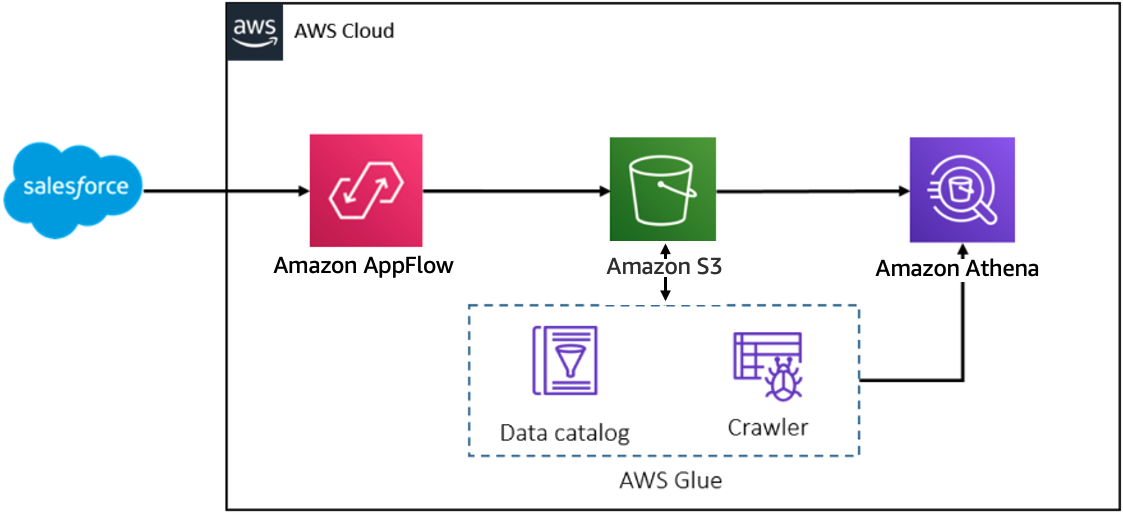
AWS AppFlow Architecture Diagram
- Connectors: AppFlow provides pre-built connectors for popular SaaS applications like Salesforce, ServiceNow, and Slack, allowing you to quickly set up data flows.
- Data Transformation: In-flight data transformation enables you to map fields, filter records, and apply custom logic before storing the data in AWS services.
- Data Storage: AppFlow can store the transformed data in various AWS services like Amazon S3, Amazon Redshift, and Amazon RDS.
- Monitoring and Logging: Integration with Amazon CloudWatch allows you to monitor data flows, set up alerts, and view logs for troubleshooting.
Use Cases
- Data Synchronization: Keep your data synchronized between SaaS applications and AWS services, ensuring consistency across your organization.
- Data Analytics: Transfer data from SaaS applications to Amazon Redshift or Amazon S3 for advanced analytics and reporting.
- Business Process Automation: Automate business processes by triggering workflows in response to data changes in SaaS applications using Amazon EventBridge.
- Data Backup and Archiving: Securely back up data from SaaS applications to Amazon S3 for long-term storage and compliance.
Integration with Other AWS Services
AWS AppFlow integrates with several other AWS services to provide a comprehensive data transfer solution:
- Amazon S3: Store and analyze your data in Amazon S3, one of the most versatile storage services in AWS.
- Amazon Redshift: Perform advanced analytics on your data by transferring it to Amazon Redshift, AWS's fully managed data warehouse service.
- Amazon EventBridge: Trigger events and automate workflows based on data changes in your SaaS applications.
- AWS Lambda: Process and transform data in real-time by integrating AppFlow with AWS Lambda for serverless compute capabilities.
Direct Connect
AWS Direct Connect
AWS Direct Connect is a cloud service solution that makes it easy to establish a dedicated network connection from your premises to AWS. With AWS Direct Connect, you can establish private connectivity between AWS and your data center, office, or colocation environment, which in many cases can reduce your network costs, increase bandwidth throughput, and provide a more consistent network experience than Internet-based connections.
Key Features
- Dedicated Network Connection: AWS Direct Connect provides a dedicated, low-latency, high-bandwidth connection from your premises directly to AWS, bypassing the public internet.
- High Performance: Benefit from reduced network costs, increased bandwidth throughput, and a consistent network experience.
- Scalable: Direct Connect supports multiple connection types, including 1 Gbps, 10 Gbps, and 100 Gbps, allowing you to scale your network connection as needed.
- Redundant Connections: Achieve higher availability and reliability by setting up multiple Direct Connect connections for redundancy.
- Hybrid Cloud Integration: Seamlessly integrate your on-premises environments with your AWS cloud workloads, enabling hybrid cloud architectures.
Architecture Overview
The following diagram illustrates how AWS Direct Connect integrates your on-premises network with AWS:
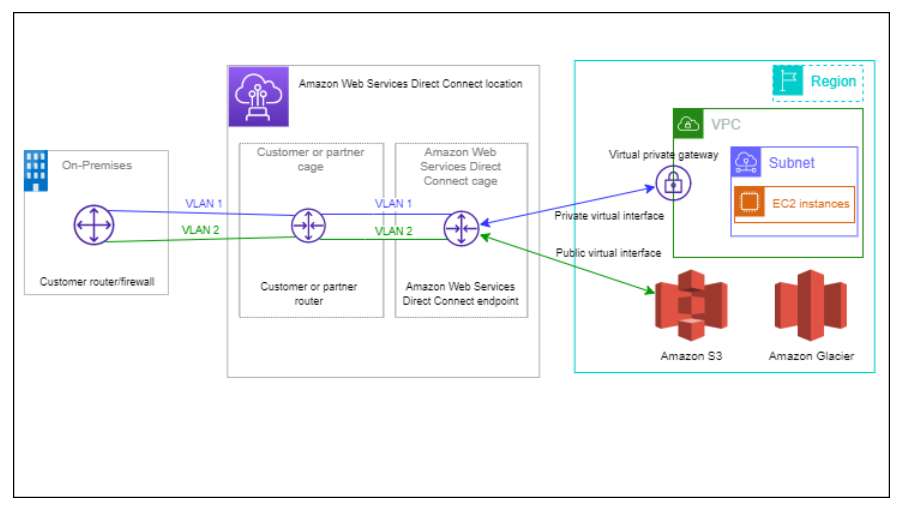
AWS Direct Connect Architecture Diagram
- On-Premises Data Center: AWS Direct Connect establishes a dedicated connection from your on-premises data center to an AWS Direct Connect location.
- AWS Direct Connect Location: The connection from your premises terminates at an AWS Direct Connect location, which is then connected to the AWS backbone network.
- Private Virtual Interface: Use private virtual interfaces to connect to your Amazon VPCs, enabling secure communication between your on-premises network and AWS.
- Public Virtual Interface: Access AWS public services such as Amazon S3 and DynamoDB via a public virtual interface, while keeping traffic off the public internet.
Use Cases
- Hybrid Cloud Architectures: Extend your on-premises data center into AWS, enabling you to run hybrid applications that span on-premises and AWS environments.
- Data Transfer and Backup: Use Direct Connect for fast, reliable data transfer to and from AWS for large-scale data migration, backup, and disaster recovery.
- Low-Latency Applications: Ensure consistent, low-latency performance for applications that require high-speed, direct access to AWS resources.
- Regulatory Compliance: Meet regulatory and compliance requirements by using a dedicated, private network connection for sensitive data transfers.
Integration with Other AWS Services
AWS Direct Connect integrates with several other AWS services to provide a robust, end-to-end network solution:
- Amazon VPC: Use private virtual interfaces to connect directly to your Amazon VPCs, enabling secure communication between your on-premises network and AWS.
- AWS Transit Gateway: Integrate Direct Connect with AWS Transit Gateway to simplify complex network architectures by interconnecting multiple VPCs and on-premises networks.
- AWS Direct Connect Gateway: Connect to multiple VPCs across different AWS regions using a single Direct Connect connection.
- AWS Global Accelerator: Use Global Accelerator in conjunction with Direct Connect to improve the availability and performance of your applications running in AWS.
Storage Gateway
AWS Storage Gateway
AWS Storage Gateway is a hybrid cloud storage service that provides on-premises access to virtually unlimited cloud storage. It seamlessly connects on-premises environments with AWS cloud storage, enabling you to store data securely and efficiently in AWS while maintaining low-latency access from on-premises applications.
Key Features
- Hybrid Cloud Storage: AWS Storage Gateway offers seamless integration between on-premises environments and AWS, enabling hybrid cloud storage solutions.
- Multiple Gateway Types: Supports various gateway types, including File Gateway, Volume Gateway, and Tape Gateway, to suit different storage needs.
- Data Encryption: All data transferred between your on-premises environment and AWS is encrypted using SSL, and data stored in AWS is encrypted at rest using AWS KMS.
- Low-Latency Access: Provides low-latency access to frequently accessed data, ensuring fast performance for on-premises applications.
- Cost-Effective Storage: Enables cost-effective storage by leveraging AWS cloud storage, reducing the need for on-premises storage infrastructure.
Architecture Overview
The following diagram illustrates how AWS Storage Gateway integrates your on-premises storage with AWS cloud storage:

AWS Storage Gateway Architecture Diagram
- On-Premises Applications: On-premises applications interact with AWS Storage Gateway as if it were a local storage device, providing seamless access to AWS cloud storage.
- Storage Gateway Appliance: The Storage Gateway appliance runs on-premises and acts as a bridge between your local environment and AWS cloud storage.
- AWS Cloud Storage: Data stored on the Storage Gateway is backed by Amazon S3, Amazon EBS, or Amazon Glacier, depending on the gateway type.
- Data Transfer and Caching: Frequently accessed data is cached locally on the gateway appliance, while less frequently accessed data is stored in the cloud, optimizing performance and cost.
Use Cases
- Data Backup and Archiving: Use AWS Storage Gateway for efficient, secure backup and archiving of on-premises data to AWS cloud storage.
- Disaster Recovery: Enable disaster recovery by replicating critical data to AWS, ensuring data availability in the event of an on-premises failure.
- Hybrid Cloud Architectures: Integrate on-premises applications with AWS storage services, enabling a hybrid cloud storage solution.
- Tape Replacement: Replace physical tape libraries with Tape Gateway, leveraging the scalability and durability of Amazon S3 and Amazon Glacier.
Integration with Other AWS Services
AWS Storage Gateway integrates with various AWS services to provide a comprehensive storage solution:
- Amazon S3: Store data in Amazon S3 using File Gateway for scalable, secure, and durable cloud storage.
- Amazon Glacier: Archive data to Amazon Glacier using Tape Gateway for cost-effective, long-term storage.
- Amazon EBS: Use Volume Gateway to create EBS snapshots, enabling efficient backups and disaster recovery.
- AWS CloudTrail: Monitor and log all API calls made by AWS Storage Gateway, ensuring compliance and security.
Transfer
AWS Transfer Family
AWS Transfer Family provides fully managed support for file transfers directly into and out of Amazon S3 and Amazon EFS using the Secure File Transfer Protocol (SFTP), File Transfer Protocol over SSL (FTPS), and File Transfer Protocol (FTP). It helps migrate file transfer workflows to AWS easily without the need to modify the applications or processes that utilize these files.
Key Features
- Protocol Support: Supports SFTP, FTPS, and FTP, allowing you to continue to use your existing protocols while transferring files to and from AWS.
- Managed Service: AWS Transfer Family is a fully managed service that takes care of infrastructure, reducing operational overhead.
- Integration with S3 and EFS: Files can be transferred directly into Amazon S3 or Amazon EFS, leveraging their scalability and durability.
- Authentication Options: Supports multiple authentication methods, including service-managed, custom, and existing identity providers via AWS IAM, AD, and LDAP.
- Security: Encrypted data transfer and optional integration with AWS Key Management Service (KMS) to encrypt data at rest.
Architecture Overview
The following diagram illustrates how AWS Transfer Family works with S3 and EFS to manage file transfers:
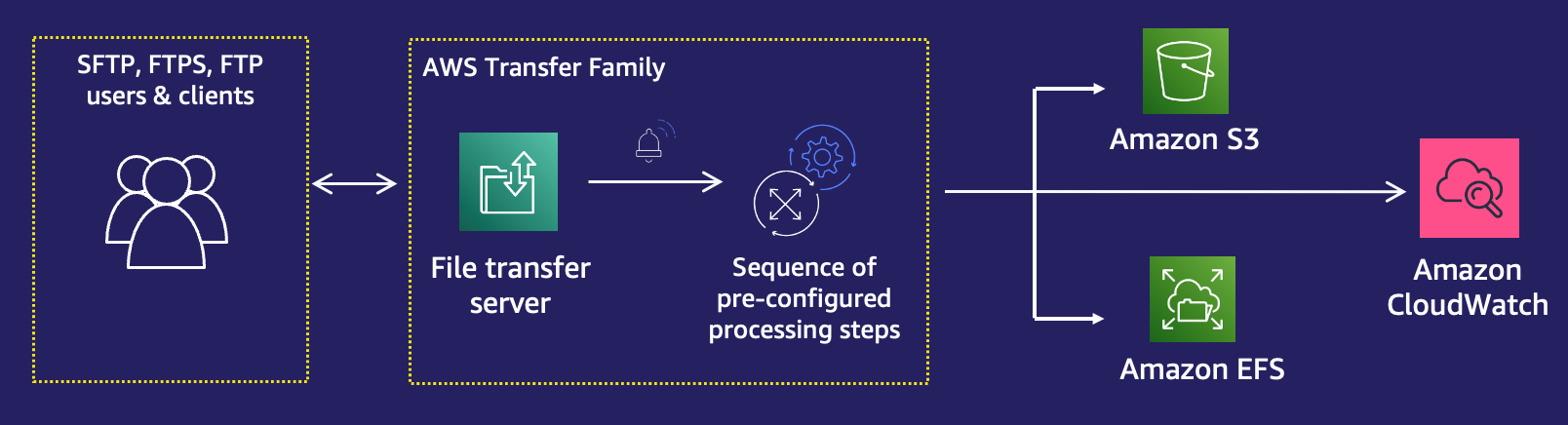
AWS Transfer Family Architecture Diagram
- File Transfer Protocols: Supports SFTP, FTPS, and FTP for secure file transfers.
- Managed Endpoints: AWS manages the server endpoints, ensuring high availability and scalability.
- Integration with Storage Services: Files are transferred directly to Amazon S3 or Amazon EFS, providing easy access to other AWS services and tools.
- Monitoring and Logging: Integrated with Amazon CloudWatch for monitoring, and AWS CloudTrail for auditing all API calls.
Use Cases
- Data Migration: Migrate existing file transfer workflows to AWS with minimal disruption to your current processes.
- Content Distribution: Use AWS Transfer Family to securely distribute large files, like media content, to a global audience using S3 and CloudFront.
- Backup and Archiving: Transfer critical files to Amazon S3 for long-term storage, leveraging S3's durability and scalability.
- Secure Transfers: Ensure secure and compliant file transfers using protocols like SFTP and FTPS with support for encryption and custom authentication.
Integration with Other AWS Services
AWS Transfer Family integrates seamlessly with various AWS services to offer a comprehensive solution:
- Amazon S3: Store and retrieve files in S3, leveraging its scalability, durability, and integration with other AWS services.
- Amazon EFS: Transfer files to and from Amazon EFS for shared access across multiple EC2 instances or other services.
- AWS IAM: Manage access control to your file transfer endpoints and integrate with existing identity providers.
- AWS CloudWatch: Monitor transfer activity and set alarms for specific events or thresholds.
- AWS CloudTrail: Audit and log all API calls made by AWS Transfer Family for compliance and security purposes.
VPN
AWS VPN
AWS VPN allows you to establish a secure and encrypted connection between your on-premises networks, remote offices, client devices, and AWS. This connection is accomplished through the use of either AWS Site-to-Site VPN or AWS Client VPN, both of which provide robust security features to protect your data as it traverses the internet.
Key Features
- Site-to-Site VPN: Establishes a secure connection between your on-premises or branch office network and your AWS resources in a Virtual Private Cloud (VPC).
- Client VPN: Enables your users to securely connect to AWS and your on-premises resources from anywhere, using an OpenVPN-based client.
- Encryption: AWS VPN uses industry-standard IPsec (Internet Protocol Security) to secure data in transit.
- Scalability: Supports scalable connections to handle multiple remote sites or users simultaneously.
- Monitoring and Logging: Integrates with AWS CloudWatch and AWS CloudTrail for monitoring, logging, and auditing VPN connections.
Architecture Overview
The following diagram illustrates how AWS VPN connects your on-premises network to AWS through a secure VPN tunnel:

AWS VPN Architecture Diagram
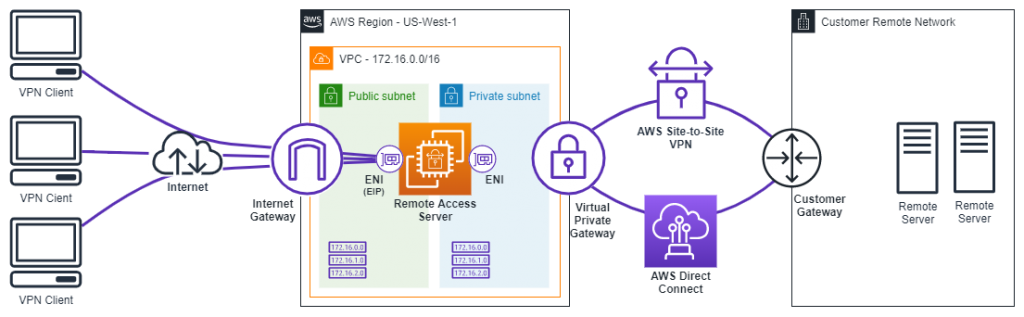
AWS VPN Architecture Diagram
- Site-to-Site VPN: A virtual private gateway or transit gateway on the AWS side establishes a connection with your customer gateway on-premises.
- Client VPN: Uses OpenVPN software to allow remote users to securely access AWS VPCs and on-premises networks from any location.
- Secure Encryption: All traffic is encrypted using IPsec standards, ensuring data protection during transmission.
- High Availability: Supports multiple connections for redundancy and failover, ensuring continuous operation.
Use Cases
- Hybrid Cloud Architecture: Securely extend your on-premises network into AWS to create a hybrid architecture, enabling seamless integration of on-premises and cloud resources.
- Remote Workforce: Enable remote employees to securely access AWS resources and on-premises systems using AWS Client VPN.
- Disaster Recovery: Set up AWS as your disaster recovery site with secure connectivity from your primary on-premises location using AWS Site-to-Site VPN.
- Secure Data Transfers: Ensure that data transfers between your on-premises environment and AWS are secure and protected from unauthorized access.
Integration with Other AWS Services
AWS VPN integrates with various AWS services to provide a comprehensive networking and security solution:
- Amazon VPC: Establish secure connections between your on-premises network and AWS VPCs, allowing seamless communication between both environments.
- AWS Transit Gateway: Centralize VPN connections and route traffic between multiple VPCs, on-premises networks, and remote users with a single gateway.
- AWS Direct Connect: Combine AWS VPN with Direct Connect for a hybrid connection, leveraging both private and encrypted connections for maximum security.
- AWS CloudWatch: Monitor the status and performance of your VPN connections with CloudWatch metrics and logs.
- AWS CloudTrail: Audit and log all API calls made by AWS VPN to ensure compliance and security best practices.
Virtual Interfaces
AWS Virtual Interfaces
AWS Virtual Interfaces are a feature of AWS Direct Connect that allow you to connect your on-premises network to AWS through a dedicated connection. Virtual Interfaces enable you to connect to your Amazon VPC or AWS services with lower latency and improved bandwidth compared to traditional internet connections.
Key Features
- Private Virtual Interface: Connects directly to your Amazon VPC using a private IP address. Ideal for accessing AWS resources within your VPC securely and with low latency.
- Public Virtual Interface: Provides access to AWS public services such as Amazon S3, Amazon DynamoDB, and others using public IP addresses. Suitable for accessing AWS services over a dedicated connection without going through the internet.
- Transit Virtual Interface: Allows you to connect to multiple VPCs across different AWS accounts using AWS Transit Gateway. Provides simplified network management and scalability.
- Bandwidth Options: Offers various bandwidth options, from 1 Gbps to 10 Gbps, to match your network requirements.
- High Availability: Supports multiple virtual interfaces for redundancy and failover to ensure continuous connectivity.
Architecture Overview
The following diagram illustrates how AWS Virtual Interfaces integrate with AWS Direct Connect and your on-premises network:

AWS Virtual Interfaces Architecture Diagram
- Direct Connect Connection: A dedicated, high-bandwidth connection between your on-premises network and AWS.
- Virtual Interfaces: Configured to access either private IP addresses (Private Virtual Interface) or public IP addresses (Public Virtual Interface).
- Amazon VPC: For Private Virtual Interfaces, securely connects to resources within your VPC.
- AWS Public Services: For Public Virtual Interfaces, access services such as S3 and DynamoDB.
- AWS Transit Gateway: For Transit Virtual Interfaces, enables connections to multiple VPCs and AWS accounts.
Use Cases
- High-Performance Applications: Use Private Virtual Interfaces to connect mission-critical applications in your VPC with low latency and high throughput.
- Secure Data Transfer: Utilize Private Virtual Interfaces to securely transfer data between your on-premises data center and AWS, avoiding the public internet.
- Access AWS Public Services: Use Public Virtual Interfaces to connect to AWS services over a dedicated line, ensuring stable and reliable access.
- Multi-Region Connectivity: Implement Transit Virtual Interfaces to connect multiple VPCs across regions or accounts, simplifying network architecture and management.
Integration with Other AWS Services
AWS Virtual Interfaces integrate with various AWS services to provide a robust networking solution:
- Amazon VPC: Connects your on-premises network directly to your VPC for secure and efficient access to AWS resources.
- AWS Transit Gateway: Enables you to manage and scale connections between multiple VPCs and on-premises networks through a central hub.
- AWS Direct Connect Gateway: Allows you to connect your Direct Connect connection to multiple VPCs and accounts using private virtual interfaces.
- AWS CloudWatch: Monitors and logs the performance and status of your Direct Connect connections and virtual interfaces.
- AWS CloudTrail: Provides logging and auditing of API calls made to manage your Direct Connect connections and virtual interfaces.
6. Data Migration / AI-ML
Comprehend
AWS Comprehend
AWS Comprehend is a natural language processing (NLP) service that uses machine learning to find insights and relationships in a text. It can perform tasks like sentiment analysis, entity recognition, key phrase extraction, language detection, and topic modeling.
Key Features
- Sentiment Analysis: Determine the sentiment (positive, negative, neutral) expressed in a text.
- Entity Recognition: Identify entities like names of people, places, and organizations in a text.
- Key Phrase Extraction: Extract key phrases from a document that represent the main ideas.
- Language Detection: Detect the language of the input text automatically.
- Topic Modeling: Analyze large collections of documents to discover topics.
Architecture Overview
The following diagram illustrates how AWS Comprehend processes text data:

AWS Comprehend Architecture Diagram
- Data Input: Text data is fed into AWS Comprehend through an API or the AWS Management Console.
- Processing: The NLP models analyze the text to extract insights like sentiment, entities, and key phrases.
- Output: The analyzed data is outputted in JSON format for easy integration with other applications.
Use Cases
- Customer Feedback Analysis: Analyze customer reviews and feedback to gauge sentiment and identify areas for improvement.
- Content Categorization: Automatically categorize and tag content based on the topics identified by AWS Comprehend.
- Social Media Monitoring: Monitor social media channels for brand sentiment and trends.
Integration with Other AWS Services
AWS Comprehend integrates with several AWS services to enhance its capabilities:
- Amazon S3: Store and retrieve text data for analysis with AWS Comprehend.
- AWS Lambda: Trigger Comprehend analysis automatically when new data is uploaded to S3.
- Amazon Redshift: Use Comprehend to analyze text data stored in Redshift databases.
- Amazon QuickSight: Visualize the insights gained from Comprehend analysis in QuickSight dashboards.
Things to Remember for the Exam
- AWS Comprehend is a fully managed NLP service that doesn't require machine learning expertise.
- It's ideal for analyzing unstructured text data like social media posts, customer reviews, and documents.
- Key features include sentiment analysis, entity recognition, and key phrase extraction.
- Comprehend can be integrated with other AWS services like S3, Lambda, and QuickSight.
- Remember the use cases for customer feedback analysis and content categorization.
Forecast
AWS Forecast
AWS Forecast is a fully managed service that uses machine learning (ML) to deliver highly accurate forecasts. With Forecast, you can predict future values like product demand, resource utilization, financial performance, and much more without requiring ML expertise.
Key Features
- Highly Accurate Forecasts: AWS Forecast leverages advanced machine learning algorithms to provide accurate predictions for time series data.
- Customizable Models: You can customize forecasting models based on your specific use case, improving the accuracy of predictions.
- Easy Integration: Forecast integrates easily with your existing systems, allowing you to incorporate predictions into your decision-making processes.
- Supports Multiple Data Sources: AWS Forecast can ingest and analyze data from multiple sources, including historical data from databases and spreadsheets.
- Scalable: AWS Forecast can scale to handle large datasets and complex forecasting models.
Architecture Overview
The following diagram illustrates how AWS Forecast processes data and generates predictions:
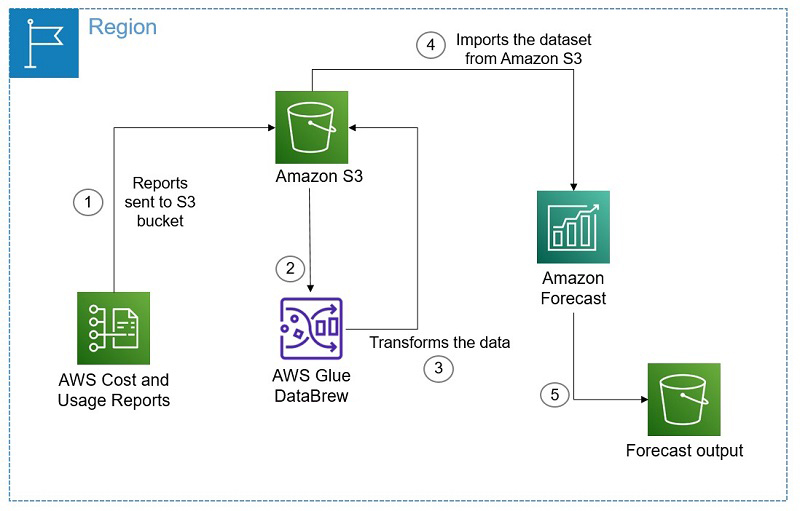
AWS Forecast Architecture Diagram
- Data Ingestion: Historical data is collected from various sources and ingested into AWS Forecast.
- Model Training: The service trains ML models using the ingested data to learn patterns and trends.
- Prediction Generation: Based on the trained models, Forecast generates predictions for future values.
- Results Output: The predictions are outputted in a format that can be integrated into your business processes.
Use Cases
- Demand Forecasting: Predict future demand for products to optimize inventory management and supply chain operations.
- Financial Forecasting: Generate financial forecasts for budgeting and financial planning purposes.
- Resource Planning: Forecast resource utilization to improve capacity planning and reduce costs.
- Sales and Marketing: Predict sales trends and customer behavior to optimize marketing campaigns and sales strategies.
Integration with Other AWS Services
AWS Forecast integrates seamlessly with other AWS services to enhance its capabilities:
- Amazon S3: Store and retrieve historical data for forecasting in Amazon S3.
- Amazon Redshift: Use data from Redshift databases as input for AWS Forecast predictions.
- AWS Lambda: Automate the process of ingesting data and generating forecasts with AWS Lambda functions.
- Amazon QuickSight: Visualize Forecast predictions in Amazon QuickSight dashboards for better decision-making.
Things to Remember for the Exam
- AWS Forecast is a fully managed service for generating accurate time series predictions using machine learning.
- It doesn't require machine learning expertise to use and can handle complex datasets and models.
- Key use cases include demand forecasting, financial forecasting, and resource planning.
- Integration with other AWS services like S3, Lambda, and QuickSight enhances its capabilities.
- Understand how Forecast can be used to optimize inventory management, financial planning, and resource utilization.
Kendra
AWS Kendra
AWS Kendra is an intelligent search service powered by machine learning. It allows organizations to index and search across a variety of data sources to provide accurate and contextually relevant search results for users.
Key Features
- Natural Language Understanding: AWS Kendra uses advanced natural language processing (NLP) to understand the context of search queries and provide relevant results.
- Connectors to Data Sources: Kendra supports a variety of data sources, including file systems, databases, applications, and more, to ensure comprehensive search capabilities.
- Domain-Specific Models: Kendra offers pre-trained models tailored to specific domains, such as IT, finance, healthcare, and legal, to improve search accuracy.
- Document Ranking: Kendra ranks documents based on relevance and context, ensuring that users receive the most pertinent information first.
- Faceted Search: Users can refine search results using facets such as date, author, or document type, making it easier to find the right information.
Architecture Overview

AWS Kendra Architecture Diagram
- Data Indexing: AWS Kendra indexes data from various sources, applying NLP to understand and categorize the content.
- Query Processing: When a user submits a search query, Kendra processes the query using its NLP models to understand the intent.
- Result Ranking: Kendra ranks the search results based on relevance, presenting the most contextually appropriate information to the user.
- Faceted Search: Users can filter and refine the search results using facets, improving their ability to find specific information.
Use Cases
- Enterprise Search: Enable employees to search across organizational data sources such as file systems, intranets, and databases for relevant information.
- Customer Support: Improve customer support experiences by allowing agents to quickly find relevant documentation and resources.
- Compliance and Legal: Search and retrieve legal documents, contracts, and compliance records efficiently.
- Healthcare Information Retrieval: Help healthcare professionals quickly access medical records, research papers, and other critical information.
Integration with Other AWS Services
AWS Kendra integrates with various AWS services to enhance its capabilities:
- Amazon S3: Store and index documents in Amazon S3 for searchable access via Kendra.
- AWS Lambda: Automate the process of data indexing and query handling with AWS Lambda functions.
- Amazon CloudWatch: Monitor Kendra's performance and usage metrics using Amazon CloudWatch.
- Amazon QuickSight: Visualize search query analytics in Amazon QuickSight for better insights into user behavior.
Things to Remember for the Exam
- AWS Kendra is an intelligent search service that uses NLP to understand and process search queries.
- Kendra supports multiple data sources, including S3, databases, and applications, for comprehensive search capabilities.
- It provides domain-specific models and faceted search to improve the accuracy and relevance of search results.
- Understand the common use cases for Kendra, such as enterprise search, customer support, and legal document retrieval.
- Integration with other AWS services like S3, Lambda, and CloudWatch enhances Kendra's functionality.
Lex
AWS Lex
AWS Lex is a fully managed service for building conversational interfaces into any application using voice and text. Lex provides the deep learning functionalities of automatic speech recognition (ASR) and natural language understanding (NLU) to enable you to build sophisticated chatbots.
Key Features
- Automatic Speech Recognition (ASR): AWS Lex converts speech to text, enabling voice input for conversational interfaces.
- Natural Language Understanding (NLU): Lex understands the intent behind user inputs, allowing for more accurate and relevant responses.
- Multi-Channel Support: Integrate Lex with multiple platforms like mobile apps, web apps, and popular messaging services such as Facebook Messenger and Slack.
- Context Management: Lex can maintain context across different interactions, allowing for more natural and continuous conversations.
- Built-in Integration with AWS Lambda: Use AWS Lambda functions to execute business logic, retrieve data, or perform tasks in response to user input.
- Versioning and Aliases: Lex supports versioning, enabling you to manage multiple versions of your bots, and aliases for easier deployment management.
Architecture Overview
The following diagram illustrates how AWS Lex interacts with users and integrates with other AWS services:

AWS Lex Architecture Diagram
- User Interaction: Users interact with the Lex chatbot through voice or text input.
- ASR and NLU: Lex uses ASR to convert voice input into text and NLU to understand the intent behind the user's input.
- Response Generation: Based on the intent, Lex generates a response, which could involve invoking an AWS Lambda function for more complex operations.
- Multi-Channel Delivery: Lex delivers the response back to the user across the specified communication channel (e.g., web app, mobile app, messaging service).
Use Cases
- Customer Support Chatbots: Automate customer interactions for tasks like answering FAQs, processing orders, or booking appointments.
- Voice-Enabled Applications: Build applications with voice capabilities for hands-free operation, such as virtual assistants.
- Internal Tools: Create bots to assist employees with internal processes, such as HR inquiries, IT support, or data retrieval.
- E-commerce Applications: Implement chatbots to assist users in product searches, recommendations, and order placements.
Integration with Other AWS Services
AWS Lex integrates with various AWS services to enhance its capabilities:
- AWS Lambda: Execute serverless functions to perform tasks such as data retrieval, calculations, or connecting to other AWS services.
- Amazon Polly: Convert text responses into lifelike speech using Amazon Polly, creating a seamless voice interface experience.
- Amazon Connect: Combine Lex with Amazon Connect to build intelligent contact center solutions with automated customer interactions.
- Amazon CloudWatch: Monitor Lex bot performance and user interactions using CloudWatch for logging and metrics analysis.
Things to Remember for the Exam
- AWS Lex is a service for building conversational interfaces using voice and text, with ASR and NLU functionalities.
- Lex integrates with AWS Lambda for executing business logic and Amazon Polly for generating voice responses.
- Understand the common use cases for Lex, including customer support, voice-enabled applications, and e-commerce chatbots.
- Lex supports multi-channel integration, allowing you to deploy chatbots across various platforms and messaging services.
- Key features include context management, versioning, and multi-channel support.
Personalize
AWS Personalize
AWS Personalize is a machine learning service that enables developers to create individualized recommendations for customers using their applications. By leveraging the same technology as Amazon.com, Personalize allows you to deliver a personalized experience for various use cases, such as product recommendations, personalized marketing, and content recommendations.
Key Features
- Custom Machine Learning Models: AWS Personalize builds and trains custom machine learning models for your data, providing more accurate and tailored recommendations.
- Real-Time Personalization: Personalize offers real-time recommendations based on user interactions and preferences.
- Integration with Multiple Data Sources: Integrate data from various sources, including clickstreams, user profiles, and transaction history, to enhance the accuracy of recommendations.
- Ease of Use: AWS Personalize abstracts the complexities of machine learning, enabling developers to create and deploy personalized recommendations without requiring expertise in ML.
- Contextual Recommendations: Personalize can provide recommendations based on the context of user interactions, such as the time of day or device type.
Architecture Overview
The following diagram illustrates the architecture of AWS Personalize and how it integrates with your applications:

AWS Personalize Architecture Diagram
- Data Ingestion: Personalize ingests data from multiple sources, such as user interactions, product catalogs, and user profiles.
- Training: The service uses the ingested data to train custom machine learning models tailored to your specific use case.
- Real-Time Inference: Personalize provides real-time recommendations based on user interactions and the trained models.
- Integration: The recommendations can be easily integrated into your applications via APIs, delivering personalized experiences to users.
Use Cases
- E-commerce Recommendations: Provide personalized product recommendations to users based on their browsing and purchase history.
- Content Personalization: Deliver personalized content, such as articles or videos, based on user preferences and behavior.
- Marketing Campaigns: Tailor marketing messages and offers to individual users, improving engagement and conversion rates.
- Media & Entertainment: Offer personalized movie or music recommendations based on user tastes and past interactions.
Integration with Other AWS Services
AWS Personalize integrates with several AWS services to enhance its functionality:
- AWS S3: Store and retrieve data used for training models and generating recommendations.
- Amazon CloudWatch: Monitor the performance and health of your AWS Personalize models and infrastructure.
- AWS Lambda: Execute custom business logic in response to recommendations or user interactions.
- AWS Glue: Prepare and transform data before ingesting it into AWS Personalize for model training.
Things to Remember for the Exam
- AWS Personalize is used to create personalized recommendations using custom machine learning models without needing ML expertise.
- Personalize can handle data from multiple sources and deliver real-time recommendations based on user interactions.
- Understand the use cases for AWS Personalize, including e-commerce, content personalization, and personalized marketing campaigns.
- Key integrations include AWS S3 for data storage, AWS Lambda for executing business logic, and Amazon CloudWatch for monitoring.
- Personalize abstracts much of the complexity of machine learning, making it accessible to developers for quick implementation.
Polly
AWS Polly
AWS Polly is a text-to-speech service that uses advanced deep learning technologies to convert written text into lifelike speech. With Polly, you can create applications that talk, allowing for a more natural and engaging user experience. It supports a wide range of languages and voices, making it suitable for global applications.
Key Features
- Lifelike Speech Synthesis: AWS Polly uses advanced neural network models to generate high-quality, natural-sounding speech in multiple languages.
- Real-Time Streaming: Polly provides real-time streaming of audio, allowing you to deliver speech immediately as the text is inputted.
- Custom Lexicons: Define and use custom pronunciations for specific words to tailor Polly’s output to your needs.
- SSML Support: Polly supports Speech Synthesis Markup Language (SSML), allowing you to control various aspects of speech, such as pronunciation, volume, pitch, and speed.
- Multiple Languages and Voices: Choose from a wide selection of languages and voices, including both male and female options, to suit your audience.
Architecture Overview
The following diagram illustrates the architecture of AWS Polly and how it integrates with your applications:
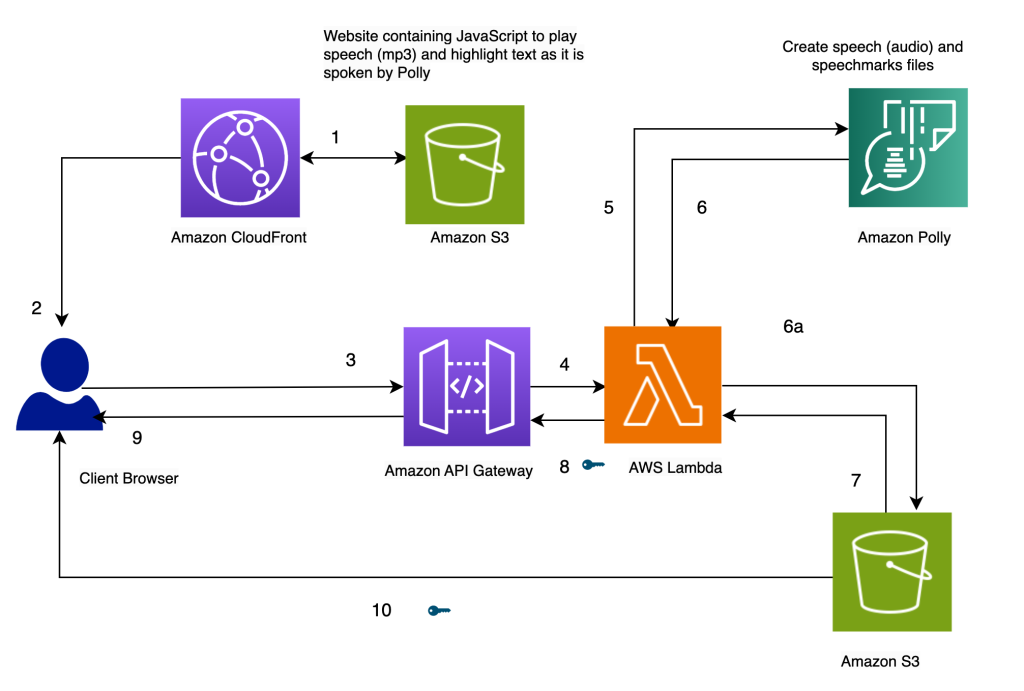
AWS Polly Architecture Diagram
- Text Input: Text is provided as input to AWS Polly through API calls or the AWS Management Console.
- Speech Synthesis: Polly processes the text using its neural network models to generate speech in the selected language and voice.
- Audio Output: The synthesized speech is delivered as an audio stream or file, which can be played back in real-time or stored for later use.
- Integration: The speech output can be easily integrated into various applications, such as virtual assistants, automated customer service systems, and e-learning platforms.
Use Cases
- Interactive Voice Response (IVR) Systems: Create dynamic, natural-sounding IVR systems for customer service or telephony applications.
- Content Creation: Convert written content, such as articles or books, into audio formats for accessibility or media consumption.
- E-learning: Use Polly to generate spoken content for educational materials, making learning more interactive and engaging.
- Assistive Technologies: Enhance accessibility by providing text-to-speech capabilities for visually impaired users.
- News Reading: Automatically convert news articles or blogs into audio podcasts, allowing users to listen to content on the go.
Integration with Other AWS Services
AWS Polly integrates with several AWS services to expand its functionality:
- Amazon S3: Store and retrieve the synthesized speech files, enabling scalable storage and retrieval.
- AWS Lambda: Trigger Polly to convert text to speech in response to specific events, such as when a user submits a request.
- Amazon CloudWatch: Monitor the performance and health of AWS Polly, tracking usage metrics and error logs.
- Amazon Transcribe: Combine Polly with Transcribe to create applications that can both transcribe and vocalize text.
Things to Remember for the Exam
- AWS Polly is a text-to-speech service that generates lifelike speech using deep learning technologies.
- It supports real-time streaming, multiple languages and voices, and customization through SSML and custom lexicons.
- Polly can be integrated with other AWS services like S3 for storage, Lambda for triggering speech synthesis, and CloudWatch for monitoring.
- Common use cases include IVR systems, content creation, e-learning, assistive technologies, and news reading.
- Understand how Polly fits into larger applications, especially in scenarios where speech output is required.
QuickSight
AWS QuickSight
AWS QuickSight is a scalable, serverless, business intelligence (BI) service that allows you to create and publish interactive dashboards. QuickSight provides insights from your data using machine learning-powered analytics, and it can connect to a variety of data sources.
Key Features
- Scalable and Serverless: QuickSight is a fully managed, serverless service that scales automatically to accommodate your data and user needs.
- Interactive Dashboards: Create and share interactive dashboards with embedded analytics and rich visualizations.
- Machine Learning Insights: Leverage machine learning-powered insights such as anomaly detection, forecasting, and natural language queries.
- Multi-source Data Connectivity: Connect to various data sources, including AWS data lakes, Redshift, S3, RDS, and third-party sources like Salesforce.
- SPICE In-memory Engine: Use the Super-fast, Parallel, In-memory Calculation Engine (SPICE) to accelerate query performance and handle large datasets.
Architecture Overview
The following diagram illustrates the architecture of AWS QuickSight and how it integrates with other AWS services:

AWS QuickSight Architecture Diagram
- Data Sources: QuickSight connects to various data sources, including AWS services like S3, Redshift, and RDS, as well as external sources.
- Data Preparation: QuickSight allows you to clean, transform, and aggregate data before visualizing it.
- SPICE Engine: QuickSight's in-memory engine enables fast querying and analysis of large datasets.
- Dashboards and Reports: Create and publish interactive dashboards that can be shared with others or embedded in applications.
Use Cases
- Business Intelligence: Provide real-time business insights by analyzing data from multiple sources and visualizing it in interactive dashboards.
- Embedded Analytics: Integrate QuickSight dashboards into your applications, enabling users to access data insights directly from your product.
- Data Exploration: Empower users to explore data on their own using QuickSight’s intuitive interface and machine learning insights.
- Operational Monitoring: Monitor key business metrics and KPIs through live dashboards that are automatically updated.
Integration with Other AWS Services
AWS QuickSight integrates with several AWS services to expand its functionality:
- Amazon S3: Import and visualize large datasets stored in S3 for in-depth analysis.
- Amazon Redshift: Analyze data from your Redshift data warehouse using QuickSight’s visualization capabilities.
- AWS IoT: Monitor and analyze IoT data in real-time using QuickSight dashboards.
- Amazon RDS: Connect QuickSight to your RDS databases for visualizing transactional data.
Things to Remember for the Exam
- AWS QuickSight is a serverless BI service that enables you to create and share interactive dashboards with data from multiple sources.
- It features machine learning-powered insights, including anomaly detection and natural language queries.
- QuickSight uses the SPICE engine for fast, in-memory data processing and querying.
- Common use cases include business intelligence, embedded analytics, data exploration, and operational monitoring.
- Understand how QuickSight integrates with other AWS services like S3, Redshift, and RDS for data analysis and visualization.
Rekognition
AWS Rekognition
AWS Rekognition is a deep learning-based image and video analysis service that can identify objects, people, text, scenes, and activities in images and videos. It also offers facial analysis, facial recognition, and the ability to detect inappropriate content.
Key Features
- Object and Scene Detection: Identify thousands of objects (e.g., vehicles, pets, furniture) and scenes (e.g., city, beach) in images and videos.
- Facial Analysis and Recognition: Detect faces in images and videos, and analyze attributes such as gender, age, emotions, and facial landmarks.
- Text Detection: Extract text from images and videos, including printed, handwritten, and scene text.
- Celebrity Recognition: Recognize famous individuals in images and videos.
- Content Moderation: Detect explicit or inappropriate content in images and videos.
- Custom Labels: Train Rekognition to identify custom objects and scenes in images, tailored to specific use cases.
Architecture Overview

AWS Rekognition Architecture Diagram
- Image/Video Input: Images and videos are uploaded to S3, where they can be analyzed by Rekognition.
- Analysis Engine: Rekognition uses deep learning models to analyze the content and detect objects, faces, text, and more.
- Output: The results of the analysis, including detected objects, faces, and text, are provided as JSON output for integration with other services or applications.
Use Cases
- Security and Surveillance: Use facial recognition for secure access control and monitoring of live video feeds.
- Media and Entertainment: Automate content moderation, celebrity recognition, and metadata tagging for large media libraries.
- Retail: Analyze customer behavior and sentiment in stores using video surveillance.
- Social Media: Detect and moderate inappropriate content in user-uploaded images and videos.
Integration with Other AWS Services
AWS Rekognition integrates with several AWS services to enhance its capabilities:
- Amazon S3: Store and retrieve images and videos for analysis.
- AWS Lambda: Trigger image and video analysis automatically based on S3 events.
- Amazon CloudWatch: Monitor Rekognition’s usage and performance metrics.
- AWS Step Functions: Orchestrate complex workflows involving Rekognition, such as processing a series of images or videos.
Things to Remember for the Exam
- AWS Rekognition provides image and video analysis using deep learning, with features like object detection, facial recognition, and content moderation.
- It can be used for security, media, retail, and social media use cases, among others.
- Rekognition integrates with S3 for storing media files, Lambda for automated processing, and Step Functions for orchestrating complex workflows.
- Remember the key features, such as facial analysis, text detection, and custom labels, for the exam.
- Understand the typical use cases and how Rekognition fits into a broader AWS architecture involving S3, Lambda, and other services.
SageMaker
AWS SageMaker
AWS SageMaker is a fully managed service that provides tools to build, train, and deploy machine learning models quickly. It includes built-in algorithms, data processing, model tuning, and deployment capabilities to simplify and accelerate the ML lifecycle.
Key Features
- Integrated Jupyter Notebooks: Use Jupyter notebooks for data exploration, preprocessing, and model building within SageMaker.
- Built-in Algorithms: Access a suite of pre-built machine learning algorithms optimized for AWS infrastructure.
- Automatic Model Tuning: Optimize model performance using Hyperparameter Optimization (HPO) to find the best algorithm settings.
- Model Deployment: Deploy models easily using built-in hosting services or create real-time endpoints for inference.
- Data Labeling: Use SageMaker Ground Truth to create high-quality training datasets by leveraging human labelers.
- Model Monitoring: Monitor and analyze deployed models to ensure they continue to perform well over time.
Architecture Overview
The following diagram illustrates how AWS SageMaker supports the machine learning lifecycle:

AWS SageMaker Architecture Diagram
- Data Preparation: Upload and prepare data using built-in tools and integrate with AWS data services like S3 and Redshift.
- Model Building: Use SageMaker Studio or Jupyter notebooks to develop models with built-in or custom algorithms.
- Training: Train models at scale using managed compute resources and automatic scaling.
- Deployment: Deploy models to endpoints for real-time inference or batch transform jobs for offline predictions.
- Monitoring and Maintenance: Track model performance and retrain models as needed using SageMaker Model Monitor.
Use Cases
- Predictive Analytics: Build models to forecast future trends based on historical data.
- Image and Video Analysis: Develop computer vision models for object detection, classification, and segmentation.
- Natural Language Processing: Create models for sentiment analysis, text classification, and language translation.
- Fraud Detection: Use machine learning to identify and prevent fraudulent activities in real-time.
Integration with Other AWS Services
AWS SageMaker integrates with several AWS services to enhance its capabilities:
- Amazon S3: Store and manage training and test data for SageMaker.
- AWS Lambda: Trigger automated workflows, such as data preprocessing or model deployment, using Lambda functions.
- Amazon CloudWatch: Monitor SageMaker resources, training jobs, and model performance metrics.
- AWS Glue: Prepare and transform data using Glue for use in SageMaker models.
Things to Remember for the Exam
- AWS SageMaker provides a comprehensive platform for building, training, and deploying machine learning models with integrated tools for each stage of the ML lifecycle.
- Key features include Jupyter notebooks, built-in algorithms, model tuning, deployment, and data labeling with SageMaker Ground Truth.
- Understand how SageMaker fits into the AWS ecosystem, including its integration with S3 for data storage, Lambda for automation, and CloudWatch for monitoring.
- Know the use cases for SageMaker, such as predictive analytics, image and video analysis, and NLP, and how to leverage its features for these applications.
- Be familiar with SageMaker’s architecture and how it supports data preparation, model building, training, deployment, and monitoring.
Textract
AWS Textract
AWS Textract is a fully managed machine learning service that automatically extracts text and data from scanned documents, including forms and tables. It enables users to digitize and analyze documents at scale, making it easier to process and understand large volumes of unstructured data.
Key Features
- Text Extraction: Extracts printed text and handwriting from scanned documents with high accuracy.
- Form Data Extraction: Recognizes and extracts key-value pairs from forms and tables within documents.
- Table Extraction: Identifies and extracts data from tables in documents, preserving the structure and relationships between cells.
- Searchable Text: Converts documents into searchable text, making it easier to find and manage information.
- Integration with AWS Services: Easily integrates with other AWS services such as S3 for storage and Lambda for automated workflows.
Architecture Overview
The following diagram illustrates how AWS Textract processes documents and extracts information:
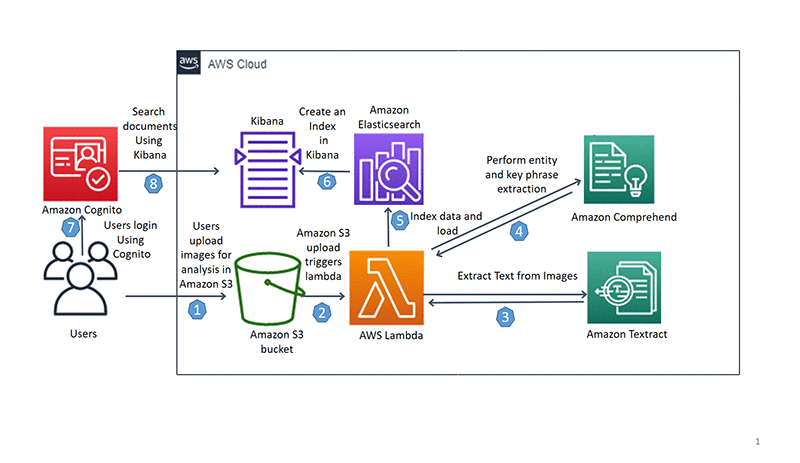
AWS Textract Architecture Diagram
- Document Input: Upload documents to AWS S3 or send directly via API for processing.
- Text Extraction: Textract uses machine learning models to analyze and extract text and data from documents.
- Data Processing: Extracted data is processed and formatted, with results including text, forms, and tables.
- Output and Integration: Results are returned via API and can be integrated into applications or stored in S3.
Use Cases
- Document Digitization: Convert physical documents into digital formats for easier storage, search, and management.
- Form Processing: Automate data entry and processing for forms, applications, and surveys.
- Invoice Management: Extract and analyze data from invoices for accounting and financial operations.
- Compliance and Auditing: Digitize and analyze documents for regulatory compliance and auditing purposes.
Integration with Other AWS Services
AWS Textract integrates with several AWS services to enhance its capabilities:
- Amazon S3: Store and manage documents for processing with Textract.
- AWS Lambda: Automate workflows and integrate Textract with other applications using Lambda functions.
- Amazon Comprehend: Use Textract in conjunction with Comprehend for advanced text analysis and sentiment analysis.
- AWS Step Functions: Orchestrate document processing workflows and integrate with other services using Step Functions.
Things to Remember for the Exam
- AWS Textract provides automated text and data extraction from scanned documents, forms, and tables using machine learning.
- Key features include text extraction, form data extraction, table extraction, and integration with other AWS services.
- Understand how Textract processes documents, extracts data, and integrates with services like S3 and Lambda for automation.
- Be familiar with use cases such as document digitization, form processing, invoice management, and compliance auditing.
- Know the architecture of Textract and how it fits into AWS workflows for processing and analyzing unstructured data.
Transcribe
AWS Transcribe
AWS Transcribe is an automatic speech recognition (ASR) service that makes it easy to add speech-to-text capabilities to your applications. It converts audio and video files into accurate text transcriptions, enabling easier content indexing, search, and analysis.
Key Features
- Speech-to-Text Conversion: Converts audio and video files into accurate text transcriptions.
- Automatic Punctuation: Adds punctuation and formatting to transcriptions for better readability.
- Speaker Identification: Identifies and labels different speakers in a conversation or recording.
- Custom Vocabulary: Allows the addition of custom vocabulary and terms to improve transcription accuracy for specific jargon or names.
- Real-Time Transcription: Provides streaming transcription for real-time applications and live broadcasts.
- Multi-Language Support: Supports multiple languages and dialects for transcription.
Architecture Overview
The following diagram illustrates how AWS Transcribe processes audio and video files for transcription:
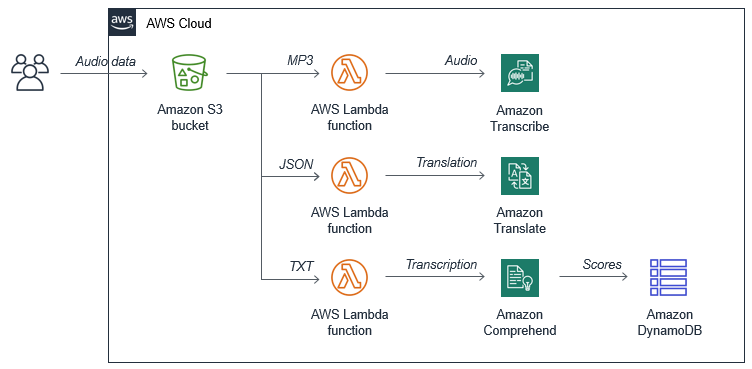
AWS Transcribe Architecture Diagram
- Audio/Video Input: Upload audio or video files to Amazon S3 or stream directly to AWS Transcribe.
- Transcription Processing: AWS Transcribe processes the audio or video, converting speech into text.
- Text Output: Transcription results are available for download or retrieval through API.
- Integration: Results can be integrated into applications, search engines, or other AWS services.
Use Cases
- Content Indexing: Automatically transcribe and index audio and video content for easier search and retrieval.
- Accessibility: Provide transcripts for videos to improve accessibility for hearing-impaired users.
- Customer Service: Transcribe customer service calls for analysis and improving customer support.
- Media and Entertainment: Create transcripts for interviews, podcasts, and media content for better content management.
Integration with Other AWS Services
AWS Transcribe integrates with several AWS services to enhance its capabilities:
- Amazon S3: Store audio and video files for processing and manage transcription results.
- AWS Lambda: Automate workflows and integrate transcription results into applications using Lambda functions.
- Amazon Comprehend: Analyze transcriptions for sentiment, key phrases, and other insights using Comprehend.
- Amazon Kinesis: Stream real-time audio data to Transcribe for live transcription and analysis.
Things to Remember for the Exam
- AWS Transcribe provides automatic speech-to-text conversion for audio and video files.
- Key features include speech-to-text conversion, automatic punctuation, speaker identification, and custom vocabulary support.
- Understand how AWS Transcribe processes audio/video input, generates transcription results, and integrates with other AWS services.
- Be familiar with use cases such as content indexing, accessibility, customer service, and media management.
- Know how Transcribe integrates with services like S3, Lambda, Comprehend, and Kinesis for enhanced functionality.
Translate
AWS Translate
AWS Translate is a fully managed neural machine translation service that delivers fast, high-quality, and affordable language translation. It allows developers to easily integrate language translation capabilities into their applications, helping users understand content in multiple languages.
Key Features
- Neural Machine Translation: Provides high-quality translations using advanced neural machine translation models.
- Language Support: Supports a wide range of languages and dialects, allowing for translations between multiple languages.
- Real-Time Translation: Offers real-time translation for applications that require immediate language conversion.
- Custom Translation Models: Allows the creation of custom translation models to cater to specific industry or domain terminologies.
- Integration with Other AWS Services: Easily integrates with other AWS services such as Amazon S3, AWS Lambda, and Amazon CloudWatch for seamless workflows.
- Cost-Effective: Provides a pay-as-you-go pricing model, making it cost-effective for various translation needs.
Architecture Overview
The following diagram illustrates how AWS Translate processes text for translation:

AWS Translate Architecture Diagram
- Text Input: Submit text for translation through the AWS Translate API or SDK.
- Translation Processing: AWS Translate processes the text using neural machine translation models.
- Text Output: Receive translated text as output, which can be integrated into applications or workflows.
- Custom Models: Optionally, use custom translation models to improve accuracy for specific terminologies.
Use Cases
- Content Localization: Translate content for global audiences, including websites, marketing materials, and documents.
- Customer Support: Provide multilingual customer support by translating support tickets and chat interactions.
- Application Translation: Integrate translation capabilities into applications to serve users in their preferred languages.
- Media and Entertainment: Translate subtitles, scripts, and other media content for international distribution.
Integration with Other AWS Services
AWS Translate integrates with several AWS services to enhance its capabilities:
- Amazon S3: Store and manage text files for translation and access translated results.
- AWS Lambda: Automate translation workflows and integrate translations into applications using Lambda functions.
- Amazon CloudWatch: Monitor translation requests and performance metrics using CloudWatch.
- AWS Glue: Integrate translation with ETL (extract, transform, load) processes to handle large-scale data translations.
Things to Remember for the Exam
- AWS Translate provides high-quality, neural machine translation for text and supports multiple languages.
- Key features include real-time translation, custom translation models, and cost-effective pricing.
- Understand how AWS Translate processes text, including input, processing, and output stages, and how custom models can enhance translations.
- Be familiar with use cases such as content localization, customer support, application translation, and media content management.
- Know the integration points with services like S3, Lambda, CloudWatch, and Glue for seamless workflows.
7. Messaging
EventBridge
AWS EventBridge
AWS EventBridge is a serverless event bus service that makes it easy to connect applications using events. It provides a way to ingest, filter, and route events from various sources to targets in your AWS environment, facilitating event-driven architectures.
Key Features
- Event Bus: Allows you to create event buses to route events from different sources to target services.
- Event Filtering: Provides filtering capabilities to process only specific events based on rules and patterns.
- Event Replay: Allows you to replay past events for debugging or reprocessing.
- Integration with AWS Services: Seamlessly integrates with other AWS services such as Lambda, SQS, SNS, and Step Functions.
- Schema Registry: Maintains a schema registry to manage and discover event schemas.
- Custom Events: Supports custom events from your own applications and services.
Architecture Overview
The following diagram illustrates how AWS EventBridge routes events through its architecture:
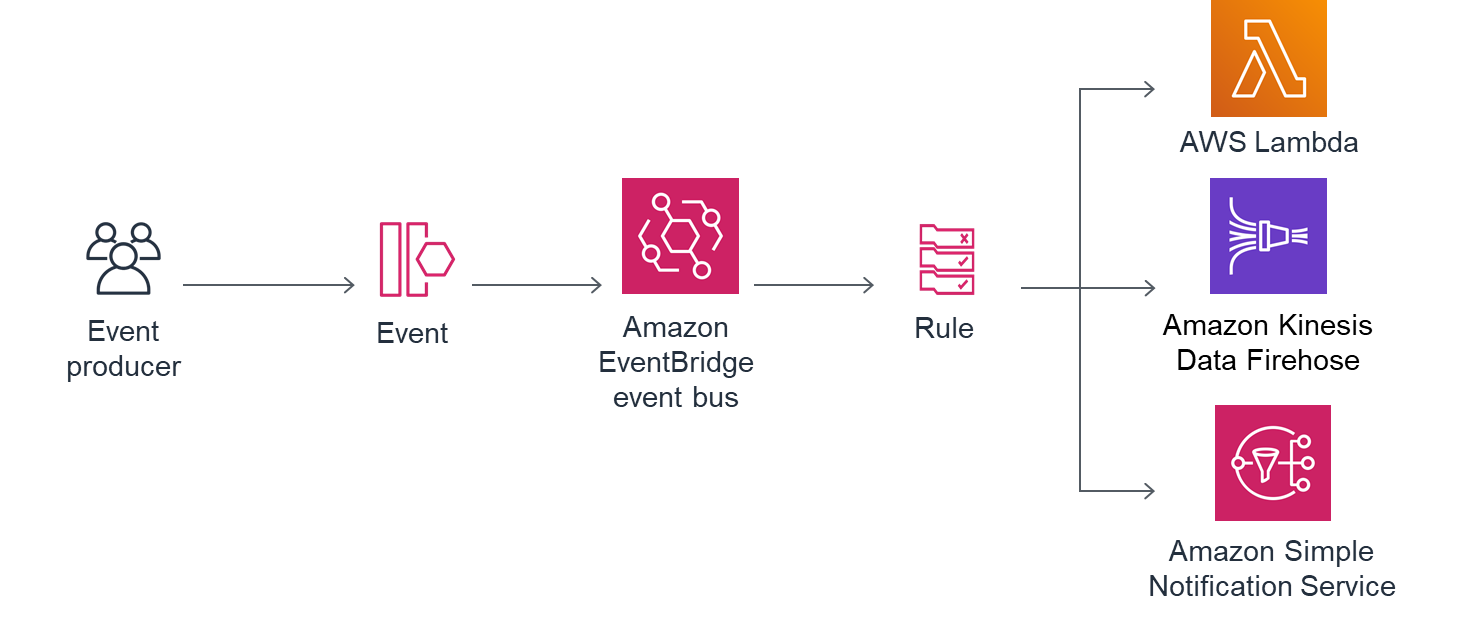
AWS EventBridge Architecture Diagram
- Event Sources: Events can come from AWS services, custom applications, or SaaS applications.
- Event Bus: Events are sent to the EventBridge event bus, where they are processed based on defined rules.
- Event Rules: Rules filter and route events to the appropriate targets.
- Targets: Event targets can include Lambda functions, SQS queues, SNS topics, Step Functions, and more.
- Schema Registry: Events and their schemas are managed in the schema registry for better integration and management.
Use Cases
- Application Integration: Integrate different services and applications by routing events between them.
- Event-Driven Architectures: Build and manage event-driven architectures that react to events in real time.
- Workflow Automation: Trigger automated workflows based on specific events or patterns.
- Real-Time Analytics: Collect and process events in real time for analytics and monitoring purposes.
Integration with Other AWS Services
AWS EventBridge integrates with a variety of AWS services to provide a comprehensive event-driven solution:
- AWS Lambda: Invoke Lambda functions in response to events for serverless processing.
- Amazon SQS: Send events to SQS queues for decoupling and asynchronous processing.
- Amazon SNS: Publish events to SNS topics for notifications and further event propagation.
- AWS Step Functions: Trigger Step Functions workflows to orchestrate complex processes based on events.
- AWS Glue: Integrate with AWS Glue for ETL operations based on events.
Things to Remember for the Exam
- AWS EventBridge is a serverless event bus service for connecting and routing events between AWS services and applications.
- Key features include event buses, filtering, replay capabilities, schema registry, and custom events.
- Understand the architecture of EventBridge, including event sources, event buses, rules, targets, and schema registry.
- Familiarize yourself with use cases such as application integration, event-driven architectures, workflow automation, and real-time analytics.
- Be aware of how EventBridge integrates with services like Lambda, SQS, SNS, Step Functions, and Glue.
Kinesis
AWS Kinesis
AWS Kinesis is a platform for real-time data streaming and analytics. It provides services to collect, process, and analyze streaming data, enabling applications to respond quickly to new information. Kinesis is ideal for scenarios where data is continuously generated and needs to be processed in real-time.
Key Services
- AWS Kinesis Data Streams: Collect and process large streams of data records in real-time. It allows you to build applications that can continuously ingest and analyze data.
- AWS Kinesis Data Firehose: Easily load streaming data into AWS data stores such as Amazon S3, Amazon Redshift, Amazon Elasticsearch Service, and Splunk.
- AWS Kinesis Data Analytics: Analyze streaming data in real-time using standard SQL queries and integrate results with other AWS services.
- AWS Kinesis Video Streams: Easily stream video data from connected devices to AWS for analytics, machine learning, and storage.
Architecture Overview
The following diagram illustrates how AWS Kinesis handles real-time data streaming and processing:

AWS Kinesis Architecture Diagram
- Data Sources: Various sources send data streams to Kinesis services, including applications, devices, and logs.
- Data Streams: Data is ingested into Kinesis Data Streams for real-time processing or Kinesis Data Firehose for loading into data stores.
- Real-Time Processing: Kinesis Data Analytics can process streaming data in real-time using SQL queries.
- Storage and Analytics: Processed data can be stored in AWS data stores like Amazon S3 or Amazon Redshift for further analysis or visualization.
- Video Streaming: Kinesis Video Streams allows for video data ingestion and analysis.
Use Cases
- Real-Time Analytics: Analyze data in real-time to gain immediate insights and make data-driven decisions.
- Log and Event Data Processing: Collect and process log and event data from various sources for monitoring and troubleshooting.
- Streaming Data Ingestion: Ingest data from applications, devices, and sensors into AWS for further processing and analysis.
- Video Data Analysis: Stream and analyze video data from devices for use cases such as surveillance and machine learning.
Integration with Other AWS Services
AWS Kinesis integrates with several AWS services to provide a robust data streaming and processing solution:
- AWS Lambda: Trigger Lambda functions in response to data records in Kinesis Data Streams or Kinesis Data Firehose.
- Amazon S3: Load streaming data into S3 for durable storage and further analysis.
- Amazon Redshift: Stream data into Redshift for data warehousing and complex analytics.
- Amazon Elasticsearch Service: Ingest data into Elasticsearch for real-time search and analytics.
- Amazon SageMaker: Use Kinesis Data Analytics results to build and deploy machine learning models.
- AWS CloudWatch: Monitor and visualize streaming data and processing metrics.
Things to Remember for the Exam
- AWS Kinesis is a platform for real-time data streaming and analytics, with services including Kinesis Data Streams, Kinesis Data Firehose, Kinesis Data Analytics, and Kinesis Video Streams.
- Understand the architecture of Kinesis, including data sources, data streams, real-time processing, and integration with other AWS services.
- Be familiar with the use cases for Kinesis, such as real-time analytics, log and event data processing, streaming data ingestion, and video data analysis.
- Know how Kinesis integrates with services like AWS Lambda, Amazon S3, Amazon Redshift, Amazon Elasticsearch Service, Amazon SageMaker, and AWS CloudWatch.
Message Queues
AWS Message Queues
AWS offers several messaging services to facilitate communication between distributed systems and components. These services provide reliable and scalable messaging solutions that support asynchronous communication, decoupling, and coordination of tasks.
Key Services
- Amazon SQS (Simple Queue Service): A fully managed message queuing service that enables you to decouple and scale microservices, distributed systems, and serverless applications. It offers two types of queues: Standard Queues (provides best-effort ordering and at-least-once delivery) and FIFO Queues (guarantees order and exactly-once processing).
- Amazon SNS (Simple Notification Service): A fully managed pub/sub messaging service that allows you to send messages to a large number of subscribers, including email, SMS, and other applications. SNS supports various message formats and delivery protocols.
- AWS MQ: A managed message broker service for Apache ActiveMQ and RabbitMQ, which provides a fully managed message broker service for applications that rely on message brokers. AWS MQ supports a wide range of messaging protocols and ensures compatibility with existing applications.
Architecture Overview
The following diagram illustrates how AWS messaging services work:

AWS Messaging Services Architecture Diagram
- Message Producers: Applications or services that send messages to a queue or topic.
- Queues and Topics: Amazon SQS queues and Amazon SNS topics act as intermediaries to receive and store messages until they can be processed.
- Message Consumers: Applications or services that receive and process messages from queues or topics.
- Message Processing: Consumers process the messages, and depending on the service, may involve further actions like data transformation, integration, or invoking other services.
Use Cases
- Decoupling Microservices: Use Amazon SQS to decouple and scale microservices by enabling them to communicate asynchronously.
- Event Notification: Utilize Amazon SNS to send notifications to multiple subscribers in real-time, such as sending alerts or updates.
- Application Integration: Leverage AWS MQ for integrating legacy applications with modern cloud-based systems, ensuring compatibility with various messaging protocols.
- Order Processing: Implement Amazon SQS FIFO Queues for processing orders in a specific sequence and ensuring exactly-once delivery.
Integration with Other AWS Services
AWS Message Queues integrate with various AWS services to provide comprehensive messaging and communication solutions:
- AWS Lambda: Trigger Lambda functions in response to messages in Amazon SQS or notifications from Amazon SNS.
- AWS Step Functions: Orchestrate workflows that involve message queues and notification services.
- AWS CloudWatch: Monitor and visualize the performance and health of message queues and topics.
- AWS IAM: Control access to messaging services using IAM policies and roles.
- AWS Glue: Integrate with Amazon SQS for processing data and automating data workflows.
Things to Remember for the Exam
- Amazon SQS is used for decoupling and scaling distributed systems, with Standard and FIFO queues offering different features.
- Amazon SNS provides pub/sub messaging capabilities, allowing for the distribution of messages to multiple subscribers.
- AWS MQ supports message brokers and is compatible with existing messaging protocols.
- Understand how to integrate AWS messaging services with other AWS services like Lambda, Step Functions, and CloudWatch.
Amazon Managed Streaming
AWS Amazon Managed Streaming
AWS provides managed streaming services to facilitate real-time data processing and analytics. These services handle the complexities of scaling, availability, and maintenance, allowing you to focus on deriving insights from streaming data.
Key Services
- Amazon MSK (Managed Streaming for Apache Kafka): A fully managed service that makes it easy to build and run applications that use Apache Kafka to process streaming data. Amazon MSK handles the operational aspects of running Kafka clusters, including monitoring, patching, and scaling.
- Amazon Kinesis: A set of services for real-time data streaming and processing. Key components include: Amazon Kinesis Data Streams: Allows you to continuously collect and process large streams of data records in real-time. Amazon Kinesis Data Firehose: A fully managed service for loading streaming data into AWS data stores such as Amazon S3, Amazon Redshift, and Amazon Elasticsearch Service. Amazon Kinesis Data Analytics: Provides real-time analytics on streaming data using standard SQL queries.
Architecture Overview
The following diagram illustrates the architecture of AWS Amazon Managed Streaming services:
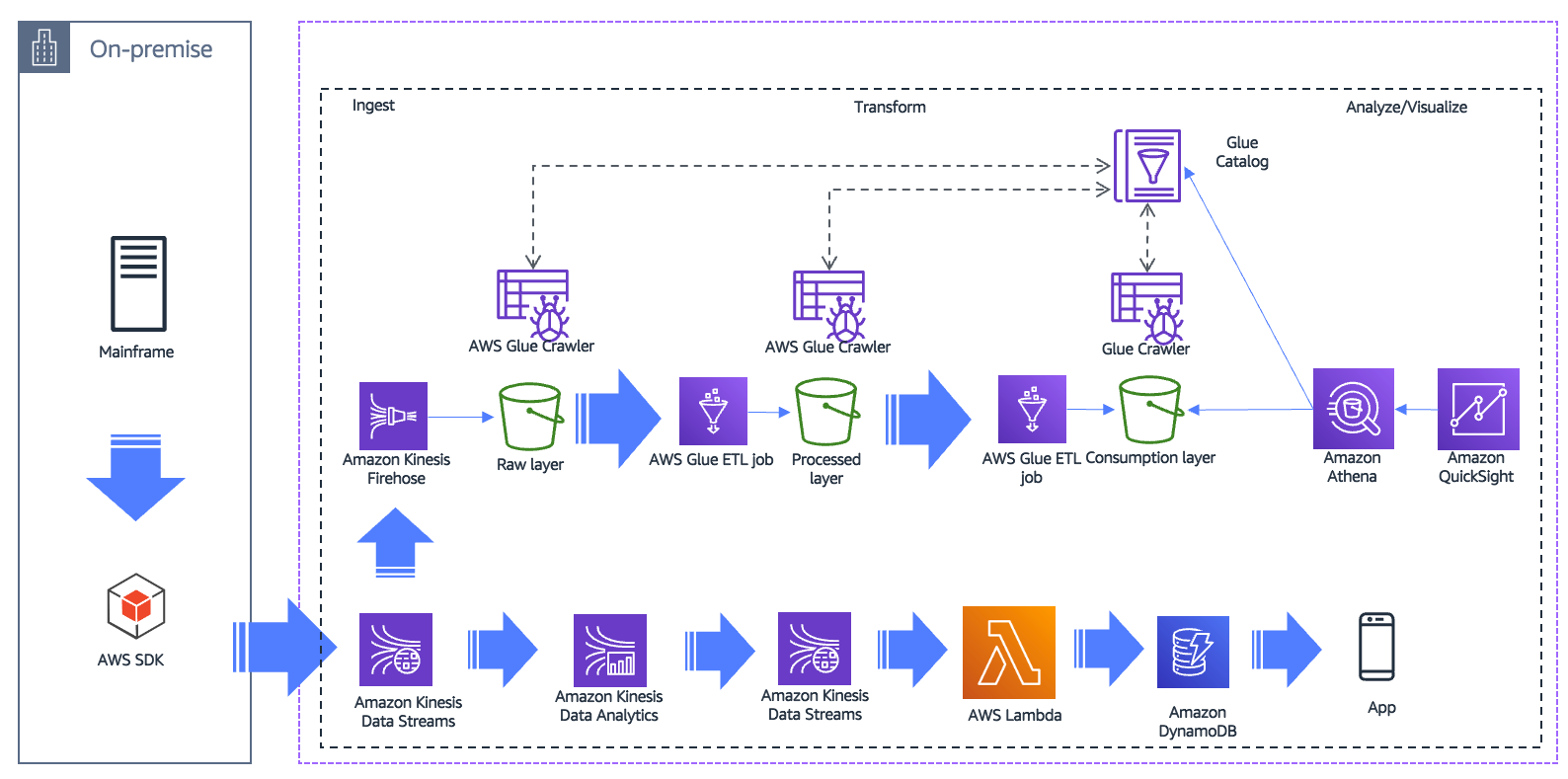
AWS Amazon Managed Streaming Architecture Diagram
- Data Producers: Applications or devices that generate streaming data.
- Data Stream: Managed streaming services like Amazon Kinesis Data Streams or Apache Kafka streams data from producers.
- Data Processing: Real-time processing with Amazon Kinesis Data Analytics or custom applications consuming data from the stream.
- Data Storage: Use Amazon Kinesis Data Firehose to load processed data into storage solutions like S3 or Redshift for further analysis.
- Data Analysis: Analyze and visualize data using AWS services like Amazon QuickSight or Amazon Athena.
Use Cases
- Real-time Analytics: Analyze data as it is generated, such as tracking user activity on a website or monitoring financial transactions.
- Log and Event Data Processing: Collect and process logs and events from applications to detect anomalies or generate alerts.
- Data Integration: Stream data from multiple sources into data lakes or data warehouses for unified analysis and reporting.
- IoT Data Processing: Handle high-throughput data from IoT devices for real-time analytics and monitoring.
Integration with Other AWS Services
AWS Managed Streaming services integrate with various AWS services to provide a comprehensive data processing solution:
- AWS Lambda: Trigger Lambda functions to process streaming data in real-time.
- AWS Glue: Use Glue for ETL (Extract, Transform, Load) operations on data ingested through Kinesis Data Firehose.
- Amazon S3: Store streaming data or processed results in S3 for long-term storage and further analysis.
- Amazon Redshift: Load streaming data into Redshift for analytics and reporting.
- Amazon QuickSight: Visualize and analyze data stored in data lakes or data warehouses.
Things to Remember for the Exam
- Amazon MSK is a managed service for Apache Kafka that simplifies the deployment and operation of Kafka clusters.
- Amazon Kinesis provides real-time data streaming and processing with various components like Data Streams, Data Firehose, and Data Analytics.
- Understand the use cases for each Kinesis component and how they integrate with other AWS services.
- Know how to architect solutions that use managed streaming services for real-time data processing and analytics.
Amazon Pinpoint
AWS Pinpoint
AWS Pinpoint is a marketing communications service that helps businesses send targeted and personalized messages to their customers. It enables you to engage your customers through multiple channels, such as email, SMS, push notifications, and voice messages.
Key Features
- Multi-Channel Communication: Engage customers through email, SMS, push notifications, and voice messages.
- Audience Segmentation: Segment your audience based on customer attributes, behaviors, and preferences to deliver targeted messages.
- Campaign Management: Create, manage, and analyze marketing campaigns from a centralized platform.
- Personalization: Personalize your messages using customer data to increase engagement and conversion rates.
- Analytics and Reporting: Track the performance of your campaigns with detailed analytics and reports.
Architecture Overview
The following diagram illustrates how AWS Pinpoint facilitates customer engagement through multi-channel communication:

AWS Pinpoint Architecture Diagram
- Data Collection: AWS Pinpoint collects customer data from various sources to build detailed customer profiles.
- Segmentation Engine: Segment customers based on attributes and behaviors for targeted messaging.
- Multi-Channel Messaging: Send personalized messages across different channels, such as email, SMS, and push notifications.
- Analytics Dashboard: Monitor campaign performance with real-time analytics and insights.
Use Cases
- Customer Engagement: Use AWS Pinpoint to send targeted messages to engage customers and improve their experience.
- Marketing Campaigns: Launch and manage marketing campaigns to promote products, services, and offers.
- Retention Strategies: Increase customer retention by delivering personalized content and offers based on user behavior.
- Cross-Channel Communication: Engage customers across multiple channels for a seamless and consistent experience.
Integration with Other AWS Services
AWS Pinpoint integrates with several AWS services to provide a comprehensive marketing communications solution:
- AWS Lambda: Trigger custom functions and workflows based on customer events in Pinpoint campaigns.
- Amazon S3: Store and manage customer data, campaign assets, and reports in a scalable storage solution.
- Amazon CloudWatch: Monitor and track the performance of your Pinpoint campaigns with detailed metrics and logs.
- Amazon SNS: Send SMS and push notifications to customers via AWS Pinpoint.
Things to Remember for the Exam
- Understand how AWS Pinpoint can be used for multi-channel customer engagement and marketing campaigns.
- Know the key features, including audience segmentation, personalization, and analytics.
- Familiarize yourself with how AWS Pinpoint integrates with other AWS services like Lambda, S3, and SNS.
- Be aware of the use cases where AWS Pinpoint can improve customer engagement and retention strategies.
Simple Email Service
AWS Simple Email Service (SES)
AWS Simple Email Service (SES) is a cloud-based email sending service designed to help businesses send marketing, notification, and transactional emails. SES provides reliable, scalable, and cost-effective email delivery, with built-in features to improve email deliverability.
Key Features
- Email Sending: Send emails at scale using a reliable and cost-effective platform.
- Deliverability Management: SES offers tools like reputation dashboards, dedicated IPs, and email authentication to improve deliverability.
- Flexible Configuration: Integrate SES with your applications via SMTP or AWS SDKs for customized email delivery.
- Inbound Email: SES can receive and process incoming emails, allowing for automatic responses, email filtering, and storage.
- Compliance and Security: SES supports encryption, authentication, and compliance with industry standards like GDPR and HIPAA.
Architecture Overview
The following diagram illustrates how AWS SES facilitates email sending and deliverability management:

AWS SES Architecture Diagram

AWS SES Architecture Diagram
- Email Sending: Send emails through SMTP or API integration with AWS SES.
- Deliverability Tools: Utilize reputation dashboards, dedicated IP addresses, and feedback loops to enhance email delivery.
- Inbound Email Processing: Receive and process emails, with the ability to store, filter, or respond to incoming messages.
- Monitoring and Analytics: Access detailed metrics on email delivery and open rates to optimize your campaigns.
Use Cases
- Transactional Emails: Send order confirmations, password resets, and other transactional emails with high deliverability.
- Marketing Campaigns: Use SES for large-scale email marketing campaigns with detailed tracking and analytics.
- Automated Responses: Set up automated email responses for incoming emails based on predefined rules.
- Notification Services: Send real-time notifications to customers or internal teams via email.
Integration with Other AWS Services
AWS SES integrates with several AWS services to provide a comprehensive email sending solution:
- AWS Lambda: Trigger custom functions and workflows in response to incoming emails.
- Amazon S3: Store inbound emails or email attachments in Amazon S3 for long-term storage.
- Amazon SNS: Send notifications based on email events like bounces and complaints.
- AWS CloudWatch: Monitor email sending metrics and set up alarms for unusual patterns or issues.
Things to Remember for the Exam
- Understand how AWS SES is used for sending and receiving emails, including key features like deliverability management and inbound email processing.
- Know the integration points with other AWS services such as Lambda, S3, and SNS for extended functionality.
- Be familiar with use cases like transactional emails, marketing campaigns, and automated responses.
- Remember the compliance and security features available in SES, including encryption and authentication mechanisms.
SNS
AWS Simple Notification Service (SNS)
AWS Simple Notification Service (SNS) is a fully managed messaging service that enables you to decouple microservices, distributed systems, and serverless applications. SNS allows you to send messages to large numbers of subscribers, such as mobile devices, email, and other distributed services.
Key Features
- Pub/Sub Messaging: SNS allows you to create topics to which multiple subscribers can receive messages, enabling a publish-subscribe messaging model.
- Multiple Protocols: Supports various protocols, including HTTP/HTTPS, email, SMS, Lambda, and other AWS services.
- Message Filtering: Apply filters to route messages to specific subscribers based on attributes.
- Message Fanout: Send a single message to multiple destinations, such as SQS queues, Lambda functions, or other SNS topics.
- Durability and Scalability: SNS is designed for high availability, durability, and scalability to handle millions of messages per second.
Architecture Overview
The following diagram illustrates how AWS SNS facilitates the distribution of messages across multiple subscribers:
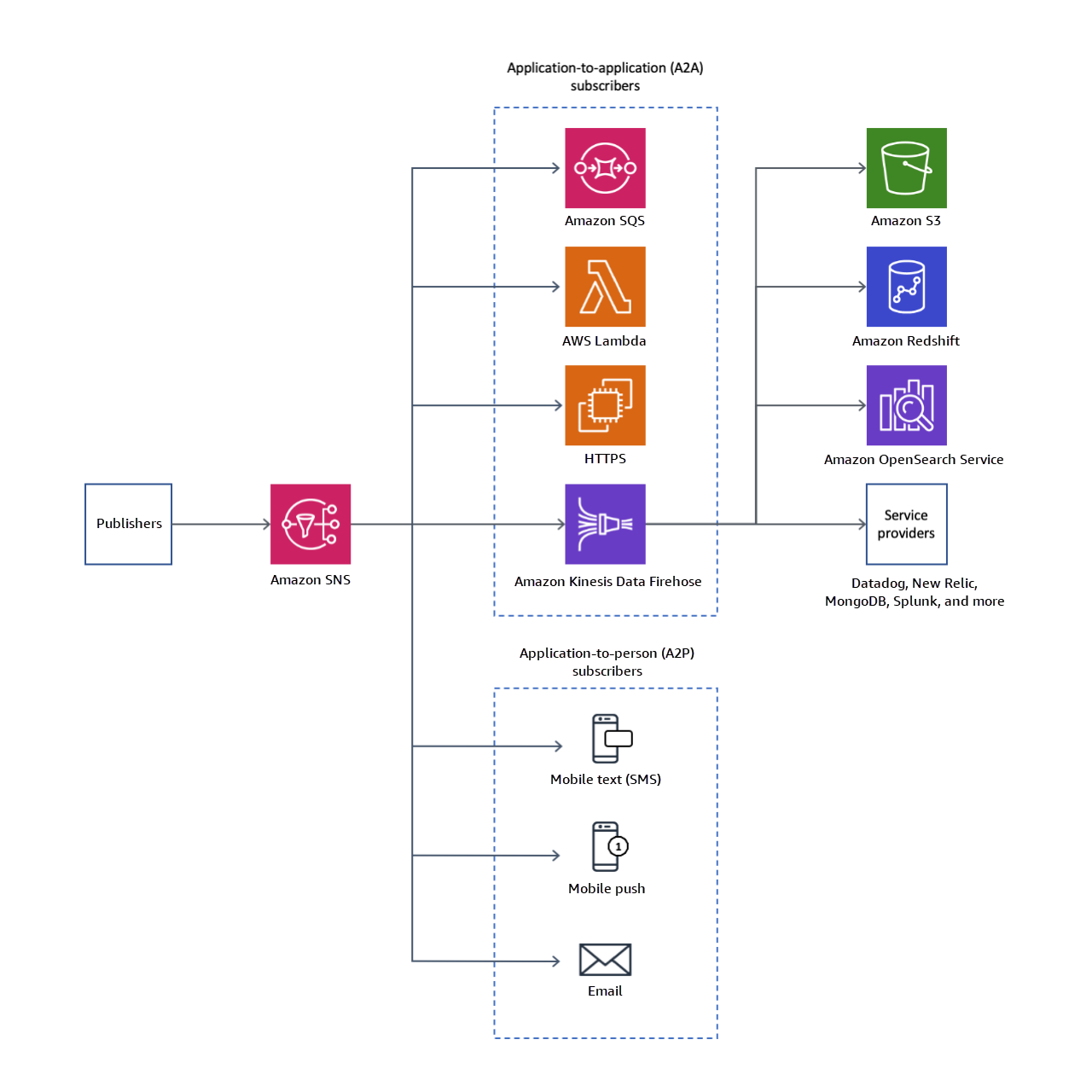
AWS SNS Architecture Diagram
- Publishers: Publishers send messages to an SNS topic, which acts as a communication channel.
- Subscribers: Subscribers, such as SQS queues, Lambda functions, or mobile devices, receive messages from the SNS topic.
- Message Filtering: Filters can be applied to deliver specific messages to specific subscribers based on their attributes.
- Fanout: The same message can be sent to multiple endpoints, ensuring it reaches all intended recipients.
Use Cases
- Application Integration: SNS is ideal for decoupling application components, enabling them to communicate asynchronously.
- Mobile Push Notifications: Send push notifications to mobile devices, using SNS to manage subscriptions and fanout.
- Message Broadcasting: Use SNS to broadcast messages to multiple systems and services simultaneously.
- Event-Driven Architectures: SNS can trigger Lambda functions or notify other AWS services in response to events.
Integration with Other AWS Services
AWS SNS integrates with various AWS services to provide a comprehensive messaging solution:
- AWS Lambda: Automatically trigger Lambda functions in response to messages published to an SNS topic.
- Amazon SQS: Fan out messages to multiple SQS queues to buffer or store messages for processing.
- AWS CloudWatch: Monitor SNS message delivery and set alarms for delivery failures or other issues.
- Amazon Kinesis: Use SNS to distribute data streams to Kinesis for real-time processing and analysis.
Things to Remember for the Exam
- Understand the pub/sub messaging model and how SNS facilitates decoupling of services in an architecture.
- Know the various protocols supported by SNS, including HTTP/HTTPS, email, SMS, and Lambda.
- Be familiar with message filtering and fanout capabilities, allowing messages to be routed or sent to multiple endpoints.
- Remember the integration points with other AWS services like Lambda, SQS, and CloudWatch for building robust event-driven architectures.
SQS
AWS Simple Queue Service (SQS)
AWS Simple Queue Service (SQS) is a fully managed message queuing service that enables you to decouple and scale microservices, distributed systems, and serverless applications. It allows you to queue and process messages asynchronously, improving the reliability and scalability of your applications.
Key Features
- Decoupling: SQS helps in decoupling the components of your application to improve scalability and fault tolerance.
- Message Persistence: Messages are stored in queues until they are processed and deleted, ensuring reliable message delivery.
- Scalability: SQS automatically scales to handle large volumes of messages without requiring manual intervention.
- Visibility Timeout: Provides the ability to prevent multiple consumers from processing the same message by using visibility timeouts.
- Dead-Letter Queues: Allows you to handle failed message processing by routing messages that cannot be processed successfully to a dead-letter queue.
Architecture Overview
The following diagram illustrates the architecture of AWS SQS and how it facilitates message queuing and processing:
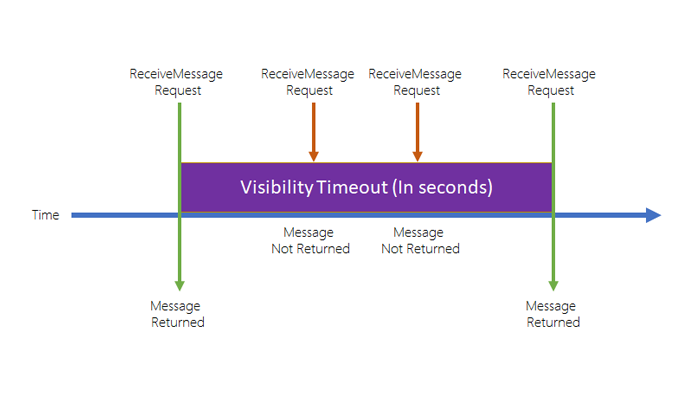
AWS SQS Architecture Diagram

AWS SQS Architecture Diagram
- Producer: Sends messages to an SQS queue.
- SQS Queue: Stores messages until they are retrieved by consumers.
- Consumer: Retrieves and processes messages from the queue.
- Visibility Timeout: Prevents other consumers from processing a message while it is being handled by one consumer.
- Dead-Letter Queue: Stores messages that failed processing after multiple attempts for further analysis and debugging.
Use Cases
- Decoupling Microservices: SQS can be used to decouple microservices, allowing each service to operate independently and handle their own workloads.
- Distributed Systems: Implement asynchronous processing in distributed systems to handle tasks that do not need immediate responses.
- Serverless Architectures: Integrate SQS with AWS Lambda to process messages in a serverless environment.
- Message Buffering: Use SQS to buffer requests between different components of your application to ensure smooth processing and reduce latency.
Integration with Other AWS Services
AWS SQS integrates with various AWS services to provide a comprehensive messaging solution:
- AWS Lambda: Automatically trigger Lambda functions to process messages from SQS queues.
- Amazon SNS: Use SNS to send messages to SQS queues as part of a pub/sub messaging model.
- AWS CloudWatch: Monitor SQS metrics and set up alarms for message processing and queue performance.
- AWS Step Functions: Coordinate and manage the workflow of multiple SQS messages and other AWS services.
Things to Remember for the Exam
- Understand Message Queuing: Know the fundamentals of message queuing, including how messages are sent, stored, and processed in SQS.
- Different Queue Types: Be familiar with the differences between Standard and FIFO queues, including their use cases and limitations.
- Visibility Timeout: Understand how visibility timeouts work and how they prevent message duplication.
- Dead-Letter Queues: Know how to configure and use dead-letter queues to handle failed message processing.
- Integration Scenarios: Be aware of how SQS integrates with other AWS services such as Lambda, SNS, and CloudWatch for building robust applications.
- Scaling and Performance: Understand SQS’s scaling capabilities and how to monitor and manage queue performance using AWS CloudWatch.
- Security: Know about security features such as encryption at rest and in transit, as well as access controls for SQS.
- Cost Management: Be aware of how SQS billing works, including costs associated with message operations and data transfer.
Simple Workflow
AWS Simple Workflow Service (SWF)
AWS Simple Workflow Service (SWF) is a fully managed service that enables you to build and run background tasks in the cloud. It helps developers manage distributed applications and orchestrate tasks across multiple services, ensuring that they are executed reliably and efficiently.
Key Features
- Workflow Orchestration: Coordinate and manage multiple tasks and services as part of a single workflow.
- Task Scheduling: Schedule and execute tasks with retry policies and timeouts.
- Visibility and Monitoring: Track the progress of workflows and tasks through detailed visibility and monitoring tools.
- State Management: Maintain the state of your workflows across distributed services, ensuring consistency and reliability.
- Integration with AWS Services: Seamlessly integrate with other AWS services like Amazon S3, Amazon EC2, and Amazon DynamoDB.
Architecture Overview
The following diagram illustrates the architecture of AWS SWF and its components:
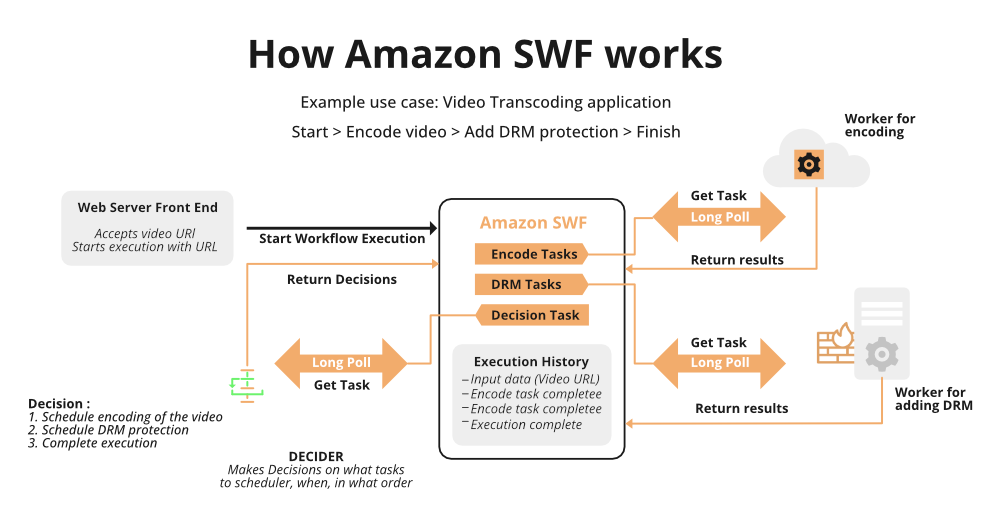
AWS SWF Architecture Diagram
- Workflow Execution: Initiates and manages the execution of workflows.
- Activity Tasks: Perform the actual work defined in the workflow.
- Decision Tasks: Make decisions and schedule activities based on the workflow logic.
- Workflow State: Keeps track of the workflow state, including task progress and results.
Use Cases
- Long-Running Workflows: Handle tasks that require long execution times, such as processing large batches of data or running complex calculations.
- Task Orchestration: Coordinate tasks across multiple services, ensuring that they are executed in the correct order and with the appropriate retry policies.
- Distributed Application Management: Manage the lifecycle and state of distributed applications, including handling failures and retries.
- Business Process Automation: Automate and manage business processes, including approvals, notifications, and data processing.
Integration with Other AWS Services
AWS SWF integrates with several AWS services to provide a comprehensive workflow management solution:
- Amazon S3: Store and retrieve data used in workflow tasks.
- Amazon EC2: Perform computational tasks as part of a workflow.
- Amazon DynamoDB: Store and manage state information and results from workflow tasks.
- AWS Lambda: Run lightweight, serverless functions as part of a workflow.
Things to Remember for the Exam
- Understand Workflow States: Know how AWS SWF manages workflow states and transitions between states.
- Task Management: Be familiar with how tasks are scheduled, executed, and retried.
- Integration Points: Understand how AWS SWF integrates with other AWS services and how to use these integrations effectively.
- Monitoring and Visibility: Be aware of the tools and metrics available for monitoring workflows and tasks.
- Use Cases: Be able to identify and describe common use cases for AWS SWF, including long-running workflows and task orchestration.
8. Networking
AWS Global Accelerator
AWS Global Accelerator
AWS Global Accelerator is a service that improves the availability and performance of your applications with global users. It provides two global static IP addresses that act as a fixed entry point to your application endpoints in AWS, helping you optimize routing and enhance the performance of your network traffic.
Key Features
- Global Static IPs: Provides two static IP addresses that act as a fixed entry point to your applications, making it easier to manage and route traffic.
- Improved Performance: Optimizes the path to your applications by routing traffic through the AWS global network, reducing latency and improving performance.
- Health Checks and Failover: Monitors the health of your endpoints and automatically routes traffic away from unhealthy endpoints to healthy ones.
- Traffic Dialing: Allows you to control the percentage of traffic routed to different endpoints, providing flexibility in traffic management.
- Integration with AWS Services: Works seamlessly with AWS services such as Amazon EC2, Elastic Load Balancing, and Amazon S3.
Architecture Overview
The following diagram illustrates how AWS Global Accelerator improves application performance and availability:
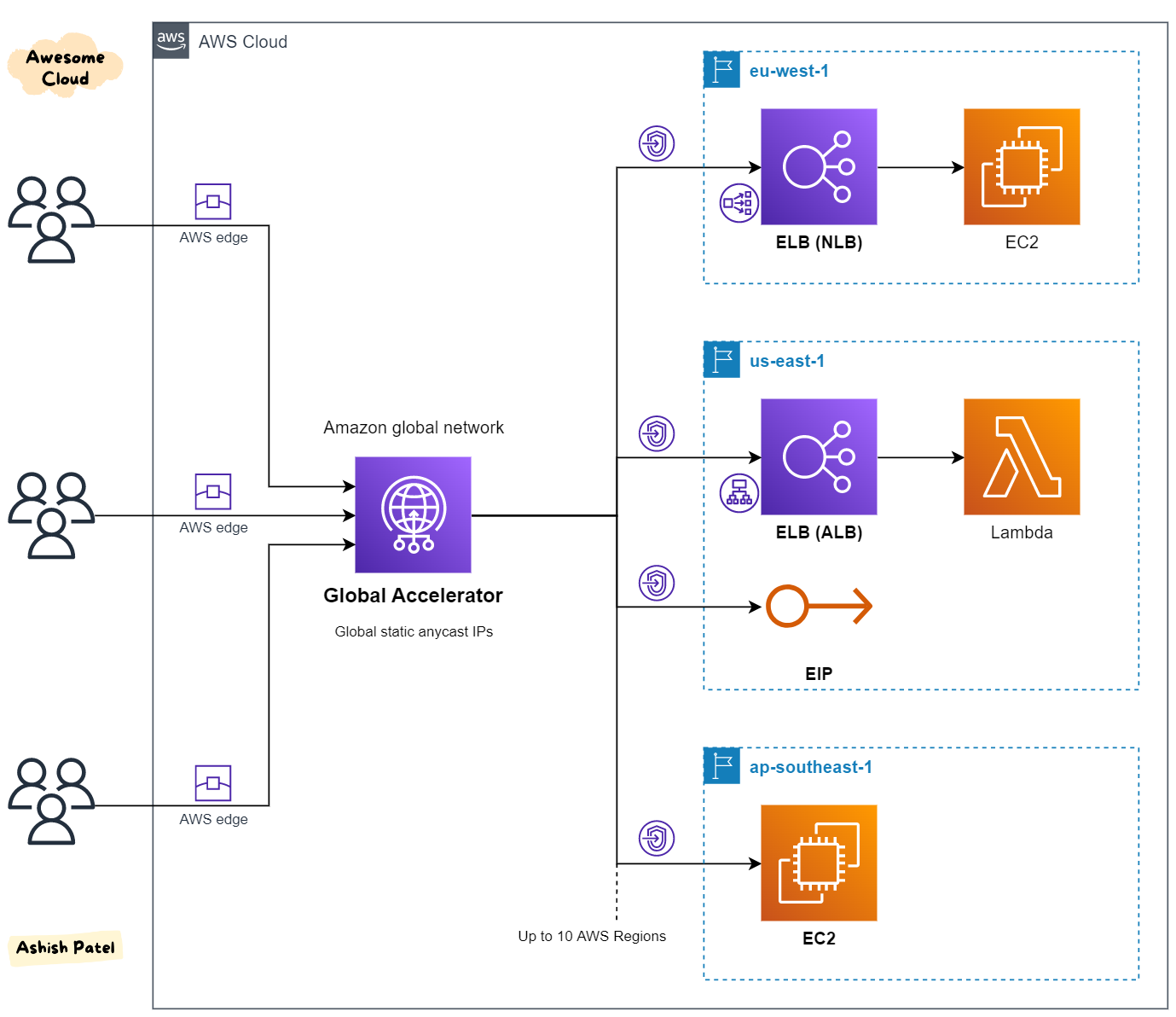
AWS Global Accelerator Architecture Diagram
- Global Static IPs: Provides a fixed entry point to your application.
- Global Network: Routes traffic through the AWS global network to optimize performance.
- Endpoint Monitoring: Monitors the health of your application endpoints.
- Traffic Management: Routes traffic to the best performing endpoints based on health checks and routing policies.
Use Cases
- Global Applications: Improve the performance and availability of applications with global users.
- Disaster Recovery: Ensure high availability and failover capabilities by automatically rerouting traffic to healthy endpoints.
- Traffic Management: Control the distribution of traffic across multiple endpoints to manage load and optimize performance.
- Content Delivery: Enhance the performance of content delivery applications by routing traffic through the AWS global network.
Integration with Other AWS Services
AWS Global Accelerator integrates with several AWS services to provide a comprehensive solution for improving application performance and availability:
- Amazon EC2: Route traffic to EC2 instances across multiple regions.
- Elastic Load Balancing (ELB): Distribute traffic to multiple load balancers for improved performance and availability.
- Amazon S3: Improve the performance of content delivery for S3-hosted content.
- AWS Lambda: Route traffic to Lambda functions for serverless application deployments.
Things to Remember for the Exam
- Understand Static IP Addresses: Know how AWS Global Accelerator uses static IP addresses to provide a fixed entry point for applications.
- Performance Optimization: Be familiar with how AWS Global Accelerator optimizes network routing to improve application performance.
- Health Checks and Failover: Understand how the service monitors the health of endpoints and performs automatic failover.
- Traffic Management: Know how to use traffic dialing to manage the distribution of traffic across endpoints.
- Integration Points: Be aware of how AWS Global Accelerator integrates with other AWS services for a comprehensive solution.
NAT
AWS NAT Gateway
AWS NAT (Network Address Translation) Gateway enables instances in a private subnet to connect to the internet or other AWS services while preventing the internet from initiating connections to those instances. NAT Gateway is a managed service that ensures high availability and scalability for network address translation.
Key Features
- High Availability: NAT Gateway is a fully managed service that automatically scales up to accommodate your traffic, ensuring high availability and fault tolerance.
- Managed Service: AWS manages the underlying infrastructure, so there is no need to worry about patching or scaling.
- Supports IPv4: NAT Gateway supports IPv4 for outbound internet access from instances in a private subnet.
- Elastic IP Integration: NAT Gateway uses an Elastic IP address, which serves as the public IP for outbound traffic from instances in a private subnet.
- Automatic Scaling: NAT Gateway automatically scales up to handle traffic as your network grows.
Architecture Overview
The following diagram illustrates how AWS NAT Gateway enables outbound internet access for instances in a private subnet:
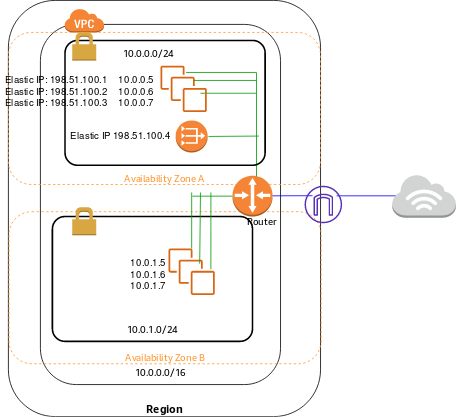
AWS NAT Gateway Architecture Diagram
- Private Subnet: Instances in the private subnet use the NAT Gateway for outbound internet access.
- Public Subnet: The NAT Gateway is placed in a public subnet with an associated Elastic IP.
- Internet Gateway: Traffic from the NAT Gateway goes through the Internet Gateway to reach the internet.
Use Cases
- Private Subnet Internet Access: Allow instances in a private subnet to access the internet or other AWS services without exposing them directly to the internet.
- Secure Applications: Ensure that your instances in private subnets are not directly accessible from the internet, adding an additional layer of security.
- Data Fetching: Use NAT Gateway to allow instances to fetch updates, patches, or data from the internet without exposing them.
Integration with Other AWS Services
AWS NAT Gateway integrates with several AWS services to provide a secure and scalable network architecture:
- Amazon VPC: NAT Gateway is a key component in creating secure and scalable network architectures within Amazon VPC.
- Internet Gateway: Works with Internet Gateway to provide outbound internet access while keeping inbound connections restricted.
- Elastic IP: Integrates with Elastic IP for consistent public IP address for outbound traffic.
- Security Groups: Can be used alongside Security Groups to manage traffic rules for instances using the NAT Gateway.
Things to Remember for the Exam
- Placement: Understand that the NAT Gateway must be placed in a public subnet with an Elastic IP attached.
- Subnet Routing: Know that instances in a private subnet must have a route to the NAT Gateway in their route table to access the internet.
- IPv4 Support: Remember that NAT Gateway supports only IPv4 traffic for outbound internet access.
- Security Considerations: Be aware that NAT Gateway only allows outbound traffic, ensuring that instances remain inaccessible from the internet.
- Pricing: Understand that NAT Gateway is charged based on usage, including data processed and hourly usage.
Route 53
AWS Route 53
AWS Route 53 is a scalable and highly available Domain Name System (DNS) web service. It is designed to route end-user requests to the appropriate resources within AWS or to an external location, ensuring reliable connections to applications and services.
Key Features
- Domain Registration: AWS Route 53 allows you to register domain names directly, providing a one-stop solution for DNS and domain management.
- DNS Management: Route 53 supports a variety of routing policies such as Simple, Weighted, Latency-based, Failover, Geolocation, and Multi-value Answer Routing.
- Health Checks: Integrated health checks monitor the health of your endpoints, automatically redirecting traffic to healthy instances.
- DNS Failover: Ensure high availability by configuring Route 53 to automatically route traffic to an alternative resource if the primary endpoint fails.
- Traffic Flow: Easily manage and visualize routing rules across multiple AWS regions with a drag-and-drop visual editor.
- Global Low Latency: Route 53 leverages a global network of DNS servers to provide low latency and high availability for DNS queries.
Architecture Overview
The following diagram illustrates how AWS Route 53 routes traffic to the appropriate AWS resources or external endpoints:

AWS Route 53 Architecture Diagram
- DNS Query: Users make DNS queries to Route 53, which resolves the queries and directs them to the correct resources.
- Routing Policies: Depending on the routing policy, Route 53 directs traffic based on criteria like latency, geographical location, or health checks.
- Health Checks: Route 53 continuously monitors the health of endpoints and reroutes traffic in case of failure.
Use Cases
- Global Applications: Use Route 53 to route traffic based on the location of the end-user, ensuring low latency and improved performance.
- Failover Routing: Implement failover routing to maintain high availability for your applications by redirecting traffic to backup instances in case of failure.
- Domain Registration and Management: Manage DNS settings and domain registrations in a single place using Route 53’s integrated domain registration feature.
- Multi-region Deployment: Route traffic between multiple AWS regions, ensuring redundancy and low latency for global applications.
Integration with Other AWS Services
AWS Route 53 integrates seamlessly with a variety of AWS services to enhance your cloud infrastructure:
- AWS Elastic Load Balancing (ELB): Route 53 can route traffic to ELB, distributing incoming traffic across multiple targets, ensuring fault tolerance and scalability.
- AWS CloudFront: Route 53 can work with CloudFront to deliver content with low latency by routing traffic to the nearest edge location.
- AWS Lambda: Use Route 53 in combination with AWS Lambda to trigger functions in response to DNS queries.
- AWS CloudWatch: Monitor DNS queries and health check statuses using CloudWatch to gain insights into your DNS traffic and endpoint health.
Things to Remember for the Exam
- Routing Policies: Understand the different routing policies (Simple, Weighted, Latency-based, Failover, Geolocation, Multi-value Answer) and their use cases.
- Health Checks: Know how Route 53 health checks work and how they can be used to trigger DNS failover.
- Domain Registration: Remember that Route 53 allows domain registration and provides an integrated solution for managing DNS records.
- DNS Failover: Be familiar with how to set up DNS failover to ensure high availability for your applications.
- Integration: Understand how Route 53 integrates with other AWS services like CloudFront, ELB, and Lambda to enhance performance and reliability.
VPC
AWS Virtual Private Cloud (VPC)
AWS Virtual Private Cloud (VPC) enables you to provision a logically isolated section of the AWS cloud where you can launch AWS resources in a virtual network that you define. VPC allows complete control over your virtual networking environment, including resource placement, connectivity, and security.
Key Features
- Subnets: VPCs can be divided into public and private subnets. Public subnets allow access to the internet, while private subnets do not.
- Route Tables: Control where network traffic is directed within your VPC. Each subnet must be associated with a route table.
- Internet Gateway (IGW): Attach an IGW to a VPC to allow communication between instances in the VPC and the internet.
- Network Access Control Lists (NACLs): Provide stateless traffic filtering for subnets within your VPC.
- Security Groups: Provide stateful filtering of inbound and outbound traffic at the instance level.
- VPN Gateway: Establish secure connections between your on-premises network and your AWS VPC using a VPN connection.
Architecture Overview
The following diagram illustrates how AWS VPC components work together to provide a secure and scalable virtual network:
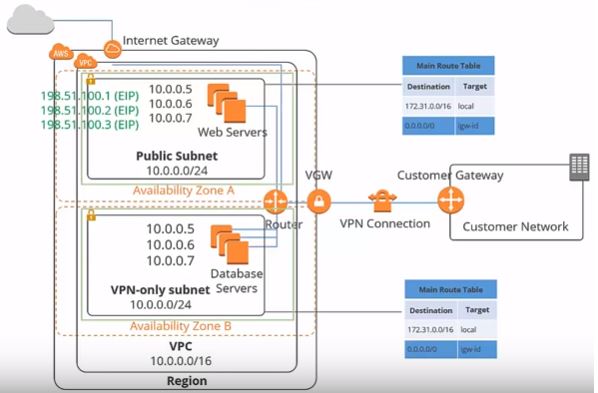
AWS VPC Architecture Diagram
- VPC: The main container for your subnets, route tables, security groups, and more.
- Subnets: Divide your VPC into smaller sections, each containing resources like EC2 instances.
- Route Tables: Determine how traffic is directed between subnets and to external networks.
- IGW: Enables communication between your VPC and the internet.
- NAT Gateway: Allows instances in a private subnet to access the internet without exposing them to incoming traffic from the internet.
Use Cases
- Secure Application Hosting: Host web applications in a public subnet and databases in a private subnet, ensuring separation of public and internal-facing resources.
- Hybrid Cloud Architectures: Extend your on-premises network into the cloud by creating a secure VPN connection to your VPC.
- Multi-Tier Applications: Implement multiple layers of security by placing different application components in separate subnets.
- Isolated Environments: Create multiple VPCs to isolate different environments such as development, staging, and production.
Integration with Other AWS Services
AWS VPC integrates with various AWS services to enhance security, scalability, and functionality:
- AWS EC2: Deploy instances in your VPC, associating them with specific subnets and security groups.
- AWS Lambda: Run serverless applications within your VPC, controlling access to VPC resources.
- AWS RDS: Deploy databases in a private subnet for enhanced security and control.
- AWS Direct Connect: Establish a dedicated network connection between your on-premises environment and your VPC for low-latency, high-throughput connectivity.
Things to Remember for the Exam
- Subnet Types: Understand the difference between public and private subnets and when to use each.
- Security Groups vs. NACLs: Know that security groups are stateful and operate at the instance level, while NACLs are stateless and operate at the subnet level.
- VPC Peering: Remember that VPC Peering connections allow resources in different VPCs to communicate as if they are within the same network.
- VPN Gateway: Understand how to set up a VPN connection to connect your on-premises network to your VPC securely.
- NAT Gateway vs. Bastion Host: Know the differences between NAT Gateways for outbound internet access from private subnets and Bastion Hosts for secure SSH access to instances in private subnets.
9. Scalability
API Gateway
AWS API Gateway
AWS API Gateway is a fully managed service that allows developers to create, publish, maintain, monitor, and secure APIs at any scale. It enables you to create RESTful APIs and WebSocket APIs that are essential for building serverless applications, microservices, and integrating with external systems.
Key Features
- API Creation: Easily create RESTful APIs or WebSocket APIs that can be integrated with AWS Lambda, EC2, or other AWS services.
- Security: Secure your APIs with AWS Identity and Access Management (IAM), API keys, or custom authorizers, and enable DDoS protection using AWS Shield.
- Monitoring & Analytics: Monitor API activity using Amazon CloudWatch, enabling you to track metrics like latency, error rates, and request counts.
- API Lifecycle Management: Manage multiple API versions, stages (e.g., development, testing, production), and deploy updates with zero downtime.
- Throttling & Quotas: Control API usage by setting request throttling and quotas to prevent abuse and manage API traffic effectively.
- Caching: Improve API performance by enabling response caching, reducing the need for back-end processing for frequently accessed resources.
Architecture Overview
The following diagram illustrates how AWS API Gateway integrates with other AWS services to provide a robust API management solution:

AWS API Gateway Architecture Diagram
- Client: Users or applications that make API requests.
- API Gateway: Acts as the "front door" for your APIs, handling requests, processing them, and routing them to the appropriate back-end services.
- AWS Lambda: A serverless compute service that can be triggered by API Gateway to process requests and return responses.
- Amazon CloudWatch: Monitors API activity and logs metrics such as latency, error rates, and request counts.
- Amazon S3: Store static content or files that can be accessed via the API Gateway.
Use Cases
- Serverless Applications: Build fully serverless applications by integrating API Gateway with AWS Lambda for backend processing.
- Microservices Architectures: Create APIs that serve as the interface between different microservices, allowing them to communicate and work together.
- WebSocket APIs: Use WebSocket APIs for real-time communication, such as chat applications, live data feeds, or interactive dashboards.
- API Monetization: Create and manage a marketplace for your APIs, controlling access and monetizing usage.
- Mobile Backend: Build APIs that serve as the backend for mobile applications, handling data storage, user authentication, and more.
Integration with Other AWS Services
AWS API Gateway integrates with several AWS services to provide a comprehensive API management solution:
- AWS Lambda: Run code in response to API requests without provisioning or managing servers.
- Amazon S3: Serve static content directly from S3 using API Gateway.
- AWS CloudFront: Distribute your API globally using CloudFront for low latency and high availability.
- AWS WAF: Protect your APIs from common web exploits by integrating AWS Web Application Firewall (WAF) with API Gateway.
- AWS Cognito: Secure your APIs with user authentication and authorization through AWS Cognito.
Things to Remember for the Exam
- Integration Types: Understand the different integration types (Lambda Proxy, HTTP Proxy, AWS Service) and when to use them.
- Security Mechanisms: Be familiar with securing APIs using IAM, API keys, and custom authorizers (e.g., Lambda Authorizers).
- Throttling & Quotas: Remember how to set request throttling and usage quotas to manage API traffic and prevent abuse.
- Monitoring & Logging: Know how to monitor API performance and activity using CloudWatch metrics and logs.
- Stages & Deployments: Understand how to manage different API stages and deploy new versions of your API without downtime.
ASG (Auto Scaling Groups)
AWS Auto Scaling Groups (ASG)
AWS Auto Scaling Groups (ASG) enable you to automatically scale your Amazon EC2 instances in response to demand. ASG helps you maintain the right number of EC2 instances to handle the load for your application, scaling up or down based on the defined conditions or schedules.
Key Features
- Automatic Scaling: ASG automatically adjusts the number of EC2 instances based on demand, scaling out when demand increases and scaling in when demand decreases.
- Health Checks: ASG performs health checks on instances, automatically replacing any unhealthy instances to maintain availability.
- Scaling Policies: Define scaling policies that dictate how and when ASG should scale, based on metrics like CPU utilization, memory usage, or custom CloudWatch metrics.
- Scheduled Scaling: Schedule scaling actions to automatically scale instances at specific times, such as increasing capacity during peak hours and reducing it during off-peak hours.
- Elastic Load Balancing (ELB) Integration: ASG works seamlessly with ELB, ensuring that traffic is evenly distributed across all healthy instances in the group.
- Multi-AZ Deployment: Distribute your instances across multiple Availability Zones (AZs) for increased redundancy and fault tolerance.
Architecture Overview
The following diagram illustrates how AWS Auto Scaling Groups interact with other AWS services to automatically manage your application's scaling needs:
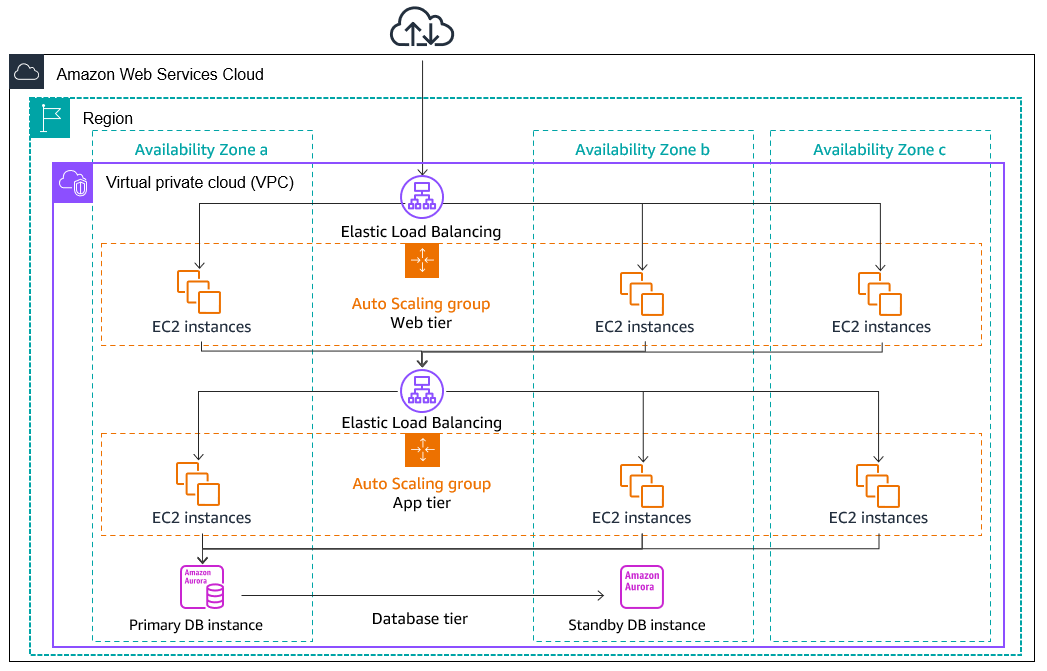
AWS Auto Scaling Groups Architecture Diagram
- Launch Configuration/Template: Define the AMI, instance type, security groups, and key pairs for instances in the ASG.
- Auto Scaling Group: The group of EC2 instances that are managed by ASG, automatically scaling in or out based on demand.
- Scaling Policies: Define the rules for scaling actions, such as when to add or remove instances based on CloudWatch metrics.
- Health Checks: Regular checks to ensure instances are healthy, with automatic replacement of unhealthy instances.
- Elastic Load Balancer (ELB): Distributes incoming traffic across the healthy instances in the ASG.
Use Cases
- Dynamic Workloads: Automatically scale your instances in response to fluctuating demand, ensuring your application remains responsive during traffic spikes and cost-efficient during low demand.
- Fault Tolerance: Increase fault tolerance by distributing instances across multiple Availability Zones, with automatic recovery of unhealthy instances.
- Cost Optimization: Schedule scaling actions to reduce the number of running instances during off-peak hours, minimizing costs while maintaining availability.
- DevOps Automation: Integrate ASG with CI/CD pipelines to automatically scale infrastructure based on deployment needs and testing environments.
Integration with Other AWS Services
AWS Auto Scaling Groups integrate with several AWS services to provide a robust scaling solution:
- Amazon CloudWatch: Monitor application metrics and trigger scaling actions based on predefined thresholds or custom metrics.
- Elastic Load Balancing (ELB): Automatically distribute traffic across healthy instances in the ASG, ensuring high availability and fault tolerance.
- AWS CloudFormation: Use CloudFormation templates to define and manage your ASG, along with the rest of your infrastructure as code.
- AWS Systems Manager: Automate management tasks, such as applying patches or running scripts on instances within your ASG.
- AWS Lambda: Trigger scaling actions or perform custom automation based on events or specific conditions.
Things to Remember for the Exam
- Launch Configurations vs. Launch Templates: Understand the differences and when to use each for defining the configuration of your instances.
- Scaling Policies: Know the different types of scaling policies (Target Tracking, Step Scaling, Simple Scaling) and when to apply them.
- Health Checks: Be aware of how ASG performs health checks and the options for replacing unhealthy instances automatically.
- Multi-AZ Deployments: Ensure you understand the benefits of deploying ASG across multiple Availability Zones for high availability.
- Elastic Load Balancer Integration: Remember how ASG integrates with ELB to balance traffic across healthy instances and how to configure this setup.
ELB (Elastic Load Balancer)
AWS Elastic Load Balancer (ELB)
AWS Elastic Load Balancer (ELB) automatically distributes incoming application traffic across multiple targets, such as EC2 instances, containers, and IP addresses. ELB helps ensure application availability and fault tolerance by spreading traffic evenly across multiple resources.
Key Features
- Load Balancing Across Multiple Targets: ELB distributes traffic across multiple targets in one or more Availability Zones, ensuring application scalability and fault tolerance.
- Supports Multiple Protocols: ELB supports HTTP, HTTPS, TCP, and UDP protocols, making it suitable for a wide range of applications.
- Three Types of Load Balancers: ELB offers three types of load balancers: Application Load Balancer (ALB), Network Load Balancer (NLB), and Gateway Load Balancer (GLB), each optimized for different use cases.
- Automatic Scaling: ELB scales its capacity to handle the traffic load as your application demand increases or decreases, without manual intervention.
- Health Checks: ELB continuously monitors the health of the registered targets and routes traffic only to healthy instances.
- Integration with AWS Services: ELB integrates seamlessly with other AWS services like Auto Scaling, Route 53, CloudWatch, and more, providing a comprehensive solution for scaling and monitoring applications.
Types of Elastic Load Balancers
- Application Load Balancer (ALB): Operates at the application layer (Layer 7) and is ideal for web applications. ALB supports advanced request routing, SSL termination, and integrates with AWS WAF for security.
- Network Load Balancer (NLB): Operates at the transport layer (Layer 4) and is designed for applications that require ultra-low latency and high throughput. NLB supports static IP addresses and can handle millions of requests per second.
- Gateway Load Balancer (GLB): Operates at Layer 3 and Layer 4 and is used for deploying and managing virtual appliances. GLB simplifies the integration of third-party virtual appliances into your network.
Architecture Overview
The following diagram illustrates how AWS Elastic Load Balancer distributes traffic across multiple targets:
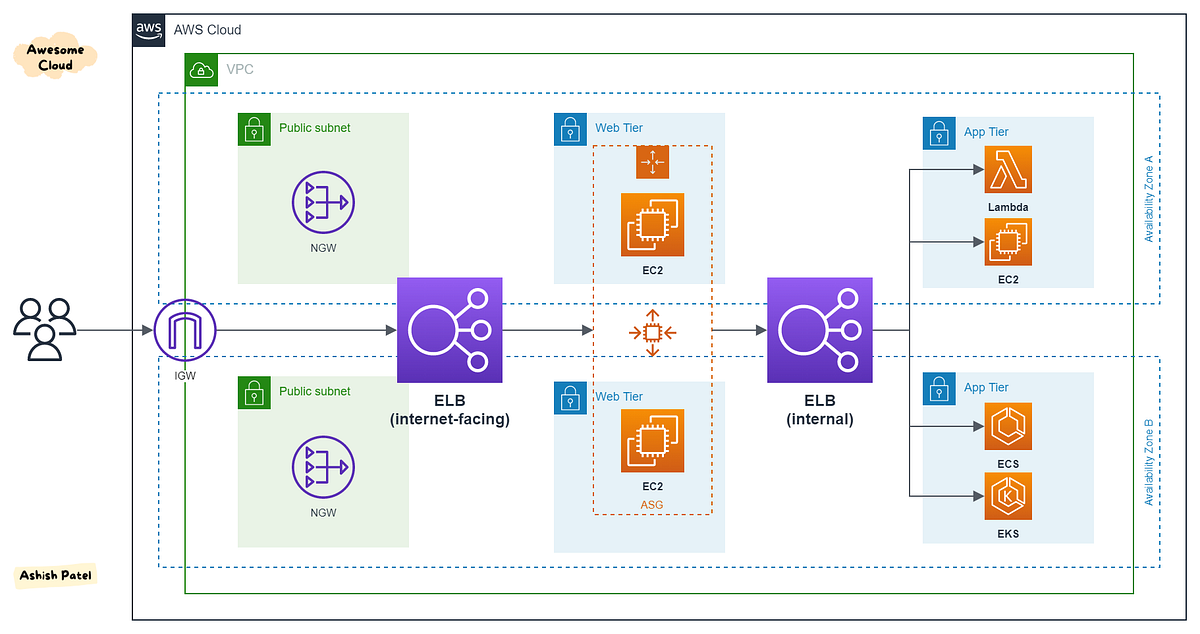
AWS Elastic Load Balancer Architecture Diagram
- Clients: End-users or applications that send requests to your application.
- Elastic Load Balancer: The ELB distributes incoming traffic across registered targets (e.g., EC2 instances) in one or more Availability Zones.
- Registered Targets: The EC2 instances, containers, or IP addresses that are registered with the ELB to receive traffic.
- Auto Scaling Groups: Automatically adjusts the number of registered targets based on demand.
- Availability Zones: ELB distributes traffic across multiple Availability Zones to increase fault tolerance and reduce latency.
Use Cases
- High Availability: Improve the availability of your application by distributing traffic across multiple targets and Availability Zones.
- Scalability: Automatically scale your application to handle traffic spikes by adding or removing targets based on demand.
- Load Distribution: Evenly distribute traffic across multiple instances or containers to optimize resource utilization and reduce latency.
- Security: Use SSL termination on the ELB to offload SSL processing from your application servers, and integrate with AWS WAF to protect against common web exploits.
Integration with Other AWS Services
AWS Elastic Load Balancer integrates with several AWS services to provide a comprehensive solution:
- AWS Auto Scaling: Automatically scale the number of instances or containers in response to traffic demand.
- Amazon Route 53: Use Route 53 to direct traffic to your ELB using DNS-based load balancing.
- AWS CloudWatch: Monitor ELB performance and health metrics, and set alarms for automatic response to changes in traffic patterns.
- AWS Certificate Manager (ACM): Manage SSL/TLS certificates for your ELB, simplifying the process of securing your application.
- AWS WAF: Protect your application from common web exploits by integrating AWS WAF with your ALB.
Things to Remember for the Exam
- Types of Load Balancers: Be familiar with the differences between ALB, NLB, and GLB, and understand their use cases.
- Health Checks: Understand how ELB performs health checks and how it routes traffic only to healthy targets.
- Cross-Zone Load Balancing: Know how cross-zone load balancing works and when to enable it.
- SSL Termination: Remember that ALB and NLB support SSL termination, offloading SSL processing from your application servers.
- Sticky Sessions: Understand how sticky sessions (session affinity) work with ALB and NLB to maintain user session state.
- Pricing: Be aware of ELB pricing models, including per-hour and per-GB data processed charges.
Step Functions
AWS Step Functions
AWS Step Functions is a fully managed service that enables you to coordinate components of distributed applications and microservices using visual workflows. It allows you to build applications by stitching together AWS services and custom code into automated workflows.
Key Features
- Visual Workflow: Step Functions provides a graphical console that helps visualize the sequence of steps in your application, making it easy to build and understand complex workflows.
- State Machines: Step Functions uses state machines to define the flow of your application. Each state in the machine represents a step in your workflow, such as a task, choice, wait, or fail state.
- Integration with AWS Services: Seamlessly integrates with a variety of AWS services such as Lambda, ECS, Fargate, SNS, SQS, DynamoDB, and more.
- Automatic Error Handling: Step Functions includes built-in error handling, retry logic, and the ability to catch and handle exceptions, ensuring your application is resilient to failures.
- Parallel Execution: Supports parallel execution of tasks, enabling the processing of multiple tasks simultaneously for faster execution.
- Event-Driven Workflows: Allows workflows to be triggered by events from other AWS services, making it ideal for event-driven architectures.
Common Use Cases
- Microservices Orchestration: Step Functions can coordinate microservices in a distributed architecture, ensuring that each service performs its task in the correct order.
- Data Processing Pipelines: Useful for building data processing workflows that involve multiple steps such as data extraction, transformation, and loading (ETL).
- Batch Processing: Automate and manage batch processing jobs that require the coordination of multiple AWS services.
- Machine Learning Workflows: Orchestrate machine learning workflows, such as training, validating, and deploying models with different AWS services.
- Order Fulfillment: Manage complex order processing workflows, ensuring that all necessary steps are completed before moving to the next phase.
Architecture Overview
The following diagram illustrates how AWS Step Functions orchestrates tasks in a distributed application:

AWS Step Functions Architecture Diagram
- State Machine: A state machine is the central component of Step Functions that defines the workflow logic and the sequence of steps.
- Tasks: Individual units of work in a state machine that perform a specific operation, such as invoking a Lambda function or calling an API.
- Transitions: Define how the state machine moves from one state to another based on the output of the current state.
- Parallel Execution: Allows the state machine to execute multiple tasks concurrently, improving the efficiency of the workflow.
- Choice State: Provides conditional branching in the state machine, enabling different execution paths based on conditions.
Integration with Other AWS Services
AWS Step Functions integrates with several AWS services, making it a powerful tool for building complex workflows:
- AWS Lambda: Invoke Lambda functions to execute code without provisioning or managing servers.
- Amazon ECS/Fargate: Run containerized tasks as part of your workflow using Amazon ECS or Fargate.
- Amazon SNS/SQS: Send notifications or messages between distributed components using SNS or SQS.
- AWS Batch: Manage batch processing jobs as part of your state machine workflow.
- AWS Glue: Orchestrate ETL jobs using AWS Glue as part of a data processing pipeline.
- Amazon DynamoDB: Store and retrieve application state data using DynamoDB.
Things to Remember for the Exam
- State Machines: Understand the components of a state machine, including tasks, transitions, and choice states.
- Integration with AWS Services: Be familiar with how Step Functions integrates with other AWS services like Lambda, ECS, SQS, SNS, and DynamoDB.
- Error Handling: Remember that Step Functions includes built-in retry mechanisms and can catch and handle errors within workflows.
- Execution History: Understand how to view and interpret the execution history of state machines for troubleshooting and monitoring purposes.
- Parallel Execution: Know how to configure parallel execution in Step Functions to improve workflow efficiency.
- Pricing: Be aware of Step Functions pricing, which is based on the number of state transitions in your workflows.
10. Security
AWS Certificate Manager
AWS Certificate Manager (ACM)
AWS Certificate Manager (ACM) is a service that lets you easily provision, manage, and deploy Secure Sockets Layer/Transport Layer Security (SSL/TLS) certificates for use with AWS services and your internal connected resources. With ACM, you can quickly request a certificate, deploy it on AWS resources, and let ACM handle the renewal process.
Key Features
- SSL/TLS Certificates: ACM allows you to create, deploy, and manage SSL/TLS certificates for securing your websites and applications.
- Automated Renewal: ACM automatically renews your SSL/TLS certificates, reducing the risk of outages due to expired certificates.
- Integration with AWS Services: Seamlessly integrates with services such as Amazon CloudFront, Elastic Load Balancing, and API Gateway to deploy certificates.
- Private Certificate Authority: ACM provides a managed private CA service for issuing certificates for internal applications without needing to manage the CA infrastructure.
- Free Public Certificates: ACM provides free SSL/TLS certificates for use with supported AWS services.
- Wildcard Certificates: Issue a single certificate that can be used for multiple subdomains, simplifying certificate management.
Common Use Cases
- Securing Web Applications: Use ACM to secure your websites and applications hosted on AWS with SSL/TLS certificates.
- Securing API Endpoints: Protect your API endpoints on Amazon API Gateway with SSL/TLS certificates provided by ACM.
- Private Certificates: Issue and manage private certificates for internal services without needing to manage your own certificate authority.
- Domain Validation: Use ACM to perform domain validation for SSL/TLS certificates, ensuring the ownership of the domain.
- Certificate Lifecycle Management: Automate the issuance, renewal, and deployment of certificates, reducing manual management efforts.
Architecture Overview
The following diagram illustrates how AWS Certificate Manager integrates with other AWS services to manage SSL/TLS certificates:

AWS Certificate Manager Architecture Diagram
- Request Certificate: ACM allows you to request a certificate for your domain or subdomains.
- Validation: ACM performs domain validation through DNS or email to verify domain ownership.
- Deployment: Certificates can be deployed on services like Elastic Load Balancing, CloudFront, and API Gateway.
- Automatic Renewal: ACM handles the automatic renewal of your SSL/TLS certificates before they expire.
Integration with Other AWS Services
AWS Certificate Manager integrates with several AWS services, providing a seamless experience for deploying SSL/TLS certificates:
- Amazon CloudFront: Deploy SSL/TLS certificates on CloudFront distributions to secure your content delivery network.
- Elastic Load Balancing: Use ACM certificates to secure your load balancers, ensuring end-to-end encryption for your applications.
- Amazon API Gateway: Protect your API endpoints with SSL/TLS certificates provided by ACM.
- AWS Elastic Beanstalk: Automatically deploy certificates on Elastic Beanstalk environments for secure web applications.
- AWS Private CA: Issue private certificates for internal services using ACM Private Certificate Authority.
Things to Remember for the Exam
- Public vs. Private Certificates: Understand the difference between public and private certificates and when to use each.
- Automatic Renewal: Remember that ACM automatically renews public SSL/TLS certificates, but private certificates may require manual renewal.
- Integration: Know how ACM integrates with services like CloudFront, Elastic Load Balancing, and API Gateway to provide SSL/TLS certificates.
- Domain Validation: Be familiar with how domain validation works in ACM, particularly using DNS or email methods.
- Pricing: Understand that ACM provides free public SSL/TLS certificates for use with supported AWS services, but private CA and private certificates incur costs.
- Use Cases: Review the common use cases for ACM, including securing web applications and API endpoints.
AWS Shield
AWS Shield
AWS Shield is a managed Distributed Denial of Service (DDoS) protection service that safeguards applications running on AWS. It provides two levels of protection: AWS Shield Standard and AWS Shield Advanced, ensuring comprehensive security against DDoS attacks.
Key Features
- Global Threat Environment: Provides continuous monitoring and automatic inline mitigations to minimize application downtime and latency during DDoS attacks.
- AWS Shield Standard: Automatically included with AWS services like Amazon CloudFront and Route 53, offering protection against common network and transport layer DDoS attacks.
- AWS Shield Advanced: Offers advanced protection for larger and more sophisticated attacks, with 24/7 access to the AWS DDoS Response Team (DRT), real-time visibility, and cost protection.
- DDoS Cost Protection: Shields against scaling charges resulting from DDoS-related traffic spikes, preventing unexpected costs during an attack.
- Automatic Application Layer DDoS Mitigations: Uses AWS WAF in conjunction with Shield Advanced to automatically mitigate complex application layer attacks.
- Comprehensive Attack Analytics: Provides detailed reports on attack vectors, mitigations, and other critical metrics, helping in post-attack analysis and improvements.
- Global Coverage: Offers protection across AWS regions, ensuring consistent security for global applications.
Common Use Cases
- Web Application Protection: AWS Shield is commonly used to protect web applications from DDoS attacks, ensuring availability and minimizing downtime.
- API Protection: Ideal for protecting APIs hosted on AWS, particularly those exposed to the internet, from various DDoS threats.
- Enterprise Applications: Used by enterprises to safeguard critical applications and services from sophisticated attacks.
- Global Infrastructure Protection: Provides a global defense layer for applications and services deployed across multiple AWS regions.
- Regulatory Compliance: Helps organizations meet regulatory requirements related to DDoS protection and security.
Architecture Overview
The following diagram illustrates the architecture of AWS Shield:

AWS Shield Architecture Diagram
- AWS Shield Standard: Integrated with AWS services like CloudFront and Route 53, providing network and transport layer protection by default.
- AWS Shield Advanced: Offers additional protection layers, including application layer defenses through AWS WAF, detailed attack visibility, and 24/7 support from the AWS DDoS Response Team.
- Attack Mitigation: Shield automatically detects and mitigates DDoS attacks, ensuring minimal impact on application availability and performance.
- Cost Protection: In the event of a DDoS attack, AWS Shield Advanced helps absorb the costs associated with scaling your resources to handle the increased traffic.
- Global Protection: AWS Shield protects applications and services across all AWS regions, providing a unified defense against DDoS threats.
Integration with Other AWS Services
AWS Shield integrates seamlessly with various AWS services to enhance protection and streamline management:
- Amazon CloudFront: Shield integrates with CloudFront to protect against network and transport layer DDoS attacks, ensuring low-latency content delivery.
- Amazon Route 53: Protects DNS services from DDoS attacks, ensuring reliable domain resolution during an attack.
- AWS WAF: Works alongside Shield Advanced to mitigate application layer attacks, offering customizable rule sets and automatic protections.
- AWS Firewall Manager: Centralizes security management across AWS accounts, allowing for easier configuration and enforcement of Shield protections.
- AWS Elastic Load Balancing: Shield protects ELB instances by mitigating large-scale DDoS attacks, ensuring application availability.
- AWS CloudTrail: Provides logs and audit trails for DDoS events, helping with compliance and post-attack analysis.
Things to Remember for the Exam
- Protection Levels: Understand the difference between AWS Shield Standard and AWS Shield Advanced: AWS Shield Standard: Automatically protects against common network and transport layer attacks, included with CloudFront and Route 53. AWS Shield Advanced: Provides additional protection for more complex attacks, with features like cost protection, advanced reporting, and access to the AWS DDoS Response Team.
- Integration with AWS WAF: Know how AWS Shield Advanced works with AWS WAF to mitigate application layer DDoS attacks.
- Cost Protection: Remember that AWS Shield Advanced offers cost protection against scaling charges during a DDoS attack.
- Global Coverage: Understand that AWS Shield provides global protection across AWS regions, making it ideal for applications with a global footprint.
- Regulatory Compliance: Be aware that AWS Shield helps meet regulatory compliance for DDoS protection.
- Common Use Cases: Know the common scenarios where AWS Shield is deployed, such as web application protection, API protection, and enterprise application defense.
Firewall Manager
AWS Firewall Manager
AWS Firewall Manager is a security management service that allows you to centrally configure and manage firewall rules across your accounts and applications in AWS Organizations. It simplifies the administration of security policies, helping ensure consistent protection across your AWS environment.
Key Features
- Centralized Security Management: Manage AWS WAF rules, AWS Shield Advanced protections, and VPC security group policies across multiple accounts from a single place.
- Automated Policy Enforcement: Automatically applies security rules and policies across all new and existing resources as they are created, ensuring consistent security across your AWS environment.
- Compliance Reporting: Provides visibility into policy compliance, helping ensure that all your resources adhere to your organization’s security policies.
- Cross-Account Protection: Allows you to apply protections, such as DDoS protections and web application firewall rules, across all accounts in an AWS Organization.
- Third-Party Integration: Integrates with third-party security services for enhanced security management and visibility.
- Customizable Policies: Create custom security policies tailored to the specific needs of your applications, services, and organizational requirements.
Common Use Cases
- Organization-Wide Security Policies: Implement organization-wide security rules that apply to all accounts and resources, ensuring uniform protection.
- Security Automation: Automate the application of security policies to new resources as they are created, reducing manual configuration efforts and minimizing human error.
- DDoS Protection: Use Firewall Manager in conjunction with AWS Shield Advanced to provide organization-wide DDoS protection.
- Web Application Security: Centrally manage AWS WAF rules to protect web applications from common threats like SQL injection and cross-site scripting.
- Compliance Management: Monitor and report on security policy compliance across all your AWS accounts, helping meet regulatory requirements.
Architecture Overview
The following diagram illustrates the architecture of AWS Firewall Manager:

AWS Firewall Manager Architecture Diagram
- Policy Management: Create and manage security policies in Firewall Manager, which automatically enforces them across your organization.
- Cross-Account Enforcement: Firewall Manager applies security policies across all accounts in your AWS Organization, ensuring consistent protection.
- Integration with AWS Services: Firewall Manager integrates with services like AWS WAF, AWS Shield Advanced, and VPC security groups for comprehensive security management.
- Monitoring and Compliance: Continuously monitors policy compliance and provides detailed reporting on security postures across your environment.
Integration with Other AWS Services
AWS Firewall Manager integrates seamlessly with various AWS services to enhance protection and streamline security management:
- AWS WAF: Centrally manage AWS WAF rules across multiple accounts, protecting web applications from common threats.
- AWS Shield Advanced: Use Firewall Manager to manage and apply DDoS protections across all accounts in your organization.
- Amazon VPC: Automate the management of VPC security group rules to ensure consistent security configurations across your AWS environment.
- AWS Organizations: Firewall Manager works with AWS Organizations to apply security policies across all accounts, ensuring organization-wide protection.
- AWS Security Hub: Integrates with Security Hub for centralized security management and compliance monitoring.
- Amazon CloudFront: Protects CloudFront distributions by applying WAF rules and Shield protections via Firewall Manager policies.
Things to Remember for the Exam
- Policy Management: Understand how AWS Firewall Manager allows for centralized security policy management across an AWS Organization.
- Automatic Policy Enforcement: Remember that Firewall Manager automatically applies security policies to new resources, ensuring consistent protection.
- Integration with AWS WAF and Shield Advanced: Know how Firewall Manager integrates with these services to provide comprehensive protection.
- Cross-Account Security: Understand how Firewall Manager enforces security policies across multiple AWS accounts within an organization.
- Compliance Monitoring: Be aware of Firewall Manager's compliance monitoring capabilities, which help ensure that all resources adhere to security policies.
- Third-Party Integration: Remember that Firewall Manager can integrate with third-party security services for enhanced management.
- Common Use Cases: Be familiar with the typical scenarios where AWS Firewall Manager is used, such as organization-wide security policy enforcement and automated security rule application.
GuardDuty
AWS GuardDuty
AWS GuardDuty is a threat detection service that continuously monitors for malicious activity and unauthorized behavior to protect your AWS accounts and workloads. It uses machine learning, anomaly detection, and integrated threat intelligence to identify and prioritize potential security threats.
Key Features
- Continuous Monitoring: GuardDuty continuously monitors AWS accounts, network traffic, and cloud workloads for potential security threats.
- Threat Intelligence Integration: Leverages threat intelligence feeds from AWS and third-party sources to detect known malicious IPs, domains, and patterns.
- Anomaly Detection: Uses machine learning to establish a baseline of normal behavior and identifies anomalies that may indicate security threats.
- Automated Remediation: Integrates with AWS Lambda and other services to automatically respond to detected threats, such as isolating compromised instances.
- Multi-Account Support: Provides centralized threat detection across multiple AWS accounts within an organization.
- Scalable and Cost-Effective: Scales automatically with your AWS environment and offers cost-effective threat detection based on usage.
Common Use Cases
- Cloud Security Monitoring: Continuously monitor AWS workloads and accounts for potential security threats, ensuring real-time protection.
- Threat Detection: Detect and prioritize potential threats, such as compromised EC2 instances or unusual API calls, based on integrated threat intelligence and anomaly detection.
- Compliance and Governance: Use GuardDuty to meet security compliance requirements by continuously monitoring and reporting on threats in your AWS environment.
- Automated Incident Response: Integrate GuardDuty with AWS Lambda to automate responses to detected threats, such as terminating compromised instances or revoking access.
- Centralized Threat Detection: Manage threat detection across multiple AWS accounts, providing a single view of security across your organization.
Architecture Overview
The following diagram illustrates the architecture of AWS GuardDuty:

AWS GuardDuty Architecture Diagram
- Data Sources: GuardDuty analyzes data from AWS CloudTrail, VPC Flow Logs, and DNS logs to detect potential threats.
- Threat Intelligence Integration: GuardDuty integrates with AWS and third-party threat intelligence sources to detect known malicious activities.
- Machine Learning Models: Uses machine learning models to identify anomalies in account behavior that may indicate a security threat.
- Findings and Alerts: GuardDuty generates findings and alerts for detected threats, which can be sent to AWS CloudWatch, SNS, or other monitoring tools.
Integration with Other AWS Services
AWS GuardDuty integrates seamlessly with various AWS services to enhance security and streamline threat detection:
- AWS Lambda: Automate responses to GuardDuty findings, such as isolating compromised instances or rotating credentials.
- AWS Security Hub: Aggregate and analyze GuardDuty findings alongside data from other AWS security services for centralized security management.
- AWS CloudWatch: Use CloudWatch to monitor and respond to GuardDuty findings in real-time, creating alarms and triggers for automated actions.
- AWS Config: Monitor compliance with security best practices by integrating GuardDuty findings with AWS Config rules.
- Amazon S3: Store GuardDuty findings in S3 for long-term analysis and auditing purposes.
Things to Remember for the Exam
- Continuous Threat Detection: Remember that AWS GuardDuty continuously monitors AWS CloudTrail, VPC Flow Logs, and DNS logs for potential security threats.
- Data Sources: Be aware that GuardDuty analyzes three primary data sources: CloudTrail logs, VPC Flow Logs, and DNS logs. Understand the significance of these logs in detecting different types of threats.
- Threat Intelligence Integration: GuardDuty integrates with AWS and third-party threat intelligence to detect known malicious IPs and domains. It's important to know that this integration helps in identifying and blocking known threats.
- Findings and Alerts: GuardDuty generates findings categorized as low, medium, or high severity. Know how these findings are used to prioritize incident response.
- Anomaly Detection: Understand that GuardDuty uses machine learning to detect anomalies in your AWS environment, identifying activities that deviate from normal behavior and could indicate potential security issues.
- Automated Response: Remember that you can automate responses to GuardDuty findings using AWS Lambda. For example, you could automatically isolate a compromised instance based on GuardDuty findings.
- Multi-Account Management: GuardDuty supports centralized threat detection across multiple AWS accounts, which is particularly useful for organizations using AWS Organizations.
- Cost-Effective: Know that GuardDuty is priced based on the volume of analyzed logs, making it scalable and cost-effective for environments of all sizes.
HSM (Hardware Security Module)
AWS CloudHSM
AWS CloudHSM is a cloud-based hardware security module (HSM) that enables you to generate and use your own encryption keys in the AWS Cloud. CloudHSM helps you comply with strict security and regulatory requirements by providing secure key storage and cryptographic operations within a tamper-resistant hardware device.
Key Features
- Dedicated Hardware: CloudHSM provides dedicated, single-tenant hardware security modules that are exclusively used by your organization.
- FIPS 140-2 Level 3 Compliance: CloudHSM meets the stringent FIPS 140-2 Level 3 security standard, making it suitable for highly regulated industries.
- Secure Key Storage: All cryptographic keys are stored in hardware, ensuring that they are never exposed outside the HSM.
- Scalable and Elastic: CloudHSM scales elastically with your needs, allowing you to add or remove HSMs as required without downtime.
- Cryptographic Operations: Supports a wide range of cryptographic operations, including key generation, encryption, decryption, and digital signing.
- Integration with AWS Services: Easily integrates with AWS services like Amazon RDS, Amazon Redshift, and AWS KMS for secure key management.
- Full Key Control: You have full control over the keys stored in the CloudHSM, including the ability to import or export keys as needed.
Common Use Cases
- Regulatory Compliance: Use CloudHSM to meet strict regulatory and compliance requirements, such as those found in financial services, healthcare, and government sectors.
- Data Encryption: Securely encrypt sensitive data using keys stored in CloudHSM, ensuring that keys are never exposed outside the HSM.
- Digital Signatures: Perform digital signing operations for documents, code, or transactions using keys stored in CloudHSM.
- Key Management: Manage cryptographic keys securely, with full control over key lifecycle and access.
- Secure Key Storage for Applications: Store and use cryptographic keys in a secure, tamper-resistant hardware environment for applications that require high security.
Architecture Overview
The following diagram illustrates the architecture of AWS CloudHSM:

AWS CloudHSM Architecture Diagram
- Dedicated HSM Instances: CloudHSM provides dedicated HSM instances that are provisioned in your AWS VPC, ensuring secure network isolation.
- Secure Communication: Applications communicate securely with CloudHSM over a secure TLS connection, ensuring data integrity and confidentiality.
- Key Management: Keys are securely generated, stored, and used within the HSM, with full control over key access and lifecycle management.
- Integration with AWS Services: CloudHSM integrates with various AWS services, enabling secure key management and cryptographic operations.
Integration with Other AWS Services
AWS CloudHSM integrates seamlessly with various AWS services to enhance security and streamline key management:
- Amazon RDS: Use CloudHSM to store and manage encryption keys for Amazon RDS databases, ensuring secure data encryption at rest.
- Amazon Redshift: Integrate CloudHSM with Amazon Redshift to securely manage encryption keys for data stored in your Redshift clusters.
- AWS KMS: Use CloudHSM as a custom key store in AWS Key Management Service (KMS) for applications that require higher levels of security and compliance.
- AWS Lambda: Securely perform cryptographic operations in Lambda functions using keys stored in CloudHSM.
Things to Remember for the Exam
- Dedicated Hardware: AWS CloudHSM provides dedicated HSM instances, ensuring that your cryptographic keys are stored in a single-tenant, tamper-resistant hardware device.
- FIPS 140-2 Compliance: CloudHSM is compliant with FIPS 140-2 Level 3, which is a key point to remember when discussing security and regulatory requirements in the exam.
- Full Key Control: Unlike AWS KMS, where AWS manages the key material, CloudHSM gives you full control over the cryptographic keys, including the ability to export keys if needed.
- Integration with AWS KMS: CloudHSM can be used as a custom key store in AWS KMS, allowing you to manage your keys in a dedicated HSM while still leveraging KMS's ease of use.
- Secure Key Storage: All keys are stored in hardware, and they are never exposed outside of the HSM. This ensures that even AWS does not have access to your keys.
- Scalability: Remember that CloudHSM is scalable, allowing you to add or remove HSMs based on your needs without incurring downtime.
- Use Cases: Common use cases include securing encryption keys for regulatory compliance, performing digital signatures, and managing sensitive cryptographic operations.
Inspector
AWS Inspector
AWS Inspector is an automated security assessment service that helps improve the security and compliance of applications deployed on AWS. It performs security assessments of your AWS resources and provides detailed findings, including recommended remediation actions.
Key Features
- Automated Security Assessments: Conducts automated security assessments of your AWS resources, including EC2 instances and containerized applications.
- Pre-Built Assessment Templates: Utilizes predefined assessment templates based on best practices and security standards to evaluate the security posture of your environment.
- Detailed Findings: Provides detailed findings and recommendations for remediation, helping you address security vulnerabilities and misconfigurations.
- Integration with AWS Services: Integrates with AWS CloudTrail, AWS Security Hub, and AWS Config to provide comprehensive security insights and streamline response processes.
- Customizable Assessments: Allows you to create custom assessment templates tailored to specific security requirements or compliance standards.
- Continuous Monitoring: Supports continuous security monitoring by running assessments on a regular schedule or on-demand.
Common Use Cases
- Security Compliance: Use Inspector to ensure compliance with security best practices and industry standards, such as PCI-DSS, HIPAA, and GDPR.
- Vulnerability Management: Identify and remediate security vulnerabilities in your AWS resources, including EC2 instances and container images.
- Configuration Review: Assess the configuration of your AWS resources to ensure they adhere to security best practices and organizational policies.
- Continuous Security Monitoring: Run regular or on-demand assessments to maintain a secure environment and address emerging security issues.
- Integration with Incident Response: Integrate with AWS Security Hub and other AWS services to streamline incident response and remediation processes based on assessment findings.
Architecture Overview
The following diagram illustrates the architecture of AWS Inspector:

AWS Inspector Architecture Diagram
- Assessment Templates: Inspector uses predefined or custom assessment templates to evaluate the security posture of AWS resources.
- Assessment Targets: Define the resources to be assessed, including EC2 instances, container images, and network configurations.
- Finding Reports: Inspector generates detailed findings and recommendations for remediation, which are accessible through the AWS Management Console or API.
- Integration with AWS Services: Integrates with AWS Security Hub and CloudTrail for centralized security management and event logging.
Integration with Other AWS Services
AWS Inspector integrates with various AWS services to enhance security assessments and streamline incident response:
- AWS Security Hub: Aggregates Inspector findings with other security data for comprehensive security management and compliance monitoring.
- AWS CloudTrail: Provides detailed logging of Inspector assessment activities and helps with auditing and compliance reporting.
- AWS Config: Monitors configuration changes and integrates with Inspector to ensure that configurations comply with security best practices.
- AWS Lambda: Automate responses to Inspector findings, such as triggering remediation actions or notifications based on assessment results.
Things to Remember for the Exam
- Automated Assessments: AWS Inspector performs automated security assessments of your AWS resources, including EC2 instances and container images. Understand the role of automated assessments in maintaining security and compliance.
- Assessment Templates: Be familiar with the predefined assessment templates provided by Inspector, which are based on best practices and security standards. Also, know how to create and use custom templates for specific security needs.
- Finding Reports: AWS Inspector generates detailed findings and recommendations for remediation. Understand how to interpret these findings and use them to improve your security posture.
- Integration with AWS Services: Inspector integrates with AWS Security Hub, CloudTrail, and AWS Config to provide comprehensive security insights and streamline incident response. Know how these integrations enhance security management.
- Continuous Monitoring: AWS Inspector supports continuous monitoring by allowing you to run assessments on a regular schedule or on-demand. Remember the importance of regular assessments in maintaining a secure environment.
- Compliance Use Cases: AWS Inspector helps meet various compliance requirements, including PCI-DSS, HIPAA, and GDPR. Be aware of how Inspector can be used to ensure compliance with these standards.
- Custom Assessments: Know how to create and use custom assessment templates tailored to specific security requirements or compliance standards.
KMS (Key Management Service)
AWS Key Management Service (KMS)
AWS Key Management Service (KMS) is a managed service that simplifies the creation and control of encryption keys used to encrypt your data. With KMS, you can centrally manage and protect your keys, integrate them with various AWS services, and control access to them.
Key Features
- Managed Encryption Keys: Simplifies the creation and management of encryption keys. AWS KMS handles key rotation, lifecycle management, and access control.
- Integration with AWS Services: Seamlessly integrates with various AWS services, including S3, EBS, RDS, and Lambda, to provide encryption capabilities for your data.
- Centralized Key Management: Provides a central location to manage encryption keys and control access, including key policies and IAM roles.
- Automatic Key Rotation: Supports automatic key rotation to enhance security by periodically rotating keys without manual intervention.
- Audit and Compliance: Integration with AWS CloudTrail for logging key usage and access. Helps meet compliance requirements by providing detailed audit logs.
- Customer-Managed Keys: Allows you to create and manage your own encryption keys, including custom key policies and usage permissions.
Common Use Cases
- Data Encryption: Encrypt sensitive data at rest and in transit using AWS KMS to protect against unauthorized access.
- Compliance Requirements: Meet regulatory and compliance requirements for data encryption by using AWS KMS to manage encryption keys securely.
- Application Integration: Integrate AWS KMS with your applications to secure data stored in AWS services like S3, EBS, and RDS.
- Secure Key Management: Use KMS to manage and protect keys for applications that require encryption, such as customer data or financial records.
- Auditing and Monitoring: Leverage integration with AWS CloudTrail to monitor and audit key usage for compliance and security purposes.
Architecture Overview
The following diagram illustrates the architecture of AWS KMS:

AWS Key Management Service Architecture Diagram
- Key Creation: AWS KMS allows you to create and manage cryptographic keys used for data encryption.
- Key Storage: Keys are stored securely in the AWS KMS service and are protected with multiple layers of security.
- Key Rotation: Automatic key rotation can be configured to enhance security by periodically updating encryption keys.
- Access Control: Key policies and IAM roles are used to control access to keys and their usage across AWS services.
- Integration with Services: AWS KMS integrates with various AWS services to provide encryption capabilities for data stored or processed by these services.
Integration with Other AWS Services
AWS KMS integrates with a range of AWS services to provide encryption and key management capabilities:
- AWS S3: Use KMS to encrypt objects stored in S3 buckets and manage access to those objects through key policies.
- AWS EBS: Encrypt Amazon EBS volumes with KMS keys to protect data at rest in your EC2 instances.
- AWS RDS: Encrypt databases and backups in Amazon RDS using KMS to secure your relational data.
- AWS Lambda: Integrate KMS with AWS Lambda functions to manage encryption keys for data processed by your serverless functions.
- AWS CloudTrail: Use CloudTrail to log and monitor KMS key usage, providing detailed audit trails for compliance and security.
Things to Remember for the Exam
- Encryption Keys: AWS KMS manages encryption keys used for protecting data. Understand how to create, rotate, and manage these keys.
- Key Policies and IAM Roles: Be familiar with how to configure key policies and IAM roles to control access to encryption keys.
- Automatic Key Rotation: Know how automatic key rotation works and its role in maintaining key security.
- Integration with AWS Services: Understand how KMS integrates with AWS services like S3, EBS, and RDS to provide encryption capabilities.
- Compliance and Auditing: Be aware of how KMS helps meet compliance requirements and how to use CloudTrail for auditing key usage.
- Customer-Managed Keys: Know how to manage your own encryption keys, including setting up key policies and usage permissions.
- Encryption Context: Understand the concept of encryption context and how it is used to provide additional security and context to your encrypted data.
Amazon Macie
AWS Amazon Macie
AWS Amazon Macie is a fully managed data security and data privacy service that uses machine learning and pattern matching to discover and protect sensitive data in AWS. Macie helps organizations comply with data protection regulations by automating the discovery of sensitive information such as PII (Personally Identifiable Information) and providing visibility into how that data is used and protected.
Key Features
- Automated Data Discovery: Macie uses machine learning to automatically discover and classify sensitive data, such as PII and financial information.
- Data Classification: Classifies data in Amazon S3 buckets, identifying sensitive information and applying appropriate access controls.
- Custom Data Types: Allows you to define and detect custom data types that are specific to your organization’s needs.
- Compliance and Reporting: Provides detailed reports and dashboards for compliance with data protection regulations, including GDPR and CCPA.
- Data Access Monitoring: Monitors and alerts on data access patterns to detect any unusual or unauthorized access to sensitive data.
- Integration with AWS Services: Integrates with AWS CloudTrail, AWS Config, and other AWS services to enhance visibility and compliance.
Common Use Cases
- Regulatory Compliance: Helps organizations meet data protection and privacy requirements by identifying and securing sensitive information.
- Data Protection: Protects sensitive data by automatically classifying and applying access controls based on data sensitivity.
- Data Access Monitoring: Monitors data access to identify and respond to potential security incidents or unauthorized access.
- Risk Management: Provides visibility into data security risks and compliance gaps, helping organizations manage and mitigate these risks effectively.
- Incident Response: Assists in responding to data breaches or security incidents by providing detailed information about sensitive data access and usage.
Architecture Overview
The following diagram illustrates the architecture of AWS Macie:

AWS Macie Architecture Diagram
- Data Discovery: Macie uses machine learning to discover and classify sensitive data in S3 buckets.
- Data Classification: Classifies data into predefined and custom categories based on sensitivity and compliance requirements.
- Access Monitoring: Monitors data access patterns and provides alerts on any anomalies or unauthorized access.
- Integration with AWS Services: Integrates with services like CloudTrail and AWS Config to provide comprehensive data protection and compliance.
Integration with Other AWS Services
AWS Macie integrates with several AWS services to enhance data security and compliance:
- AWS S3: Macie scans S3 buckets to discover and classify sensitive data, applying access controls based on data classification.
- AWS CloudTrail: Integrates with CloudTrail to provide visibility into data access patterns and detect any unusual activity.
- AWS Config: Works with AWS Config to monitor changes to S3 bucket configurations and ensure compliance with data protection policies.
- AWS Lambda: Allows for custom automation and responses based on Macie findings, such as automated alerts or access changes.
- AWS Security Hub: Provides a central view of security findings from Macie and other AWS services, helping to manage and respond to security issues.
Things to Remember for the Exam
- Data Classification: Understand how Macie classifies data and the types of sensitive information it can detect (e.g., PII, financial data).
- Automated Discovery: Be familiar with how Macie automatically discovers and classifies sensitive data in S3 buckets.
- Custom Data Types: Know how to define and detect custom data types tailored to your organization’s specific needs.
- Compliance Reporting: Understand the compliance and reporting features of Macie, including its role in meeting regulations like GDPR and CCPA.
- Integration with AWS Services: Be aware of how Macie integrates with other AWS services like CloudTrail and AWS Config for enhanced data protection and monitoring.
- Access Monitoring: Know how Macie monitors and alerts on data access patterns to detect potential security incidents.
- Risk Management: Understand how Macie helps in managing and mitigating data security risks and responding to incidents.
Network Firewall
AWS Network Firewall
AWS Network Firewall is a managed service that provides network traffic filtering and threat protection for Amazon Virtual Private Cloud (VPC) environments. It offers fine-grained control over network traffic to and from your VPC by enabling you to define security rules that allow or deny traffic based on your organization's policies.
Key Features
- Stateful Firewall: Provides stateful traffic filtering, maintaining the state of network connections and making decisions based on the context of the traffic.
- Customizable Rules: Allows you to define and customize rules for both inbound and outbound traffic based on IP addresses, protocols, and ports.
- Managed Service: AWS Network Firewall is fully managed, reducing the operational overhead of maintaining and updating firewall software.
- Integration with AWS Services: Integrates with other AWS services like AWS CloudWatch for logging and monitoring, AWS Security Hub for centralized security management, and AWS Config for compliance tracking.
- High Availability: Automatically scales to accommodate changes in traffic volume and maintains high availability with built-in fault tolerance.
- Centralized Management: Provides a single interface for managing firewall policies across multiple VPCs within an AWS Region.
Common Use Cases
- Network Security: Protects your VPC from unwanted network traffic and threats by defining custom firewall rules and monitoring traffic flows.
- Regulatory Compliance: Helps meet compliance requirements by enforcing network security policies and providing detailed traffic logs and metrics.
- Application Protection: Secures applications running in your VPC by controlling inbound and outbound network traffic based on application-specific requirements.
- Threat Detection: Identifies and mitigates threats in your network traffic through stateful inspection and logging of network flows.
- Multi-VPC Security: Manages and enforces consistent network security policies across multiple VPCs within the same AWS Region.
Architecture Overview
The following diagram illustrates the architecture of AWS Network Firewall:
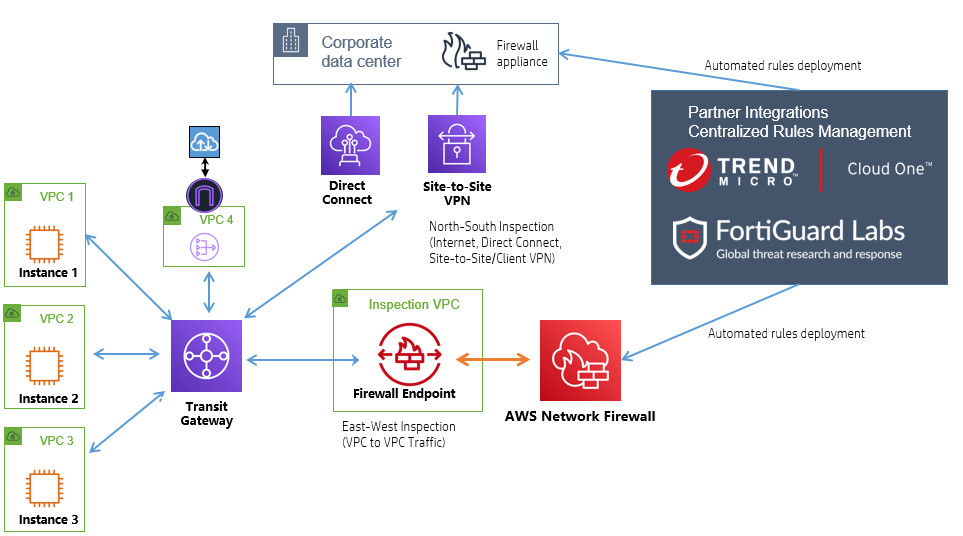
AWS Network Firewall Architecture Diagram
- Traffic Filtering: Network Firewall inspects and filters network traffic based on user-defined rules.
- Stateful Inspection: Maintains connection states to ensure that only valid traffic is allowed through the firewall.
- Logging and Monitoring: Integrates with AWS CloudWatch for real-time monitoring and AWS Security Hub for centralized security management.
- High Availability: Automatically scales and provides fault tolerance to handle changes in traffic volume and ensure continuous protection.
Integration with Other AWS Services
AWS Network Firewall integrates with several AWS services to enhance security and compliance:
- AWS CloudWatch: Provides monitoring and logging of network traffic flows and firewall activities.
- AWS Security Hub: Aggregates and centralizes security findings from Network Firewall and other AWS services for comprehensive security management.
- AWS Config: Tracks configuration changes to firewall policies and ensures compliance with security standards.
- AWS VPC Flow Logs: Captures information about the IP traffic going to and from Network Firewall, aiding in traffic analysis and troubleshooting.
- AWS IAM: Manages access to Network Firewall resources by defining permissions and roles for users and applications.
Things to Remember for the Exam
- Stateful vs. Stateless: Understand the difference between stateful and stateless firewalls, and how AWS Network Firewall provides stateful traffic inspection.
- Rule Customization: Be familiar with how to define and customize firewall rules for filtering traffic based on IP addresses, protocols, and ports.
- Integration Points: Know how Network Firewall integrates with AWS CloudWatch, Security Hub, and other AWS services for enhanced security and compliance.
- High Availability: Remember that Network Firewall automatically scales and maintains high availability with built-in fault tolerance.
- Logging and Monitoring: Understand how to use CloudWatch and other tools for monitoring and logging network traffic and firewall activities.
- Compliance and Security Management: Be aware of how Network Firewall helps meet compliance requirements and manage network security policies across multiple VPCs.
Systems Manager Parameter Store
AWS Systems Manager Parameter Store
AWS Systems Manager Parameter Store is a managed service that provides a centralized location to manage your configuration data, secrets, and parameters. It helps you store, retrieve, and manage configuration data such as application settings, database connection strings, and secrets used by your applications and services.
Key Features
- Secure Storage: Store configuration data and secrets securely using encryption with AWS KMS. Support for secrets management with automatic rotation.
- Parameter Types: Support for different parameter types including String, StringList, and SecureString to accommodate various data storage needs.
- Versioning: Maintain different versions of parameters, allowing you to manage changes and roll back to previous versions if needed.
- Access Control: Use AWS IAM policies to control access to parameters and secure sensitive information.
- Integration: Easily integrate with other AWS services such as EC2, Lambda, and ECS for seamless parameter retrieval and usage in your applications.
- Parameter Hierarchy: Organize parameters into a hierarchical structure for better management and easier retrieval.
Common Use Cases
- Application Configuration: Store and manage application settings such as feature flags, database connection strings, and API keys.
- Secrets Management: Securely store sensitive information like passwords and API keys with encryption and automatic rotation.
- Environment Management: Use parameter hierarchies to manage configuration data across different environments (e.g., development, staging, production).
- Dynamic Configuration: Retrieve and use configuration data dynamically in your applications without hardcoding values in your code.
- Automated Deployments: Integrate with deployment pipelines to manage and update application configurations during deployment processes.
Architecture Overview
The following diagram illustrates the architecture of AWS Systems Manager Parameter Store:

AWS Systems Manager Parameter Store Architecture Diagram
- Parameter Storage: Parameters are stored securely and can be accessed using the AWS SDK or AWS CLI.
- Encryption: Parameters, especially SecureString parameters, are encrypted using AWS KMS for secure storage.
- Access Control: IAM policies control access to parameters and ensure that only authorized users and services can retrieve or modify them.
- Version Management: Parameters are versioned, allowing you to track changes and revert to previous versions as needed.
- Integration: AWS Systems Manager Parameter Store integrates with other AWS services for seamless use of parameters in applications and deployment processes.
Integration with Other AWS Services
AWS Systems Manager Parameter Store integrates with several AWS services to enhance its functionality:
- AWS Lambda: Retrieve parameters in Lambda functions to use configuration data or secrets securely in serverless applications.
- AWS EC2: Use EC2 instance roles and IAM policies to securely access parameters from within EC2 instances.
- AWS ECS: Configure ECS tasks to retrieve parameters for containerized applications during deployment and runtime.
- AWS CloudFormation: Use Parameter Store parameters in CloudFormation templates to dynamically manage configuration settings during stack creation or updates.
- AWS CodePipeline: Integrate with CodePipeline to manage and update application configurations as part of your CI/CD processes.
Things to Remember for the Exam
- Parameter Types: Understand the different parameter types (String, StringList, SecureString) and their use cases.
- Encryption: Know how encryption works for SecureString parameters using AWS KMS and the benefits of securing sensitive data.
- Versioning: Be familiar with parameter versioning and how to manage and roll back to previous versions of parameters.
- Access Control: Understand how to use IAM policies to control access to parameters and secure configuration data.
- Integration: Remember how Parameter Store integrates with AWS services like Lambda, EC2, and ECS for dynamic configuration management.
- Hierarchical Structure: Know how to organize parameters into a hierarchical structure to manage and retrieve configuration data effectively.
Security Token Service (STS)
AWS Security Token Service (STS)
AWS Security Token Service (STS) is a web service that enables you to request temporary, limited-privilege credentials for AWS IAM users or federated users. It is used to grant access to AWS resources based on temporary credentials, which is ideal for scenarios where users or applications need temporary access to AWS resources or services.
Key Features
- Temporary Security Credentials: Issue temporary credentials with defined permissions, expiration time, and scope for secure access to AWS resources.
- Federated Access: Allow users from external identity providers (e.g., Google, Facebook, or corporate directories) to access AWS resources using federated identities.
- Role Assumption: Enable users or services to assume roles with specific permissions, making it easier to delegate access within AWS accounts or across accounts.
- Session Duration: Control the duration of the temporary security credentials, with a maximum validity of 12 hours for most operations.
- API Operations: Access key STS API operations including `AssumeRole`, `GetSessionToken`, and `AssumeRoleWithWebIdentity` for obtaining temporary credentials.
Common Use Cases
- Temporary Access: Provide temporary access to AWS resources for applications, users, or third-party services, reducing the risk associated with long-term credentials.
- Cross-Account Access: Enable users or services in one AWS account to access resources in another account by assuming roles.
- Federated User Access: Allow users from external identity providers to access AWS resources without needing an IAM user account in AWS.
- Secure API Access: Use temporary credentials to secure API calls and operations, enhancing the security posture of your applications.
- Role Delegation: Delegate specific permissions to other AWS accounts or services, allowing controlled access to resources and actions.
Architecture Overview
The following diagram illustrates the architecture of AWS Security Token Service (STS):
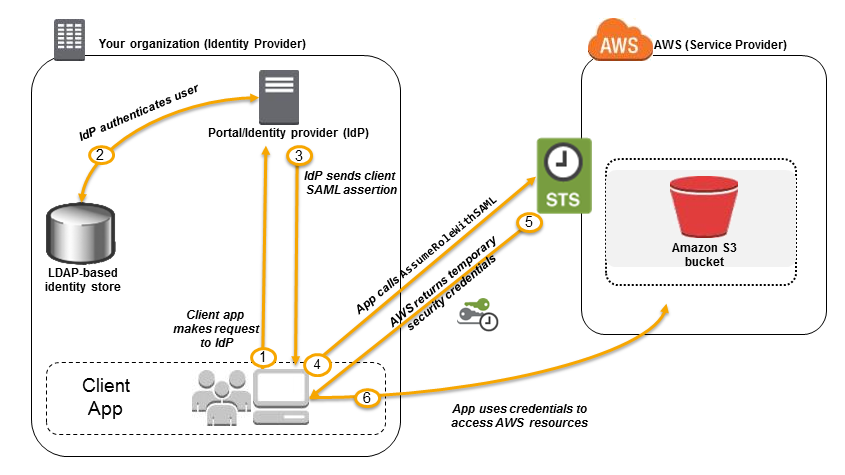
AWS Security Token Service Architecture Diagram
- STS Request: Clients make API requests to STS to obtain temporary security credentials.
- Temporary Credentials: STS issues temporary credentials with a defined expiration time and limited permissions.
- Role Assumption: Users or services assume roles and receive temporary credentials for accessing AWS resources.
- Federated Access: Users from external identity providers are authenticated and granted temporary credentials for accessing AWS services.
- Session Management: Credentials are managed and validated by AWS STS during their validity period.
Integration with Other AWS Services
AWS Security Token Service integrates with several AWS services to provide secure, temporary access:
- AWS IAM: Use STS with IAM roles to delegate access and manage permissions for AWS resources.
- AWS Lambda: Use temporary credentials to access other AWS services or resources within Lambda functions.
- AWS CloudFormation: Enable cross-account access and resource management by assuming roles in CloudFormation stacks.
- AWS CodePipeline: Manage access to deployment resources and other services using temporary credentials in CI/CD pipelines.
- AWS S3: Use temporary credentials to securely access S3 objects and perform operations without long-term credentials.
Things to Remember for the Exam
- Temporary Credentials: Understand how STS issues temporary credentials and the benefits of using them for secure, short-term access.
- Role Assumption: Be familiar with how to use `AssumeRole` to grant temporary access to AWS resources across different accounts or within the same account.
- Federated Access: Know how STS integrates with external identity providers to enable federated user access to AWS services.
- Session Duration: Remember the maximum duration for temporary credentials and how it affects access control and session management.
- API Operations: Review the key STS API operations such as `AssumeRole`, `GetSessionToken`, and `AssumeRoleWithWebIdentity` for obtaining and managing temporary credentials.
- Security Best Practices: Understand security best practices for using temporary credentials and managing roles and permissions effectively.
Secrets Manager
AWS Secrets Manager
AWS Secrets Manager is a service that helps you protect access to your applications, services, and IT resources without the upfront investment and on-going maintenance costs of operating your own infrastructure. Secrets Manager enables you to easily rotate, manage, and retrieve database credentials, API keys, and other secrets throughout their lifecycle.
Key Features
- Secret Rotation: Automate the rotation of secrets such as database credentials and API keys to reduce the risk of compromise.
- Secure Storage: Store secrets securely using encryption and manage access via AWS Identity and Access Management (IAM).
- Access Control: Use fine-grained access controls to manage who can access or modify secrets.
- Integration with AWS Services: Easily integrate with other AWS services such as RDS, Redshift, and Lambda for managing secrets.
- Audit and Monitoring: Track and monitor access to secrets using AWS CloudTrail and integrate with AWS CloudWatch for alerts.
Common Use Cases
- Database Credentials: Manage and rotate database credentials securely without embedding them in your code or configuration files.
- API Keys: Store and manage API keys and credentials for third-party services securely.
- Application Secrets: Securely manage application secrets and sensitive configurations such as OAuth tokens and encryption keys.
- Compliance and Security: Meet compliance requirements and enhance security by rotating secrets regularly and securely managing access.
- Integration with CI/CD: Use Secrets Manager with CI/CD pipelines to manage deployment secrets and access credentials securely.
Architecture Overview
The following diagram illustrates the architecture of AWS Secrets Manager:
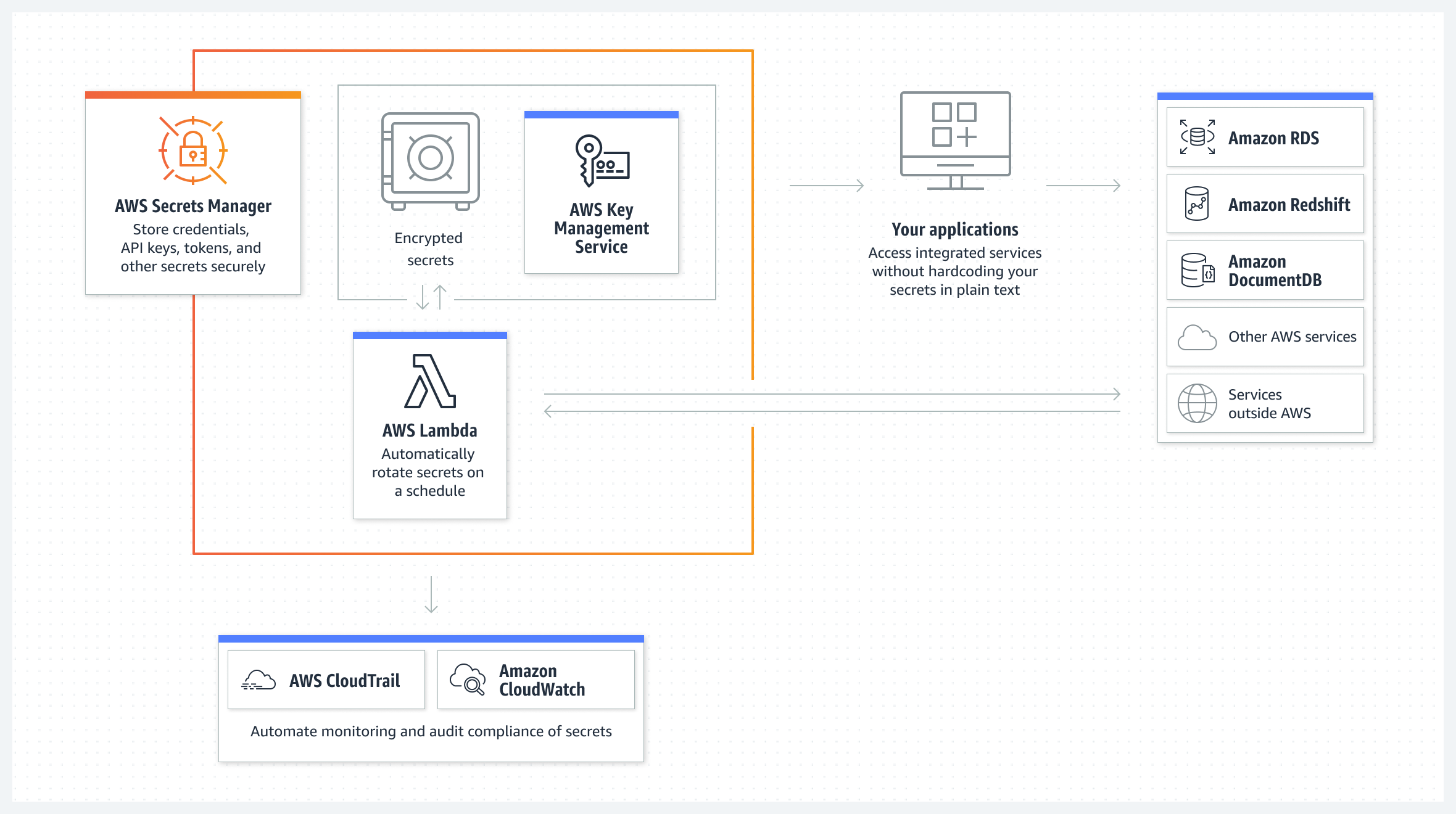
AWS Secrets Manager Architecture Diagram
- Secrets Storage: Store and encrypt secrets in Secrets Manager.
- Secret Rotation: Automatically rotate secrets based on predefined schedules.
- Access Management: Control access to secrets using IAM policies and roles.
- Integration: Access secrets from applications and services using AWS SDKs and APIs.
- Monitoring and Auditing: Track and monitor secret access and usage using CloudTrail and CloudWatch.
Integration with Other AWS Services
AWS Secrets Manager integrates with several AWS services to provide secure management and access to secrets:
- AWS RDS: Automatically rotate database credentials for RDS instances.
- AWS Lambda: Access and use secrets within Lambda functions to securely manage API keys and credentials.
- AWS CloudFormation: Use Secrets Manager in CloudFormation templates to securely manage parameters and secrets.
- AWS ECS: Integrate with ECS to manage secrets for containerized applications and services.
- AWS IAM: Manage access to secrets using IAM roles and policies to ensure secure access control.
Things to Remember for the Exam
- Secret Rotation: Understand how to configure and automate secret rotation to enhance security.
- Secure Storage: Know the encryption mechanisms used for storing secrets and how access control is managed.
- Access Control: Be familiar with IAM policies and roles used to control access to secrets in Secrets Manager.
- Integration: Review how Secrets Manager integrates with other AWS services such as RDS, Lambda, and CloudFormation for secret management.
- Audit and Monitoring: Understand how to use AWS CloudTrail and CloudWatch to monitor and audit access to secrets.
- Compliance and Security Best Practices: Be aware of compliance requirements and security best practices for managing and rotating secrets securely.
Security Group
AWS Security Groups
AWS Security Groups are virtual firewalls that control inbound and outbound traffic to AWS resources, such as EC2 instances. They provide a way to manage access to resources by defining rules that allow or deny traffic based on criteria such as IP address, protocol, and port number.
Key Features
- Stateful Filtering: Security Groups are stateful, meaning that if you allow an inbound request from a specific IP, the response is automatically allowed, regardless of outbound rules.
- Rules-Based Control: Define rules to allow or deny traffic based on source IP, destination IP, port, and protocol. Each Security Group can have multiple inbound and outbound rules.
- Apply to Multiple Resources: Security Groups can be applied to multiple EC2 instances, ensuring consistent security configurations across your infrastructure.
- Default Security Group: Each VPC comes with a default Security Group that allows all inbound and outbound traffic unless modified.
- Dynamic Updates: Changes to Security Group rules are automatically applied to all associated resources, providing flexibility in managing access control.
Common Use Cases
- Application Segmentation: Use Security Groups to segment applications into different tiers (e.g., web servers, application servers, database servers) and control traffic flow between them.
- Restricted Access: Restrict access to specific resources, such as databases, by allowing only traffic from trusted IP addresses or other Security Groups.
- Compliance and Security: Implement security controls to meet compliance requirements by defining precise access rules for sensitive resources.
- Testing and Development: Use Security Groups to create isolated environments for testing and development, ensuring that only authorized traffic can access your instances.
Architecture Overview
The following diagram illustrates how AWS Security Groups operate within a VPC:
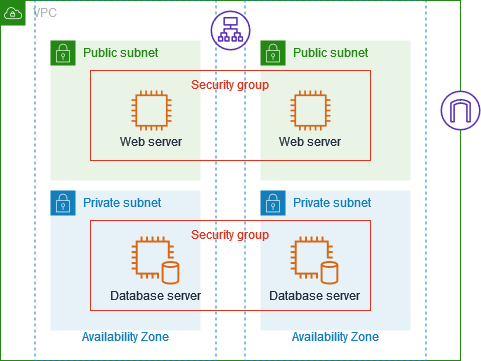
AWS Security Groups Architecture Diagram
- Security Group Rules: Define inbound and outbound rules that control traffic to and from instances.
- Instance Association: Attach Security Groups to instances to enforce the defined rules.
- Traffic Filtering: Security Groups filter traffic based on the rules applied, allowing or denying traffic as specified.
- Dynamic Updates: Changes to Security Group rules are automatically reflected in associated instances.
Integration with Other AWS Services
AWS Security Groups integrate with various AWS services to provide comprehensive security controls:
- AWS EC2: Control traffic to and from EC2 instances using Security Groups.
- AWS Elastic Load Balancer (ELB): Apply Security Groups to ELB to manage access to your load balancers and backend instances.
- AWS RDS: Use Security Groups to control access to RDS instances, ensuring only authorized traffic can reach your databases.
- AWS Lambda: Apply Security Groups to Lambda functions within a VPC to manage access to resources.
- AWS Elastic Beanstalk: Configure Security Groups for Elastic Beanstalk environments to manage access to your application instances.
Things to Remember for the Exam
- Stateful vs. Stateless: Understand the difference between stateful Security Groups and stateless Network ACLs. Security Groups are stateful, meaning responses to allowed inbound traffic are automatically allowed.
- Rule Management: Know how to configure inbound and outbound rules, and how to manage multiple rules within a Security Group.
- Default Security Group: Be familiar with the default Security Group settings and how they apply to instances in a new VPC.
- Resource Association: Understand how to associate Security Groups with different AWS resources, including EC2 instances, ELB, RDS, and Lambda functions.
- Traffic Flow Control: Review how Security Groups manage traffic flow between different tiers of an application and across multiple resources.
- Security Group Limits: Be aware of the default limits for Security Groups, including the maximum number of rules and Security Groups per instance.
WAF (Web Application Firewall)
AWS WAF (Web Application Firewall)
AWS WAF is a web application firewall that helps protect your web applications from common web exploits that could affect application availability, compromise security, or consume excessive resources. It provides customizable rules to block, allow, or count web requests based on conditions such as IP addresses, HTTP headers, and query string parameters.
Key Features
- Customizable Rules: Define rules to match specific patterns in web requests, such as IP addresses, HTTP headers, URIs, and query string parameters.
- Managed Rule Groups: Use pre-configured managed rule groups provided by AWS or AWS Marketplace to protect against common threats like SQL injection and cross-site scripting (XSS).
- Real-Time Metrics and Logging: Monitor web traffic and analyze request patterns with real-time metrics and detailed logging via Amazon CloudWatch and AWS Kinesis Data Firehose.
- IP Set and Regex Pattern Set: Create IP sets to allow or block requests from specific IP addresses and regex pattern sets to match complex request patterns.
- Integration with AWS Services: Integrate with other AWS services like AWS Shield for DDoS protection, Amazon CloudFront for content delivery, and Application Load Balancer (ALB) for routing traffic.
Common Use Cases
- Protecting Web Applications: Safeguard your web applications from common vulnerabilities and attacks, such as SQL injection, XSS, and HTTP flood attacks.
- Regulatory Compliance: Implement security measures to meet compliance requirements and protect sensitive data by filtering malicious web traffic.
- Rate Limiting: Control the rate of incoming requests to your application to prevent abuse and ensure fair access for all users.
- Bot Protection: Block or challenge requests from known malicious bots and automated scripts to prevent scraping and other automated attacks.
Architecture Overview
The following diagram illustrates how AWS WAF integrates with other AWS services to provide web application protection:

AWS WAF Architecture Diagram
- Web ACL: Create and manage web access control lists (ACLs) that define the rules for filtering web requests.
- Rules and Conditions: Configure rules and conditions to match specific request patterns and apply actions (allow, block, count).
- Integration Points: Attach web ACLs to resources like Amazon CloudFront distributions, Application Load Balancers (ALBs), and AWS API Gateway APIs.
- Monitoring and Logging: Use CloudWatch metrics and Kinesis Data Firehose for real-time monitoring and logging of web traffic.
Integration with Other AWS Services
AWS WAF integrates with various AWS services to enhance security and provide comprehensive protection:
- Amazon CloudFront: Apply WAF rules to CloudFront distributions to protect your content delivery network (CDN) from malicious requests.
- Application Load Balancer (ALB): Attach WAF web ACLs to ALBs to filter traffic to your application instances based on custom rules.
- AWS API Gateway: Protect APIs from malicious traffic and attacks by applying WAF rules to your API Gateway endpoints.
- AWS Shield: Integrate with AWS Shield for additional DDoS protection and enhanced security for your web applications.
- Amazon CloudWatch: Monitor web traffic and WAF metrics with CloudWatch dashboards and alarms for proactive security management.
Things to Remember for the Exam
- WAF Rules and Conditions: Understand how to create and configure WAF rules and conditions, including IP set and regex pattern set usage.
- Managed Rule Groups: Familiarize yourself with AWS managed rule groups and third-party options for common web security threats.
- Web ACL Configuration: Review how to configure web ACLs and associate them with AWS resources such as CloudFront distributions and ALBs.
- Integration Points: Know the integration points with other AWS services and how WAF can be used in conjunction with services like AWS Shield and CloudWatch.
- Metrics and Logging: Understand how to set up and interpret CloudWatch metrics and Kinesis Data Firehose logs for WAF monitoring and analysis.
- Rate Limiting and Bot Protection: Review how to configure rate limiting and bot protection features to prevent abuse and automated attacks.
11. Storage
Aurora
Amazon Aurora
Amazon Aurora is a MySQL- and PostgreSQL-compatible relational database engine that combines the performance and availability of high-end commercial databases with the simplicity and cost-effectiveness of open-source databases. Aurora is part of the Amazon RDS (Relational Database Service) family and is fully managed by AWS, meaning it handles time-consuming tasks such as provisioning, patching, backup, recovery, and failover automatically.
Key Features
- High Performance: Aurora offers up to five times better performance than standard MySQL databases and three times better than standard PostgreSQL databases, with the same level of reliability and security.
- Scalability: Automatically scales storage up to 128 TB per database instance and allows for read replica scaling to accommodate thousands of concurrent queries.
- High Availability: Aurora provides multi-AZ (Availability Zone) replication with automated failover, ensuring continuous availability and minimal downtime.
- Automated Backups: Continuous backups to Amazon S3 and point-in-time recovery ensure that your data is always protected.
- Global Database: Aurora Global Database allows for a single database to span multiple AWS regions, enabling low-latency global reads and disaster recovery with cross-region replication.
- Compatibility: Aurora is compatible with both MySQL and PostgreSQL, making it easy to migrate existing applications with minimal changes.
Common Use Cases
- High-Performance Applications: Use Aurora for applications that require high throughput and low latency, such as online transaction processing (OLTP) systems.
- Scalable Web Applications: Aurora is ideal for web applications that need to scale quickly to handle increasing traffic, providing both read and write scalability.
- Disaster Recovery: Aurora’s Global Database feature allows you to set up cross-region replicas for disaster recovery, ensuring that your database is resilient to regional failures.
- Cost-Effective Database Migration: Migrate from expensive commercial databases to Aurora to reduce costs without sacrificing performance or reliability.
- Multi-Region Applications: Use Aurora Global Database to support applications that serve users across multiple regions, reducing latency and improving user experience.
Architecture Overview
The following diagram illustrates how Amazon Aurora is architected for high performance, availability, and scalability:
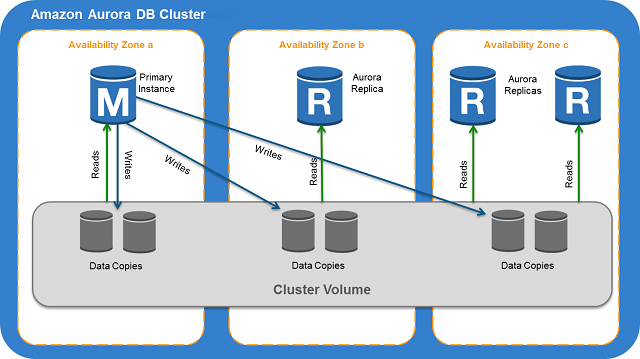
Amazon Aurora Architecture Diagram
- Storage Layer: Aurora’s distributed, fault-tolerant, self-healing storage system automatically replicates data across multiple Availability Zones.
- Compute Layer: Aurora separates the compute layer from the storage layer, allowing each to scale independently based on your needs.
- Replication: Aurora supports both synchronous replication for high availability and asynchronous replication for read scaling and cross-region replication.
- Backups: Continuous backups are stored in Amazon S3, with point-in-time recovery options available to restore your database to any point in time.
Integration with Other AWS Services
Amazon Aurora integrates with a variety of AWS services to provide a seamless database experience:
- Amazon RDS: Aurora is part of the RDS family, and it integrates with other RDS services like RDS Proxy, IAM authentication, and Performance Insights.
- AWS Lambda: Use AWS Lambda to build serverless applications that interact with your Aurora database for scalable and efficient processing.
- Amazon CloudWatch: Monitor your Aurora databases using Amazon CloudWatch to gain insights into performance, resource utilization, and operational health.
- AWS DMS: Migrate existing databases to Amazon Aurora using the AWS Database Migration Service (DMS) with minimal downtime.
- Amazon S3: Utilize Amazon S3 for continuous backups and to store database snapshots, ensuring your data is always protected.
Things to Remember for the Exam
- Aurora vs. RDS: Understand the differences between Amazon Aurora and standard RDS databases, particularly in terms of performance, scalability, and availability.
- Global Database: Know how Aurora Global Database enables cross-region replication and disaster recovery.
- Backup and Restore: Be familiar with Aurora’s backup and restore capabilities, including continuous backups and point-in-time recovery.
- Scaling: Understand how Aurora scales storage and read replicas independently to handle varying workloads.
- Compatibility: Remember that Aurora is compatible with MySQL and PostgreSQL, making it easy to migrate existing applications.
- Pricing: Be aware of Aurora’s pricing model, which includes charges for database instances, storage, I/O operations, and cross-region replication for Global Database.
- Use Cases: Review the common use cases for Aurora, especially in scenarios that require high availability, disaster recovery, and high performance.
DocumentDB
Amazon DocumentDB
Amazon DocumentDB is a scalable, fully managed document database service that supports MongoDB workloads. It is designed to handle JSON data, making it ideal for use cases that involve content management, catalogs, user profiles, and mobile applications. DocumentDB is highly available, automatically replicating data across multiple Availability Zones.
Key Features
- MongoDB Compatibility: Amazon DocumentDB is compatible with the MongoDB API, enabling seamless migration of MongoDB workloads with minimal changes to the application code.
- Fully Managed: As a fully managed service, DocumentDB handles database management tasks such as provisioning, patching, backup, recovery, and scaling.
- Scalability: DocumentDB can scale read capacity by adding read replicas and scales storage automatically up to 64 TB without downtime.
- High Availability: DocumentDB provides multi-AZ deployment with automated failover and continuous backup to Amazon S3 with point-in-time recovery.
- Performance: Optimized for performance, DocumentDB separates compute and storage, allowing each to scale independently.
- Security: Provides encryption at rest and in transit, along with integration with AWS Identity and Access Management (IAM) for fine-grained access control.
Common Use Cases
- Content Management: Ideal for managing unstructured data like blogs, articles, and documents that are stored as JSON.
- Catalogs: Use DocumentDB to store and manage catalogs, such as product catalogs, with flexible schema and easy querying.
- User Profiles: DocumentDB is well-suited for storing user profile data, where the schema might evolve over time.
- Mobile Applications: Use DocumentDB to back mobile applications that require flexible schema and fast access to user data.
- Internet of Things (IoT): Store and manage large volumes of time-series data generated by IoT devices in a scalable, efficient way.
Architecture Overview
The following diagram illustrates the architecture of Amazon DocumentDB:

Amazon DocumentDB Architecture Diagram
- Storage Layer: DocumentDB's storage layer is distributed, fault-tolerant, and self-healing, automatically replicating data across multiple Availability Zones.
- Compute Layer: The compute layer, which handles query processing, is separated from the storage layer, enabling independent scaling of compute and storage resources.
- Backup and Recovery: Continuous backup to Amazon S3, with point-in-time recovery, ensures that your data is protected and can be restored to any point in time.
- Read Replicas: DocumentDB supports adding read replicas to scale read operations and improve the availability of the database.
Integration with Other AWS Services
Amazon DocumentDB integrates with several AWS services to provide a comprehensive document database solution:
- AWS Lambda: Build serverless applications that interact with your DocumentDB database using AWS Lambda.
- Amazon CloudWatch: Monitor performance and operational metrics for your DocumentDB clusters using Amazon CloudWatch.
- Amazon VPC: Run DocumentDB in a VPC to isolate your database within your virtual network and control access using security groups.
- AWS DMS: Migrate existing MongoDB databases to DocumentDB using AWS Database Migration Service (DMS) with minimal downtime.
- Amazon S3: Use S3 for continuous backups and store database snapshots, ensuring your data is always protected.
Things to Remember for the Exam
- MongoDB Compatibility: Remember that DocumentDB is compatible with MongoDB, but some advanced MongoDB features may not be supported.
- Backup and Recovery: Know how DocumentDB handles backups and how to perform point-in-time recovery.
- Scalability: Understand how DocumentDB scales compute and storage independently, and how to use read replicas to scale read capacity.
- High Availability: Review the high availability features of DocumentDB, including multi-AZ replication and automated failover.
- Security: Be familiar with how DocumentDB integrates with IAM for access control and supports encryption at rest and in transit.
- Use Cases: Study the common use cases for DocumentDB, particularly in scenarios that involve unstructured or semi-structured data like JSON.
DynamoDB
Amazon DynamoDB
Amazon DynamoDB is a fully managed NoSQL database service that provides fast and predictable performance with seamless scalability. It is designed for applications that require consistent, single-digit millisecond response times at any scale. DynamoDB supports both document and key-value store models.
Key Features
- Managed Service: DynamoDB is fully managed by AWS, handling tasks like provisioning, patching, and scaling, allowing you to focus on your application.
- Scalability: DynamoDB automatically scales up or down to handle capacity and maintain performance as your application's traffic fluctuates.
- Global Tables: DynamoDB supports multi-region, fully replicated tables, allowing for low-latency access to data globally.
- Fine-Grained Access Control: Integrated with AWS Identity and Access Management (IAM), you can define who has access to specific data within your DynamoDB tables.
- Streams: DynamoDB Streams capture changes in your table, enabling real-time processing, analytics, or event-driven architectures.
- On-Demand Mode: DynamoDB offers on-demand capacity mode, which automatically accommodates workloads as they scale up or down.
Common Use Cases
- Web Applications: DynamoDB is ideal for handling high-traffic web applications that require quick, predictable response times.
- Mobile Backends: Used as a backend for mobile applications, DynamoDB can store user profiles, game states, and other semi-structured data.
- IoT Applications: DynamoDB can manage massive amounts of IoT data due to its scalable, low-latency design.
- Gaming: Games that require a highly available and scalable database to manage user data and game states benefit from DynamoDB's performance.
- Serverless Architectures: DynamoDB integrates well with AWS Lambda, allowing for the creation of serverless applications that are highly scalable and cost-efficient.
Architecture Overview
The following diagram illustrates the architecture of Amazon DynamoDB:

Amazon DynamoDB Architecture Diagram
- Storage: DynamoDB stores data across multiple Availability Zones, ensuring durability and high availability.
- Partitions: Data is automatically partitioned across multiple servers based on partition keys, enabling scalable performance.
- Indexing: DynamoDB supports both primary (hash key and sort key) and secondary indexes, providing flexibility in how data is queried.
- Streams: DynamoDB Streams allow applications to react to changes in data, enabling use cases like real-time analytics and triggering workflows.
Integration with Other AWS Services
Amazon DynamoDB integrates with several AWS services to provide a comprehensive solution:
- AWS Lambda: Build event-driven applications by triggering Lambda functions in response to changes in DynamoDB Streams.
- Amazon CloudWatch: Monitor the performance and operational health of DynamoDB tables using CloudWatch metrics and alarms.
- Amazon S3: Use S3 to back up DynamoDB tables or to move cold data out of DynamoDB for long-term storage.
- AWS Glue: Use AWS Glue to extract, transform, and load (ETL) data from DynamoDB into other data stores for analytics.
- Amazon Kinesis Data Streams: Combine DynamoDB with Kinesis to analyze and process streaming data in real-time.
Things to Remember for the Exam
- Consistency Models: Understand the difference between eventually consistent reads and strongly consistent reads in DynamoDB.
- Capacity Modes: Be familiar with the two capacity modes: provisioned and on-demand, and know when to use each.
- Global Tables: Know how DynamoDB Global Tables provide multi-region, fully replicated databases with low-latency access.
- Indexes: Remember the differences between primary keys, local secondary indexes (LSI), and global secondary indexes (GSI).
- Streams: Understand how DynamoDB Streams work and how they can be used to trigger events or replicate data.
- Integration: Review how DynamoDB integrates with other AWS services, especially AWS Lambda and Amazon S3, for event-driven architectures and data backup.
ElastiCache
Amazon ElastiCache
Amazon ElastiCache is a fully managed, in-memory caching service that supports two open-source in-memory caching engines: Redis and Memcached. ElastiCache enables web applications to retrieve information from fast, managed, in-memory caches instead of relying on slower disk-based databases, improving performance and scalability.
Key Features
- Managed Service: ElastiCache automates common administrative tasks like patching, backup, and recovery, reducing operational overhead.
- Scalability: Scale your in-memory data store both vertically and horizontally with ease, depending on the needs of your application.
- High Availability: ElastiCache supports replication and automatic failover, ensuring high availability and durability of cached data.
- Security: Integrated with Amazon VPC, ElastiCache provides network isolation and supports encryption in transit and at rest.
- Performance: By storing frequently accessed data in memory, ElastiCache significantly reduces latency and speeds up application performance.
Common Use Cases
- Session Storage: Store and manage user session data in a fast and scalable manner, reducing the load on backend databases.
- Caching Frequently Accessed Data: Cache database query results, API responses, or any other frequently accessed data to reduce latency and improve response times.
- Real-time Analytics: Utilize ElastiCache to manage real-time analytics data, providing immediate insights into application performance and user behavior.
- Gaming Leaderboards: Manage dynamic, real-time leaderboards for gaming applications with the high-speed processing capabilities of ElastiCache.
- Message Queuing: Use ElastiCache as a highly available and low-latency message queuing system, supporting the rapid delivery of messages.
Architecture Overview
The following diagram illustrates the architecture of Amazon ElastiCache:

Amazon ElastiCache Architecture Diagram
- Data Nodes: ElastiCache clusters are made up of multiple nodes that store cached data in-memory, providing fast access.
- Replication: Data is replicated across multiple nodes to ensure high availability and data durability.
- Automatic Failover: In case of a primary node failure, ElastiCache automatically fails over to a secondary node to maintain availability.
- Cluster Management: ElastiCache provides tools to easily manage and scale clusters, add or remove nodes, and monitor performance.
Integration with Other AWS Services
Amazon ElastiCache integrates seamlessly with other AWS services to provide a robust and scalable solution:
- Amazon RDS: Use ElastiCache to cache the results of frequent database queries from Amazon RDS, reducing the load on your database.
- AWS Lambda: Integrate ElastiCache with AWS Lambda for event-driven caching, improving the performance of serverless applications.
- Amazon CloudWatch: Monitor the performance and health of your ElastiCache clusters using CloudWatch metrics and alarms.
- Amazon VPC: Deploy ElastiCache clusters within a VPC for enhanced security and network isolation.
- Amazon S3: Use ElastiCache to cache objects stored in Amazon S3, speeding up content delivery for users.
Things to Remember for the Exam
- Redis vs. Memcached: Know the differences between Redis and Memcached, including use cases, data structures, and capabilities.
- Scaling: Understand how to scale ElastiCache clusters both vertically (by increasing instance size) and horizontally (by adding more nodes).
- High Availability: Be familiar with the concepts of replication and automatic failover in ElastiCache for ensuring high availability.
- Security: Review the security features of ElastiCache, including VPC integration, encryption in transit, and encryption at rest.
- Integration: Study how ElastiCache integrates with other AWS services, such as Amazon RDS, Lambda, and CloudWatch, for optimized performance.
- Use Cases: Remember the common use cases for ElastiCache, especially in scenarios involving caching, session management, and real-time analytics.
FSx
Amazon FSx
Amazon FSx provides fully managed, high-performance file systems optimized for a variety of workloads, including Windows-based applications, machine learning, big data, media processing, and more. FSx supports multiple file systems, such as Amazon FSx for Windows File Server and Amazon FSx for Lustre.
Key Features
- Fully Managed Service: Amazon FSx automates administrative tasks such as hardware provisioning, patching, and backups, allowing you to focus on your applications.
- High Performance: FSx offers fast and consistent performance, with low latencies and high throughput, making it ideal for performance-intensive workloads.
- Cost Efficiency: Pay only for the resources you use, with options to optimize costs through data compression, storage tiers, and file system backups.
- Security: Integrated with AWS Identity and Access Management (IAM), Amazon VPC, and supports encryption at rest and in transit to secure your data.
- Multi-AZ Deployment: FSx supports multi-AZ deployments for high availability and data durability, ensuring your file systems are resilient to failures.
Common Use Cases
- Windows File Storage: Amazon FSx for Windows File Server provides a fully managed, highly reliable file storage for Windows-based applications that require shared file storage.
- High-Performance Computing: Amazon FSx for Lustre offers a scalable, high-performance file system optimized for compute-intensive workloads like machine learning, big data processing, and media rendering.
- Database Backups: Use Amazon FSx to store database backups for long-term retention with quick recovery options.
- Content Management: Store and manage large amounts of unstructured data, such as images, videos, and documents, with high availability and performance.
- Media Processing: Optimize the processing of large media files, such as video rendering and editing, with low-latency access to data.
Architecture Overview
The following diagram illustrates the architecture of Amazon FSx:

Amazon FSx Architecture Diagram
- File Systems: Amazon FSx provides multiple file system options, each optimized for specific workloads, such as FSx for Windows File Server and FSx for Lustre.
- Scalable Performance: FSx allows you to scale performance based on your workload needs, offering high throughput and low-latency file access.
- Data Redundancy: FSx ensures data redundancy through replication, and it supports multi-AZ deployments for high availability.
- Integration with AWS Services: FSx integrates with other AWS services like Amazon EC2, Amazon S3, and AWS Backup to provide a comprehensive storage solution.
Integration with Other AWS Services
Amazon FSx integrates with several AWS services to enhance functionality and simplify management:
- Amazon EC2: Use FSx as a shared file system for Amazon EC2 instances, enabling high-performance data sharing across instances.
- Amazon S3: FSx for Lustre can be linked to Amazon S3, allowing you to process data directly from S3 and store results back into S3.
- AWS Directory Service: Integrate FSx for Windows File Server with AWS Managed Microsoft AD for seamless authentication and access control.
- AWS Backup: Use AWS Backup to automate and manage backups of your FSx file systems, ensuring data durability and compliance.
- Amazon CloudWatch: Monitor the performance and health of your FSx file systems using CloudWatch metrics and alarms.
Things to Remember for the Exam
- FSx for Windows vs. FSx for Lustre: Know the differences between FSx for Windows File Server and FSx for Lustre, including their use cases, performance characteristics, and supported features.
- Multi-AZ Deployment: Understand how FSx supports multi-AZ deployments for high availability and data redundancy.
- Security Features: Be familiar with the security features of FSx, including VPC integration, IAM permissions, and encryption at rest and in transit.
- Integration: Study how FSx integrates with other AWS services like EC2, S3, and AWS Directory Service for seamless operation and management.
- Performance Optimization: Review how to optimize FSx performance based on workload requirements, including throughput, IOPS, and data compression.
- Use Cases: Remember the common use cases for FSx, especially in scenarios involving Windows file storage, high-performance computing, and media processing.
RDS (Relational Database Service)
Amazon RDS (Relational Database Service)
Amazon RDS is a fully managed relational database service that supports several database engines, including MySQL, PostgreSQL, MariaDB, Oracle, SQL Server, and Amazon Aurora. RDS automates time-consuming administrative tasks such as hardware provisioning, database setup, patching, and backups, allowing you to focus on your applications.
Key Features
- Fully Managed: Amazon RDS handles database administration tasks like backups, patching, monitoring, and scaling, allowing you to focus on development.
- Multi-AZ Deployment: RDS supports Multi-AZ deployments for high availability and data durability, with automated failover to a standby instance.
- Read Replicas: Improve performance and scale read-heavy workloads by creating up to five read replicas of your RDS instance.
- Automated Backups: RDS offers automated backups and point-in-time recovery, helping ensure your data is safe and recoverable.
- Security: RDS integrates with AWS Identity and Access Management (IAM), Amazon VPC, and supports encryption at rest and in transit for secure database management.
- Performance Monitoring: RDS provides metrics through Amazon CloudWatch and allows you to enable Enhanced Monitoring for more detailed insights into database performance.
Common Use Cases
- Web Applications: Use RDS to host the relational database backend for web applications that require scalability, high availability, and fault tolerance.
- OLTP (Online Transaction Processing): RDS is ideal for transactional applications that require fast, reliable, and scalable relational database management.
- Data Warehousing: RDS can be used to run smaller data warehousing workloads, while Amazon Redshift is recommended for large-scale data warehousing.
- Disaster Recovery: Use RDS Multi-AZ and Read Replicas to create a robust disaster recovery architecture with minimal downtime.
- Hybrid Cloud Database Management: Integrate RDS with on-premises databases for hybrid cloud deployments, leveraging AWS's scalability and security.
Architecture Overview
The following diagram illustrates the architecture of Amazon RDS:

Amazon RDS Architecture Diagram
- Primary Instance: The primary instance handles all database writes and can replicate data to Read Replicas and a standby instance in Multi-AZ deployments.
- Read Replicas: These are copies of the primary database that handle read-only traffic, improving performance by offloading reads from the primary instance.
- Standby Instance: In a Multi-AZ deployment, a standby instance in another Availability Zone (AZ) serves as a failover target in case of primary instance failure.
- Backups and Snapshots: RDS automatically performs daily backups and allows you to create manual snapshots for data recovery or migration purposes.
- Integration with VPC: Deploy RDS instances within your Amazon VPC for network isolation, security, and control over database access.
Integration with Other AWS Services
Amazon RDS integrates with several AWS services to enhance its functionality and simplify database management:
- Amazon EC2: Use RDS as the backend database for applications hosted on Amazon EC2 instances, enabling scalable and reliable data management.
- AWS Lambda: Trigger AWS Lambda functions in response to database events, such as changes to RDS tables, for real-time processing and automation.
- AWS DMS (Database Migration Service): Migrate databases to RDS with minimal downtime using AWS DMS, supporting homogenous and heterogeneous migrations.
- Amazon CloudWatch: Monitor RDS instance performance and health using CloudWatch metrics and set alarms to alert you of any issues.
- AWS Backup: Manage automated backups of RDS instances using AWS Backup, ensuring compliance and data protection.
Things to Remember for the Exam
- RDS vs. Aurora: Know the differences between Amazon RDS and Amazon Aurora, particularly in terms of performance, scalability, and availability features.
- Multi-AZ Deployment: Understand how Multi-AZ deployments provide high availability and automated failover for RDS instances.
- Read Replicas: Be familiar with the use of Read Replicas to scale read-heavy workloads and how they differ from Multi-AZ setups.
- Security Features: Study the security features of RDS, including VPC integration, IAM roles, and encryption options (at rest and in transit).
- Backup and Restore: Review how RDS handles automated backups, snapshots, and point-in-time recovery for data protection.
- Use Cases: Remember common use cases for RDS, especially in scenarios involving web applications, OLTP workloads, and disaster recovery.
- Supported Database Engines: Be aware of the database engines supported by RDS and their specific use cases and benefits.
Redshift
Amazon Redshift
Amazon Redshift is a fully managed, petabyte-scale data warehouse service in the cloud. You can start with just a few hundred gigabytes of data and scale up to a petabyte or more. Redshift makes it easy to analyze large amounts of data quickly using SQL-based tools and business intelligence (BI) applications.
Key Features
- Scalable and Cost-Effective: Redshift allows you to start small and scale as your needs grow, providing cost-effective data warehousing solutions.
- Columnar Storage: Data is stored in a columnar format, optimizing performance for read-heavy operations typical of analytical workloads.
- Massively Parallel Processing (MPP): Redshift uses MPP architecture to distribute queries across multiple nodes, enabling fast processing of large datasets.
- Data Encryption: Redshift supports encryption at rest and in transit, ensuring your data is secure.
- Integration with AWS Services: Redshift integrates with various AWS services, including S3, Kinesis, EMR, and Glue, to facilitate data ingestion and processing.
- Backup and Restore: Redshift automatically backs up your data and allows for easy restoration, supporting point-in-time recovery.
- Data Sharing: Redshift allows you to share data across Redshift clusters and AWS accounts without the need to copy or move data.
Common Use Cases
- Data Warehousing: Redshift is ideal for running complex queries on large datasets, making it suitable for enterprise data warehousing.
- Business Intelligence: Use Redshift with BI tools to gain insights into your data, supporting decision-making processes in your organization.
- ETL Processing: Redshift integrates with AWS Glue and other ETL tools to efficiently transform and load data from various sources.
- Log Analysis: Store and analyze logs from applications and infrastructure using Redshift for deep, actionable insights.
- Analytics: Perform advanced analytics, such as predictive modeling and machine learning, on large datasets using Redshift's integration with AWS services.
Architecture Overview
The following diagram illustrates the architecture of Amazon Redshift:

Amazon Redshift Architecture Diagram
- Leader Node: The leader node manages client connections and receives queries, which it parses and develops into execution plans.
- Compute Nodes: The compute nodes store data and execute the queries as instructed by the leader node. Each compute node is divided into slices, and each slice processes part of the query in parallel.
- Columnar Storage: Data is stored in a columnar format, enabling efficient data compression and faster query performance.
- Data Distribution: Data is distributed across compute nodes based on the distribution style (e.g., key, even, or all) to optimize query performance.
- Data Loading: Redshift integrates with Amazon S3, Kinesis, and other data sources for seamless data loading.
Integration with Other AWS Services
Amazon Redshift integrates with various AWS services to enhance its functionality and streamline data management:
- Amazon S3: Load data into Redshift from Amazon S3 using the COPY command, enabling fast and scalable data ingestion.
- AWS Glue: Use AWS Glue for ETL processing, allowing you to prepare data before loading it into Redshift.
- Amazon Kinesis: Stream real-time data into Redshift from Kinesis Data Streams for real-time analytics.
- Amazon EMR: Use Amazon EMR for big data processing and then load the processed data into Redshift for further analysis.
- Amazon QuickSight: Connect Redshift to Amazon QuickSight for visualization and business intelligence, allowing you to create interactive dashboards.
Things to Remember for the Exam
- Redshift vs. RDS: Understand the differences between Redshift and RDS, particularly in terms of use cases, scalability, and performance.
- Columnar Storage: Remember that Redshift uses columnar storage, which is optimized for read-heavy analytical queries.
- Distribution Styles: Know the different distribution styles (key, even, all) and how they affect data placement and query performance.
- Cluster Management: Be familiar with how Redshift clusters are managed, including resizing, backup, and restore operations.
- Security Features: Study Redshift's security features, including encryption, IAM roles, and VPC integration.
- Data Ingestion: Review how data is loaded into Redshift from various sources, including Amazon S3, Kinesis, and on-premises databases.
- Performance Optimization: Understand how to optimize Redshift performance through techniques such as compression, data distribution, and query optimization.
S3 (Simple Storage Service)
Amazon S3 (Simple Storage Service)
Amazon S3 (Simple Storage Service) is an object storage service that offers industry-leading scalability, data availability, security, and performance. This means that customers of all sizes and industries can use it to store and protect any amount of data for a range of use cases, such as websites, mobile applications, backup and restore, archive, enterprise applications, IoT devices, and big data analytics.
Key Features
- Scalable Storage: Amazon S3 can store an unlimited amount of data, making it highly scalable and suitable for any size workload.
- Durability: S3 is designed for 99.999999999% (11 9's) durability, automatically replicating data across multiple Availability Zones.
- Security: S3 supports various security features, including encryption at rest and in transit, access control policies, and integration with AWS IAM for fine-grained permissions.
- Versioning: S3 allows you to keep multiple versions of an object, enabling recovery from accidental deletion or overwrites.
- Lifecycle Management: Automate the migration of data between different storage classes based on user-defined rules, optimizing costs.
- Storage Classes: S3 offers multiple storage classes such as S3 Standard, S3 Intelligent-Tiering, S3 Standard-IA, and S3 Glacier, catering to various access patterns and cost requirements.
- Cross-Region Replication: S3 can automatically replicate objects across different AWS Regions for compliance and disaster recovery.
- Event Notifications: S3 can trigger Lambda functions or send notifications to SNS, SQS, or EventBridge when objects are created or deleted.
- Data Transfer Acceleration: Speed up content distribution using the global Amazon CloudFront network, reducing latency for users worldwide.
Common Use Cases
- Backup and Restore: Store backups of applications and data in S3, taking advantage of its durability and lifecycle management features.
- Data Archiving: Use S3 Glacier for cost-effective, long-term data archiving with retrieval times ranging from minutes to hours.
- Big Data Analytics: Store massive datasets in S3 and process them with AWS analytics services like EMR, Athena, and Redshift Spectrum.
- Static Website Hosting: Host static websites directly from S3, leveraging its scalability and low-latency performance.
- Content Distribution: Distribute content globally using S3 in conjunction with Amazon CloudFront for low-latency delivery.
- IoT Data Storage: Store data generated by IoT devices in S3 for subsequent processing, analysis, and long-term storage.
- Data Lakes: Create a centralized repository in S3 to store structured and unstructured data at scale, supporting various analytics and machine learning workloads.
Architecture Overview
The following diagram illustrates the architecture of Amazon S3:

Amazon S3 Architecture Diagram
- Buckets: Buckets are the fundamental containers in S3 where objects (files and metadata) are stored. Each object is identified by a unique key within a bucket.
- Objects: An object consists of the data (file) and metadata, which includes details like the creation date, version ID, and access permissions.
- Storage Classes: S3 offers various storage classes that optimize costs based on access frequency and durability requirements.
- Access Control: S3 supports bucket policies, access control lists (ACLs), and IAM policies to manage permissions and control access to buckets and objects.
- Data Encryption: S3 supports server-side encryption (SSE) with S3-managed keys (SSE-S3), AWS KMS-managed keys (SSE-KMS), and customer-provided keys (SSE-C).
- Data Replication: S3 can replicate objects automatically to another bucket within the same or different AWS Region using cross-region replication (CRR) or same-region replication (SRR).
Integration with Other AWS Services
Amazon S3 integrates with various AWS services to enhance its functionality and streamline data management:
- Amazon CloudFront: Distribute content stored in S3 with low latency and high transfer speeds using Amazon CloudFront, a global content delivery network (CDN).
- AWS Lambda: Trigger serverless functions automatically when objects are uploaded to S3, enabling real-time data processing.
- Amazon EMR: Process big data stored in S3 using Hadoop, Spark, and other big data frameworks on Amazon EMR.
- Amazon Athena: Perform serverless SQL queries on data stored in S3 using Amazon Athena, which supports various file formats like CSV, JSON, and Parquet.
- AWS Glue: Use AWS Glue to catalog, transform, and move data between S3 and other data stores, enabling ETL operations.
- Amazon Redshift: Load data from S3 into Amazon Redshift for high-performance analytics and data warehousing.
- Amazon Macie: Discover and protect sensitive data stored in S3 using Amazon Macie, a data security and privacy service.
- Amazon RDS and Aurora: Use S3 as a target for database backups from Amazon RDS and Aurora, facilitating long-term storage and disaster recovery.
Things to Remember for the Exam
- S3 Storage Classes: Understand the different S3 storage classes and their use cases: S3 Standard: Ideal for frequently accessed data with low latency and high throughput performance. S3 Intelligent-Tiering: Automatically moves data between frequent and infrequent access tiers based on access patterns. S3 Standard-IA: Suitable for infrequently accessed data that requires rapid access when needed. S3 One Zone-IA: For infrequently accessed data stored in a single Availability Zone with lower cost than Standard-IA. S3 Glacier: Low-cost storage for archival data with retrieval times ranging from minutes to hours. S3 Glacier Deep Archive: Lowest-cost storage for long-term data retention with retrieval times in hours.
- S3 Versioning: Know how S3 versioning works: Enables keeping multiple versions of an object in a bucket. Helps in recovering from accidental deletions or overwrites by maintaining object history.
- Access Control Mechanisms: Be familiar with securing S3 resources: Bucket Policies: JSON-based policies applied to buckets for defining permissions. Access Control Lists (ACLs): Grant permissions to individual objects or buckets. IAM Policies: Define fine-grained permissions for AWS users and roles.
- Data Encryption: Understand encryption options: SSE-S3: Server-side encryption with Amazon S3-managed keys. SSE-KMS: Server-side encryption with AWS Key Management Service (KMS) keys. SSE-C: Server-side encryption with customer-provided keys. Client-Side Encryption: Encryption performed before uploading data to S3.
- Cross-Region Replication (CRR): Know how CRR works: Automatically replicates objects from one S3 bucket to another bucket in a different AWS Region. Benefits include disaster recovery, compliance, and data locality.
- Lifecycle Policies: Remember how to configure policies: Automate transitioning objects between storage classes (e.g., Standard to Glacier). Manage object expiration to automatically delete objects after a specified period.
- Event Notifications: Be aware of notification capabilities: S3 can trigger events to Lambda functions, SNS topics, or SQS queues on object creation, deletion, or other events.
- Static Website Hosting: Understand configuration steps: Create a bucket with the same name as your domain. Enable static website hosting and configure index and error documents. Set up a bucket policy to allow public read access. Configure DNS settings to point to the S3 bucket.
S3 Glacier
Amazon S3 Glacier
Amazon S3 Glacier is a secure, durable, and low-cost storage service for data archiving and long-term backup. It is designed to provide you with a solution for data that is infrequently accessed and stored for months, years, or decades. With S3 Glacier, customers can reliably store large or small amounts of data at a very low cost.
Key Features
- Low-Cost Storage: S3 Glacier offers very low-cost storage, making it ideal for data that is infrequently accessed.
- Durability: S3 Glacier is designed for 99.999999999% (11 9's) durability, with data automatically replicated across multiple Availability Zones.
- Data Retrieval Options: S3 Glacier offers three retrieval options—Expedited, Standard, and Bulk—to balance cost and retrieval speed.
- Security: S3 Glacier supports encryption of data at rest and in transit, access control using IAM policies, and audit logs via AWS CloudTrail.
- Flexible Management: S3 Glacier integrates with S3 Lifecycle policies to automatically transition objects from S3 to S3 Glacier based on predefined rules.
- Vault Lock: The Vault Lock feature allows you to easily deploy and enforce compliance controls that meet even the most stringent regulatory requirements.
- Integration with AWS Services: S3 Glacier integrates with various AWS services such as AWS Lambda, AWS DataSync, and AWS Storage Gateway for seamless data management and processing.
Common Use Cases
- Data Archiving: Ideal for archiving data that is infrequently accessed, such as compliance records, raw data for analytics, and backups.
- Long-Term Backup: S3 Glacier is used for long-term backup of mission-critical data, offering durable storage at a fraction of the cost of traditional on-premises solutions.
- Compliance Storage: Organizations use S3 Glacier for storing compliance data, with features like Vault Lock providing added security and governance controls.
- Digital Preservation: Suitable for the long-term preservation of digital media, such as photos, videos, and other important files that need to be retained indefinitely.
Architecture Overview
The following diagram illustrates the architecture of Amazon S3 Glacier:
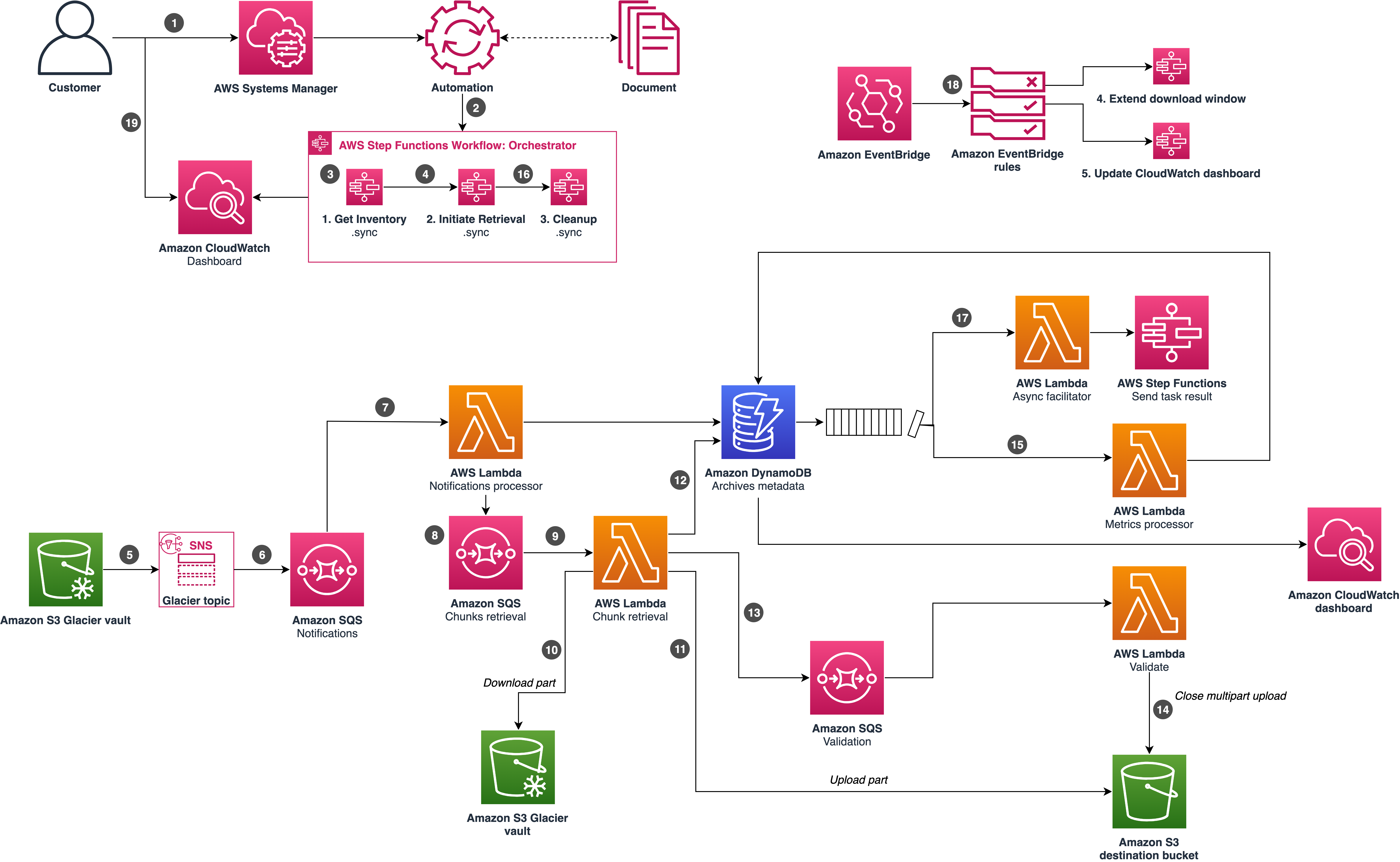
Amazon S3 Glacier Architecture Diagram
- Vaults: Vaults are containers in S3 Glacier used to store archives (data). Each vault can be configured with policies to control access and retrieval settings.
- Archives: An archive is any data, such as a photo, video, or document, that you store in a vault. Each archive is assigned a unique ID within the vault.
- Data Retrieval: S3 Glacier offers three retrieval options: Expedited (1-5 minutes), Standard (3-5 hours), and Bulk (5-12 hours).
- Access Control: Access to S3 Glacier resources is managed through IAM policies, which allow you to control who can create, access, and manage your vaults and archives.
- Data Encryption: S3 Glacier encrypts data at rest by default, and you can configure it to use AWS KMS keys for additional security.
Integration with Other AWS Services
Amazon S3 Glacier integrates with various AWS services to enhance its functionality and streamline data management:
- AWS S3: Use S3 Lifecycle policies to automatically transition data from S3 Standard or S3-IA to S3 Glacier for long-term storage.
- AWS DataSync: Automate and accelerate moving data from on-premises storage to S3 Glacier using AWS DataSync.
- AWS Lambda: Trigger serverless functions when data is retrieved from S3 Glacier, enabling automated processing or alerts.
- AWS Storage Gateway: Integrate S3 Glacier with on-premises storage through AWS Storage Gateway, facilitating seamless data archiving.
- AWS Backup: Manage and automate backups across AWS services, including S3 Glacier, using AWS Backup.
Things to Remember for the Exam
- Data Retrieval Options: Understand the three retrieval options in S3 Glacier: Expedited: Fastest retrieval, suitable for urgent data needs, with retrieval times of 1-5 minutes. Standard: Cost-effective retrieval for regular use cases, with retrieval times of 3-5 hours. Bulk: Lowest cost retrieval option, suitable for large data sets with retrieval times of 5-12 hours.
- Vault Lock: Know the importance of Vault Lock: Enforces compliance controls on vaults, such as WORM (Write Once Read Many) policies. Once a Vault Lock policy is set, it cannot be changed or deleted, ensuring data integrity and compliance.
- Data Encryption: Be familiar with encryption in S3 Glacier: Data is encrypted at rest by default using AES-256 encryption. Optionally, use AWS KMS to manage encryption keys for additional security.
- S3 Lifecycle Integration: Understand how S3 Glacier integrates with S3 Lifecycle policies: Automatically transition objects from S3 Standard, S3-IA, or S3 One Zone-IA to S3 Glacier based on lifecycle rules. Reduces storage costs by moving infrequently accessed data to lower-cost Glacier storage.
- Use Cases: Be aware of common use cases for S3 Glacier: Archiving compliance records, raw data, and backups for long-term storage. Digital preservation of important files like photos, videos, and documents.
Storage Gateway
AWS Storage Gateway
AWS Storage Gateway is a hybrid cloud storage service that enables on-premises applications to seamlessly use AWS cloud storage. It provides low-latency access to data with local caching, while also allowing for secure backup and disaster recovery.
Key Features
- Hybrid Cloud Storage: AWS Storage Gateway bridges on-premises environments with the AWS cloud, providing a seamless integration between on-premises storage and AWS cloud storage.
- Low-Latency Access: By caching frequently accessed data locally, Storage Gateway ensures low-latency access to critical data.
- Data Backup and Archiving: It facilitates secure and efficient data backup and archiving to the cloud, enabling long-term data storage with minimal on-premises infrastructure.
- File, Volume, and Tape Gateway: Supports multiple configurations, including File Gateway for file storage, Volume Gateway for block storage, and Tape Gateway for tape backups.
- Seamless Integration: Integrates with AWS services like Amazon S3, Amazon S3 Glacier, and Amazon EBS for storage and data management.
- Data Encryption: Provides robust data encryption both in transit and at rest, ensuring data security.
- Scalability: Automatically scales storage capacity in the cloud as data grows, eliminating the need for upfront hardware investment.
Common Use Cases
- Backup and Restore: AWS Storage Gateway is commonly used for secure and cost-effective data backup and restore, ensuring data is protected and recoverable in case of failure.
- Hybrid Cloud Workloads: Ideal for hybrid cloud workloads where on-premises applications require low-latency access to data stored in the AWS cloud.
- Disaster Recovery: Facilitates disaster recovery by replicating data to the cloud, ensuring business continuity in case of on-premises failures.
- Data Archiving: Used for archiving data to Amazon S3 or S3 Glacier, providing long-term data storage at a low cost.
- Media and Entertainment: Often used in media and entertainment for storing and managing large media files, with integration to AWS cloud for processing and distribution.
Architecture Overview
The following diagram illustrates the architecture of AWS Storage Gateway:

AWS Storage Gateway Architecture Diagram
- File Gateway: Provides a file interface to S3, allowing you to store and retrieve files as objects in S3, while caching frequently accessed data locally.
- Volume Gateway: Offers block storage volumes that are backed up to AWS, and can be mounted as iSCSI devices, with snapshots stored in S3 as EBS snapshots.
- Tape Gateway: Emulates a physical tape library, enabling tape-based backup systems to backup data to AWS, with tapes stored in S3 and archived in S3 Glacier.
- Local Cache: Frequently accessed data is cached locally, reducing latency and improving performance for on-premises applications.
- Cloud Storage: Data is securely stored in Amazon S3, S3 Glacier, or Amazon EBS, with automatic scaling and managed security.
- Data Transfer: Data is transferred securely between on-premises environments and AWS using encrypted connections, with optimized bandwidth management.
Integration with Other AWS Services
AWS Storage Gateway integrates with various AWS services to enhance its functionality and streamline data management:
- Amazon S3: Used for storing files and volumes from File Gateway and Volume Gateway, providing durable and scalable cloud storage.
- Amazon S3 Glacier: Ideal for archiving tapes from Tape Gateway, offering low-cost, long-term storage for infrequently accessed data.
- Amazon EBS: Snapshots from Volume Gateway are stored as Amazon EBS snapshots, providing reliable and scalable block storage.
- AWS Backup: Provides centralized management and automation of backups for AWS Storage Gateway, ensuring data is securely backed up across AWS services.
- AWS Lambda: Enables serverless functions to trigger actions based on events from AWS Storage Gateway, such as data transfer or processing.
Things to Remember for the Exam
- Types of Gateways: Be familiar with the three types of Storage Gateway: File Gateway: For storing files as objects in S3, with local caching for low-latency access. Volume Gateway: Provides block storage volumes backed by AWS, with snapshots stored as EBS snapshots. Tape Gateway: Emulates a physical tape library, enabling backup applications to store data in AWS, with tapes stored in S3 and archived in S3 Glacier.
- Use Cases: Understand the common use cases for each type of gateway: File Gateway: Ideal for file storage and retrieval, especially for hybrid cloud workloads requiring low-latency access. Volume Gateway: Suitable for block storage use cases, such as backup and disaster recovery. Tape Gateway: Used for tape backups, providing a cloud-based alternative to traditional tape storage.
- Data Transfer and Caching: Know how AWS Storage Gateway handles data transfer and caching: Data is securely transferred between on-premises environments and AWS using encrypted connections. Frequently accessed data is cached locally to reduce latency and improve performance.
- Integration with AWS Services: Be aware of how Storage Gateway integrates with other AWS services, such as Amazon S3, S3 Glacier, Amazon EBS, and AWS Backup.
- Security and Compliance: Understand the security features of AWS Storage Gateway, including data encryption in transit and at rest, and compliance with various regulatory standards.
- Scalability: Remember that AWS Storage Gateway automatically scales storage capacity in the cloud, eliminating the need for upfront hardware investment.
Supplementary: Exam Overview
Duration: 130 min | 65 Questions | Pass: 720/1000 | $150 USD
Supplementary: Practice Questions
See the PDF for full practice questions with answers and explanations.